Most AI voice agents fail after launch because the demo tests conversation quality while production tests workflow control. Real callers interrupt, change intent, challenge policy, and need account-specific action. To fix it, contact center teams need cleaner intent design, stronger context, clear handoffs, and live quality visibility before they scale.
This is not only a contact center issue. Gartner reported in May 2026 that by 2027, 40% of enterprises will demote or decommission autonomous AI agents because governance gaps are identified only after production incidents occur. That matters for AI voice agents because production incidents usually show up through poor handoffs, unclear permissions, weak audit trails, and unresolved customer contacts.
Orvera AI is an Agentic Conversational AI Platform for Enterprise Contact Centers. This guide looks at AI voice agent failure from the production floor, not the demo room. It explains where launches break, what contact center leaders should check before volume rises, and how to fix the gaps before they affect customer experience, rep productivity, and return on investment.
AI voice agents often fail after launch because the business treats go-live as the finish line. In a contact center, go-live is where the real test starts. A controlled demo can show that the AI agent understands a few clean intents, but live customers bring interruptions, unclear requests, account-specific issues, policy exceptions, and emotions into the call.
The gap usually appears in the first few weeks. The AI agent answers the call, but it does not always know when the workflow is outside its limits. It may collect the right information but miss the next action. It may transfer the call but send the rep too little context. It may contain the call but fail to prove that the customer’s issue was actually resolved.
Many AI voice agents are trained on clean scripts, approved phrases, and predictable call paths. Real customers do not speak that way. They interrupt, change their mind, use different words for the same problem, speak with accents, ask unexpected questions, and sometimes call in frustrated.
Customer intent is the real reason someone is calling. A customer may say, “I was charged again,” but the intent could be billing support, cancellation, refund status, account correction, or escalation. When the AI agent reads the intent poorly, the rest of the call moves in the wrong direction.
AI voice agents fail when they can talk but cannot check the systems needed to resolve the call. If the AI agent cannot access customer relationship management, billing, ticketing, order, or account data in real time, it can only give general answers. That may be fine for basic questions, but it does not resolve account-specific issues.
Escalation fails when the AI agent does not know when to stop handling the call. Some calls need a rep because the issue is urgent, sensitive, complex, or emotionally charged. If the handoff rule is unclear, customers get stuck repeating themselves to software when they need human judgment.
AI voice agents need ongoing review after launch because customer behavior changes in production. New questions appear. Policies change. Seasonal volume shifts. Reps find gaps that were not visible in testing. Without post-launch monitoring, small failures become repeated customer experience problems.
An AI voice agent usually shows failure through customer behavior before it shows up in a dashboard. Customers hang up, repeat themselves, ask for a rep, or leave the call without a clear resolution. These signs should be reviewed early because they often point to workflow, intent, training, or escalation problems.
High call drop-off rates mean customers are leaving the conversation before the AI agent completes the workflow. This can happen when the AI agent pauses too long, gives an answer that does not match the question, asks for the same detail again, or makes the customer feel stuck.
The pain point is simple: the customer called to get something done, not to test the AI agent. If drop-offs rise after launch, teams should review where customers leave the call, what the AI agent said right before the hang-up, and whether the next step was clear enough to keep the customer engaged.
Fallback responses are the moments when the AI agent says it did not understand the customer or asks them to repeat the request. A few fallback responses are normal in live conversations. Too many of them show that the AI agent is missing common phrases, unclear intent, accents, or call types that were not covered well during training.
This creates a direct customer experience problem. The caller starts repeating the same issue in different words, the call gets longer, and trust drops. Teams should group fallback responses by intent, review the exact words customers used, and update training coverage for the requests the AI agent keeps missing.
Customers ask for a human rep when they do not trust the AI agent to solve the issue. Sometimes they ask because the answer is unclear. Sometimes they ask because the AI agent is slowing down the process. In more complex calls, they may ask because the issue needs judgment, empathy, or an exception that software should not handle alone.
This signal should not be ignored or treated as resistance to AI. It usually means the AI agent is not giving enough proof that the call is moving toward resolution. Teams should review these calls to see whether the customer asked for a rep because of poor intent recognition, weak answers, missing account context, or delayed escalation.
Containment rate shows how many calls the AI agent handles without sending them to a rep. A low containment rate means the AI agent is not resolving enough calls on its own. This may happen because the use case is too broad, the workflow is incomplete, or the AI agent cannot access the systems needed to complete the request.
The pain point is not the transfer itself. Some calls should go to reps. The real problem is when routine calls keep transferring because the AI agent cannot identify the intent, answer with confidence, or complete the next action. Teams should separate healthy escalations from avoidable escalations before judging containment.
Poor customer sentiment after AI-handled calls shows that the conversation may have felt unhelpful, inaccurate, slow, or incomplete. This can appear in customer satisfaction (CSAT) scores, complaints, repeat calls, survey comments, or call transcripts where customers show frustration.
Sentiment matters because an AI agent can technically complete a call and still leave the customer unhappy. Teams should review negative sentiment alongside accuracy, escalation quality, and final resolution. If customers sound frustrated after the AI agent handled the call, the issue may be tone, timing, missing context, poor handoff, or an answer that did not solve the actual problem.
See how Orvera helps teams fix AI voice agent failures with cleaner workflows, better handoffs, and post-launch visibility.Most AI voice agent problems are avoidable. They usually come from weak planning, broad launch scope, poor conversation design, missing system access, or unclear success metrics. The fix is to launch with a focused use case, test real caller behavior, and measure what changed for customers, reps, and the business. This gives teams a cleaner way to improve performance before small gaps turn into customer experience problems.
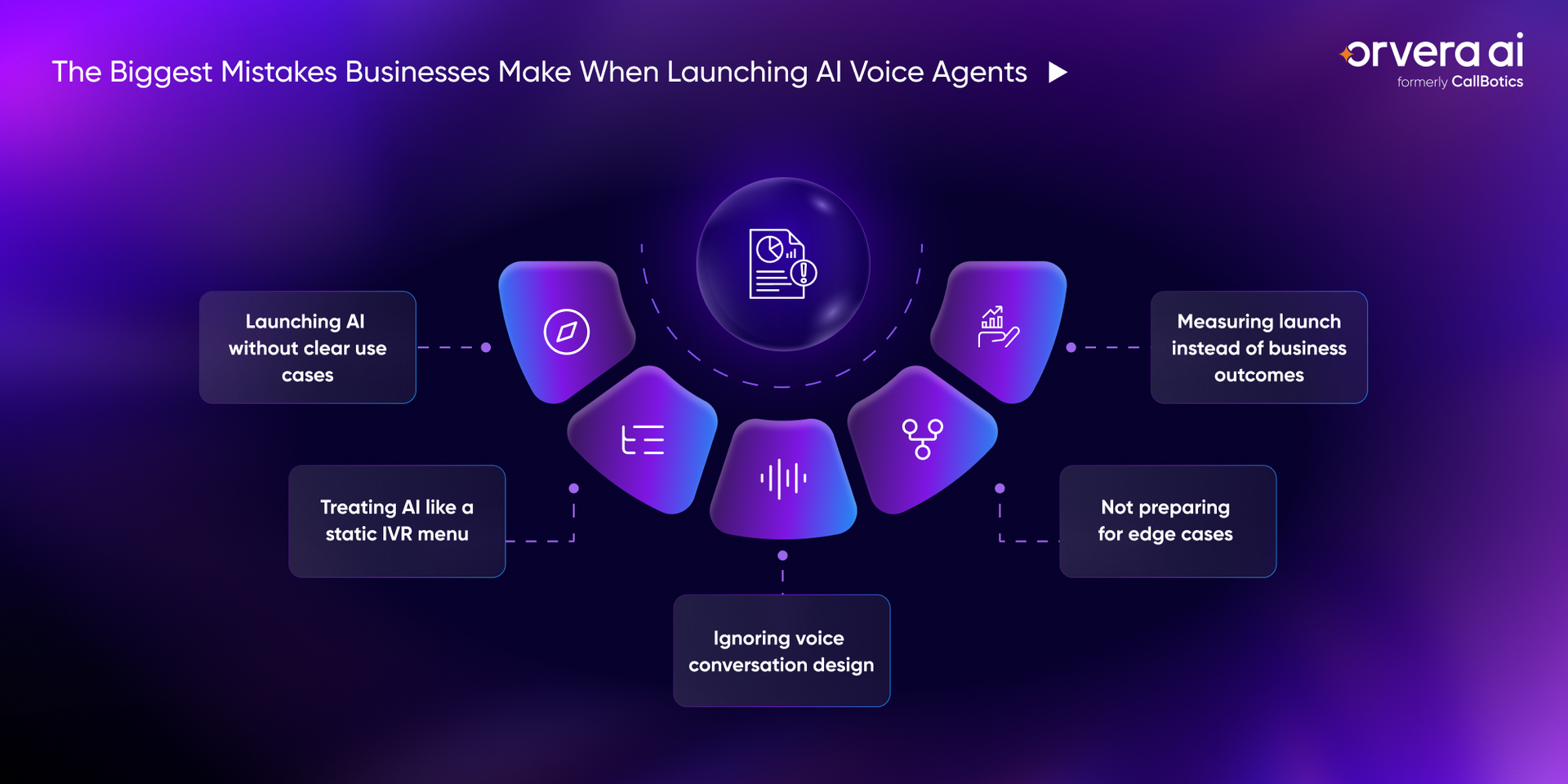
AI voice agents struggle when businesses try to automate too much at once. A better launch starts with specific, high-volume workflows where the customer need is clear and the outcome can be measured. Clear use cases also make it easier for teams to train, test, and improve the AI agent after launch.
An AI voice agent should not work like a phone tree with better wording. If the experience feels rigid, customers will try to bypass it because they feel trapped instead of helped. The goal is to let customers explain the issue naturally while the AI agent guides the call toward the right next step.
Voice AI needs a different design approach than chat or website copy. Customers are listening in real time, so responses need to be short, clear, and easy to act on. A good voice flow reduces confusion by telling the customer what is happening and what they need to do next.
Edge cases are calls that do not follow the expected path. They include unusual requests, emotional callers, mixed intents, incomplete information, failed verification, and policy exceptions. These calls need clear rules because they are often the moments where customer trust is easiest to lose.
Going live is not the result. It is the starting point for measuring whether the AI voice agent is helping customers get their issues resolved faster and with less effort. The strongest launch reviews connect AI performance to customer experience, rep productivity, and business impact.
Post-launch measurement is what shows whether the AI voice agent is actually helping the contact center. Going live does not prove return on investment (ROI). Teams need to track how the AI agent resolves calls, where it fails, when it hands off, and how customers feel after the interaction.
Containment rate is the percentage of calls the AI agent resolves without sending the customer to a rep. It helps teams see whether the AI agent can handle the routine conversations it was built for, such as appointment booking, order updates, billing questions, account checks, or frequently asked questions.
A low containment rate usually means the AI agent is not completing enough calls on its own. The issue may be weak intent recognition, missing system access, unclear workflows, or too many calls being sent to reps too early. Teams should review which call types are contained, which ones transfer, and whether contained calls are actually resolved.
Fallback rate shows how often the AI agent fails to understand or respond correctly to a customer request. These are the moments where the AI agent says it did not understand, asks the customer to repeat, or moves to a generic recovery response.
A high fallback rate is a clear sign that the AI agent needs better training coverage. It may be missing common phrases, accents, mixed intents, or real caller behavior that did not appear during testing. Teams should review fallback calls by intent and update the AI agent with the words customers actually use.
Escalation rate is the percentage of calls the AI agent sends to a rep. The goal is not to remove escalation completely. Some calls need human judgment, especially when the issue is urgent, emotional, complex, or outside the AI agent’s approved workflow.
The real question is whether escalations happen at the right time. A healthy escalation gives the rep the customer’s intent, verified details, attempted steps, and a short summary. A weak escalation makes the customer repeat the whole story, which increases frustration and slows the rep down.
Average handling time (AHT) shows how long it takes to complete a customer interaction. AI voice agents can reduce AHT by resolving simple calls faster and collecting useful context before sending complex calls to a rep.
AHT should not be reduced at the cost of resolution. A short call is not a win if the customer has to call again. Teams should compare AHT with resolution rate, repeat contacts, and escalation quality so they know whether the AI agent is saving time or moving work to another part of the contact center.
Customer satisfaction score (CSAT) shows whether customers are satisfied after an AI-handled conversation. This matters because an AI agent can reduce workload and still create a poor customer experience if the answer is unclear, the workflow is slow, or the issue is not resolved.
CSAT helps teams see the customer side of AI performance. If CSAT drops after AI-handled calls, leaders should review transcripts, call summaries, escalation points, and repeat contact patterns. The goal is not only fewer calls for reps. The goal is better resolution with less effort for the customer.
Sentiment score helps teams understand how the customer feels during the AI conversation. It can show frustration, confusion, satisfaction, urgency, or emotional shifts that may not appear in standard call metrics.
This is useful because some calls look complete on paper but still feel poor to the customer. A customer may finish the call, but their language, tone, or repeated complaints may show that trust dropped during the interaction. Teams should use sentiment data to tune responses, improve escalation rules, and identify moments where the AI agent needs to hand off sooner.
AI voice agents work best when teams treat launch as the start of improvement, not the end of setup. The goal is to build a reliable, scalable, and customer-friendly workflow that can improve as real calls come in. That means teams need a clear review cycle after launch, not only a launch checklist.
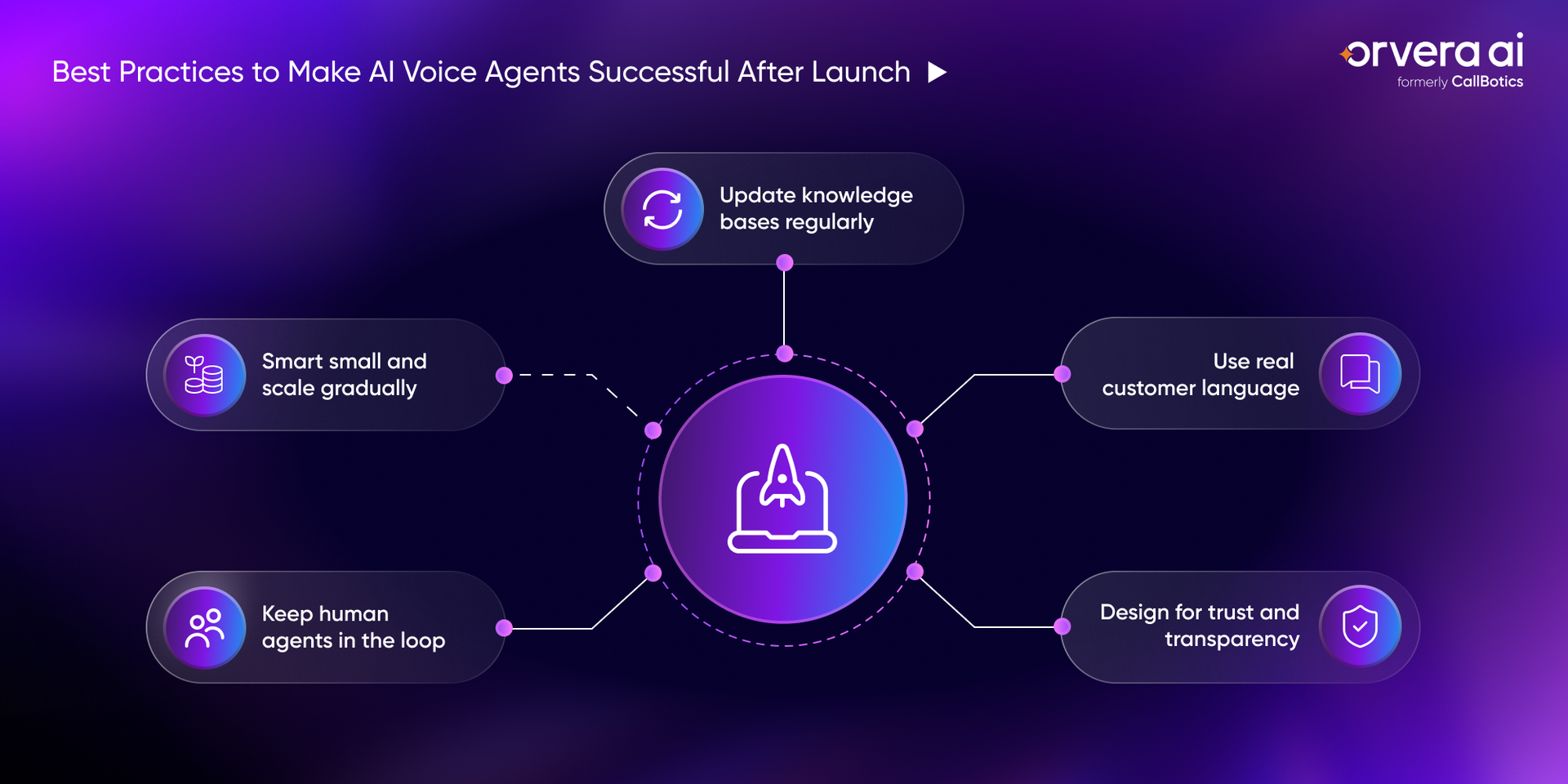
AI voice agents perform better when the first launch is focused. Start with one or two high-volume use cases where the customer need is clear, the workflow is repeatable, and the outcome is easy to measure. A focused start also makes problems easier to find because the team knows exactly which workflow is being tested.
AI should support human teams, not take over every conversation. Reps are still needed for sensitive calls, complex issues, exceptions, and moments where customer judgment matters. Their feedback shows where the AI agent is helping and where it is creating extra work.
AI voice agents depend on the information they are allowed to use. If product details, pricing, policies, or process steps are outdated, the AI agent may give an answer that sounds clear but is still wrong. Even a small outdated policy can create the wrong answer across many live calls.
AI voice agents should be trained on how customers actually speak, not only how internal teams describe workflows. Customers use short phrases, incomplete details, accents, slang, and different words for the same issue. That gap between internal language and customer language is where many misunderstandings begin.
Customers should know when they are speaking with AI, what the AI agent can help with, and how they can reach a rep when needed. Clear expectations reduce frustration and make the conversation easier to follow. When customers know the path, they are less likely to feel stuck in the conversation.
Orvera helps enterprises move past the demo-stage version of Voice AI and build AI agents that work in live contact center environments. The focus is on better conversation design, clearer escalation, system context, performance visibility, and ongoing improvement after launch.
Orvera helps design voice flows around how customers actually speak, not how a process looks on paper. That means the AI agent is built to handle interruptions, intent changes, unclear requests, and complex questions without pushing the caller into a rigid path.
This matters after launch because real customers rarely follow a clean script. Orvera’s Voice AI helps teams create natural-sounding conversations that confirm intent, ask the right follow-up questions, and move the call toward a clear next step.
Orvera gives teams visibility into how AI voice agents perform after launch, so leaders can see where the workflow is helping and where it needs work. Teams can review containment, fallback, escalation, sentiment, and resolution performance instead of guessing from a small sample.
This helps contact center teams fix problems before they spread across more calls. If fallback rates rise, escalations happen too late, or sentiment drops after AI-handled calls, teams can use that data to improve training, knowledge, and call flows.
Orvera supports handoffs to reps when the AI agent reaches a call that needs human judgment. The handoff should not make the customer start over, so the AI agent passes the conversation context, customer intent, and previous AI responses to the rep.
This protects the customer experience during complex, urgent, or sensitive conversations. Reps get a clearer starting point, customers feel heard, and the contact center avoids the common problem of AI creating extra work for the people it was supposed to support.
Orvera helps connect AI voice agents with business systems so they can use the right data during live calls. Without system context, an AI agent can only give general answers, which are not enough for account-specific requests, billing questions, order updates, or service issues.
With the right integrations in place, the AI agent can check relevant information, follow approved workflows, and complete more useful tasks during the call. When the request moves outside the approved workflow, the AI agent can hand off to a rep with the context already attached.
AI voice agents usually fail after launch because they are not built for real customer conversations. They may work well in a demo, but live calls bring unclear intent, missing context, policy exceptions, frustration, and questions the test environment did not cover.
The fix is not to launch and hope the AI agent improves on its own. Businesses need clear use cases, strong system integrations, practical escalation rules, and KPIs that show whether customers are actually getting help. With the right launch strategy and ongoing review, AI voice agents can become reliable tools for handling more customer interactions while giving reps the context they need for complex calls.

Anindita Majumder is a content and copywriter with about four years of experience across content writing, copywriting, and journalism. Her work has involved building and shaping content for global brands in B2B SaaS tech, healthcare, travel tech, edtech, and more. Her love for reading often spills into the way she ideates. Outside of work, she is a vocalist, which keeps her creativity flowing.
See how enterprises automate calls, reduce handle time, and improve CX with Orvera AI.
Orvera AI is an enterprise-ready conversational AI platform, built on 18+ years of contact center leadership experience and designed to deliver structured resolution, stronger customer experience, and measurable performance.