Managed vs Self-Serve Voice AI Platforms: Which One Is Right for Your Business?
Choosing a voice AI platform affects how quickly you launch, how much work your team owns and how much control you keep after go-live. This guide compares managed and self-serve voice AI platforms to help you pick the right fit.

Key highlights
TL;DR: In a Nutshell
- Managed voice AI platforms give teams expert support for setup, workflow design, testing, monitoring, and ongoing improvement
- Self-serve voice AI platforms give teams more control, but they also require more internal time, skill, and ownership
- Managed platforms usually fit contact centers with complex calls, high volume, integrations, and limited technical bandwidth
- Self-serve platforms usually fit technical teams, simple workflows, experiments, and businesses that want hands-on control
- Buyers should compare both models across setup, customization, cost, control, scalability, support, and performance after launch
- The right choice is the model that helps the AI agent resolve routine calls, escalate clearly, and improve without adding hidden work for reps
The choice between managed and self-serve voice AI platforms comes down to who does the work. It affects how quickly you can launch, how much your internal team has to own and how much control you keep after the AI agent goes live. Most buyers first need to understand how the two models differ.
A managed voice AI platform gives you the software plus hands-on help with setup, workflows, testing, tuning, and support. A self-serve voice AI platform gives your team the tools to build and manage the AI agents on its own. This choice matters more now because Gartner reported in January 2026 that generative AI cost per resolution in customer service will exceed $3 by 2030, and AI-related regulatory changes will increase assisted service volume (opens in a new tab) by 30% by 2028.
This guide compares managed and self-serve voice AI platforms across setup, customization, cost, control, scalability, and support. This guide helps contact center and CX leaders choose the model that fits their team, budget, technical capacity, and risk tolerance.
Short answer: Choose a managed voice AI platform when your contact center has complex calls, high volume, many integrations and limited technical bandwidth, because the provider helps with setup, testing, monitoring and tuning. Choose a self-serve builder when a technical team owns a narrow, simple use case and wants hands-on control over changes.
Managed vs Self-Serve Voice AI Platforms: Quick Comparison
Managed and self-serve voice AI platforms can both help contact centers use AI agents for customer calls. The difference is in how much work your team owns before and after launch. A platform that looks easier to buy can still become harder to run if every workflow change, integration issue, or call-quality fix depends on internal technical time. This table compares both models across setup, customization, control, technical effort, pricing, scalability, support, and best-fit use case.
| Comparison area | Managed voice AI platform | Self-serve voice AI platform | Best for |
|---|---|---|---|
| Setup | Vendor helps with setup, workflow design, testing and launch | Internal team builds and configures most of the setup | Managed works better when the team needs speed and guidance, and self-serve works better when the team has strong internal AI and technical resources |
| Customization | Custom workflows are usually built with vendor support | Depends on what your team can build inside the tool | Managed works well for complex call flow, and self-serve works well for simpler or repeatable use cases |
| Control | Vendor stays closely involved in changes, tuning, and updates | Your team has more direct control over changes and experiments | Managed fits teams that want support, and self-serve fits teams that want hands-on control |
| Technical effort | Lower internal effort because the vendor handles much of the build and upkeep | Higher internal effort because your team owns configuration, testing, and maintenance | Managed fits teams with limited technical bandwidth, and self-serve fits teams with dedicated technical owners |
| Pricing | May include software, setup support, and ongoing service | Often starts lower, but internal build and maintenance time should be counted | Managed fits teams that want predictable support, and self-serve fits teams that want to manage more work internally |
| Scalability | Usually supported by the vendor as call volume, workflows, and use cases grow | Depends on your team's ability to manage more intents, integrations, and updates | Managed fits contact centers with growing complexity, and self-serve fits teams scaling a narrow set of use cases |
| Support | Usually hands-on before and after launch | Usually documentation, help center content, tickets, or limited vendor guidance | Managed fits teams that need ongoing guidance, self-serve fits teams comfortable troubleshooting on their own |
| Best-fit business type | CX teams that need production support, complex workflows, and lower internal lift | Teams with in-house AI product, or engineering resourses that want to build and manage directly | Choose based on your team’s capacity as well as the software features |
What Is a Managed Voice AI Platform
A managed voice AI platform is a solution where the provider does more than give your team access to software. The provider helps design, deploy, monitor, and improve AI voice agents based on your business goals, call types, systems, and customer needs.
This model is useful when voice AI needs to work in a real contact center. The hard part is not building one call flow. The hard part is making sure the AI agent handles live callers correctly, connects with the right systems, escalates to a rep when needed, and keeps improving after launch.
How managed voice AI platforms work
Managed voice AI platforms usually start with understanding your call volume, common intents, escalation rules, and existing contact center setup. The vendor then helps build the conversation flows, connect required systems, test different caller paths, and prepare the AI agent for live use.
After deployment, the work does not stop. The vendor monitors call performance, reviews where callers drop off, checks whether the AI agent is resolving the right issues, and adjusts the workflows over time. This helps avoid a common pain point: launching voice AI once, then leaving internal teams to figure out every issue on their own.
What managed platforms usually include
Most managed platforms include implementation support, call flow design, AI training, system integrations, testing, quality checks, reporting, and ongoing performance monitoring. These services matter because small mistakes in voice AI can create big problems, such as wrong routing, repeated questions, poor handoffs, or unresolved calls that look successful on paper.
A strong managed model also supports ongoing improvement. That can include updating scripts, tuning escalation rules, reviewing call analytics, and helping teams understand what is working and what needs fixing. This is especially important when customer needs, business policies, or contact center workflows change often.
Who should use a managed voice AI platform
A managed voice AI platform is a strong fit for CX teams with many call types, regulated industries (opens in a new tab), high-volume contact centers, and teams with complex workflows. These teams usually need more than a basic builder because the AI agent may need to handle sensitive information, follow approved processes, connect with multiple systems, and know when to hand the call to a human rep.
This model also works well for teams that do not have dedicated AI engineering resources. Instead of asking internal teams to own conversation design, integrations, testing, monitoring, and ongoing changes, the managed provider carries much of that work. That gives contact center leaders a clearer path from planning to live use, without adding another heavy technical project to the team’s workload.
What Is a Self-Serve Voice AI Platform
A self-serve voice AI platform is a tool where your team configures, launches, and manages AI voice agents mostly on its own. Most of the work happens inside a dashboard, builder, or workflow tool, so your team owns the setup, testing, updates, and day-to-day changes. This setup can move quickly at the start, but the real test comes when live callers take unexpected paths that the original flow did not cover.
This model gives businesses more direct control, but it also puts more responsibility on the internal team. The tool may be easy to access, but the real work is making sure the AI agent understands callers, follows the right process, connects with systems, and hands the call to a rep when needed. The tradeoff is clear: self-serve gives your team more freedom, but that freedom only works when someone has the time, skill, and ownership to keep the AI agent accurate after launch.
How self-serve voice AI platforms work
Self-serve voice AI platforms usually give teams templates, drag-and-drop builders, application programming interfaces, scripts, prompts, and workflow tools to build their own AI voice agents. The pain point is that the setup can look simple at first, but every caller path still needs clear logic, testing, and regular fixes.
- Teams usually start with a template or builder, then customize the greeting, call flow, questions, and responses
- Technical teams may use application programming interfaces, prompts, and workflow tools to connect the AI agent with business systems
- Internal owners need to test call paths, check handoffs, review errors, and update the AI agent when policies or workflows change
What self-serve platforms usually include
Self-serve platforms usually include flow builders, prompt tools, voice settings, call logs, basic analytics, integrations, testing tools, and usage-based billing. These features are useful, but they work best when someone on the team knows how to turn the tools into a reliable live workflow.
- Flow builders and prompt tools help teams design how the AI agent should speak, respond, and move through a call
- Call logs, testing tools, and basic analytics help teams find where callers get stuck or where the AI agent gives the wrong response
- Integrations and usage-based billing give teams flexibility, but costs and maintenance can rise as call volume and workflow complexity grow
Who should use a self-serve voice AI platform
A self-serve voice AI platform is a good fit for startups, technical teams, simple call workflows, experiments, and businesses that want more direct control. It works best when the use case is narrow, the team can test quickly, and someone internally can own performance after launch.
- Startups and technical teams can use self-serve tools to test ideas without waiting for a long implementation process
- Businesses with simple workflows, such as appointment reminders or basic call routing, may not need a heavily managed setup
- Teams that want more control should be ready to own prompt updates, workflow changes, integrations, analytics, and troubleshooting
Pros and Cons of Managed Voice AI Platforms
Managed voice AI platforms can reduce the internal work needed to launch and maintain AI agents. The tradeoff is that businesses give the provider a larger role in setup, decisions, support, and ongoing changes. Your choice should come down to whether your team needs help running production workflows, or only software it can manage on its own.
Pros of managed voice AI platforms
The biggest advantage of a managed voice AI platform is that your team does not have to figure out every part of the launch alone. The provider helps with implementation, call flow design, system connections, testing and live deployment, which is useful when the AI agent needs to handle real customer calls.
Managed platforms also help after launch. If callers get stuck, handoffs fail, integrations break, or call quality drops, the provider can help troubleshoot and improve the workflow. This usually leads to stronger reliability, better workflow design, cleaner integrations, and ongoing performance improvement without putting every fix on your internal team.
Cons of managed voice AI platforms
The main tradeoff is cost and control. Managed voice AI platforms can have a higher upfront cost because the provider is doing more than offering software access. Your internal team may also have less direct control over every change, especially if updates need to go through the vendor’s process.
There can also be some dependency on vendor support. If your team wants to test new flows, change prompts, adjust routing, or launch new use cases quickly, you may need to coordinate with the provider. For complex projects, planning can also take longer because the vendor needs to understand your workflows, systems, escalation rules, and business requirements before the AI agent goes live.
Pros and Cons of Self-Serve Voice AI Platforms
Self-serve voice AI platforms give teams more direct control over how AI agents are built, tested, and changed. This can work well when the use case is simple, the team is technical, and someone can own the workflow after launch.
The tradeoff is that the business takes on more of the operational work. A lower entry cost can look attractive at first, but teams still need to account for setup time, conversation design, integrations, testing, and ongoing fixes. If ownership is unclear, the tool can sit between operations, product, and engineering with no one fully responsible for results.
Pros of self-serve voice AI platforms
The biggest advantage of a self-serve voice AI platform is control. Your team can test ideas, adjust call flows, change prompts, update responses, and experiment without waiting for a managed service team to make every change.
Self-serve platforms can also be easier to start with when budgets are tight or the use case is narrow. They are a good fit for technical teams that want hands-on access, faster experimentation, flexible testing, and the ability to build simple AI agents on their own timeline.
Cons of self-serve voice AI platforms
The main limitation is the internal workload. Your team has to design the conversation, test different caller paths, connect systems, monitor call quality, fix errors, and keep the AI agent updated when business rules change.
Support can also be lighter than a managed model, which creates risk when the AI agent starts handling live callers. Poor conversation design, weak fallback responses, integration issues, and limited performance optimization can lead to unresolved calls, bad handoffs, and more work for human reps.
Questions to Ask Before Choosing a Voice AI Platform
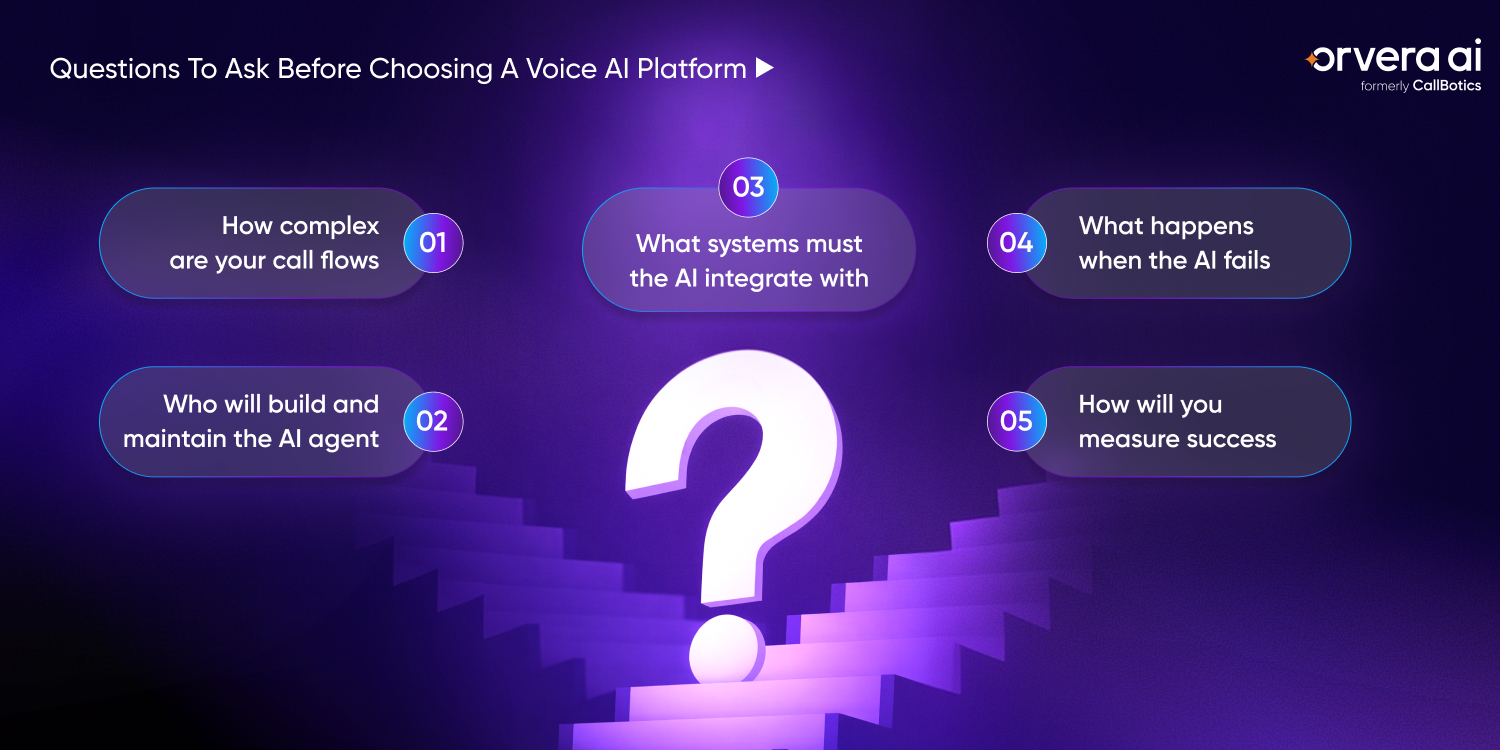
Before choosing between a managed and self-serve voice AI platform, buyers should look beyond features and demo quality. The right choice depends on how complex the call flows are, who will maintain the AI agent, which systems it needs to connect with, how failure is handled, and how success will be measured after launch.
How complex are your call flows
Start by looking at what callers actually need when they contact your business. If the AI agent only needs to answer one or two simple intents, a self-serve platform may be enough. If callers move across departments, customer types, account statuses, policies, or backend workflows, the setup needs more planning.
Complex call flows often break when teams design for the happy path only. A caller may ask two questions in one call, change the issue midway, fail verification, or need a human rep. If your workflows include multiple intents, escalation paths, or system checks, choose a model that can support that complexity without leaving every fix to your internal team.
Who will build and maintain the AI agent
A voice AI platform needs someone to design the conversation, test call paths (opens in a new tab), monitor performance, and update the AI agent after launch. In a self-serve model, that work usually sits with your internal team. In a managed model, the provider helps carry more of the setup and ongoing improvement work.
This question matters because voice AI is not finished on launch day. Scripts change, policies change, customer behavior changes, and broken handoffs need attention. If your team does not have dedicated AI, product, operations, or engineering resources, a self-serve tool can become another system nobody fully owns.
What systems must the AI integrate with
List the systems the AI agent needs to access before you choose a platform. This may include customer relationship management systems, helpdesk tools, billing systems, scheduling tools, order management platforms, or contact center software. The more systems involved, the more important integration planning becomes.
Callers expect answers. If the AI agent cannot check an order, update a ticket, confirm an appointment, or see account context, the call may still end with a rep doing the real work. Buyers should ask which integrations are supported, who builds them, who maintains them, and what happens when a connected system is down.
What happens when the AI fails
Every buyer should ask how the platform handles low-confidence answers, missing data, angry callers, repeated questions, and requests the AI agent cannot complete. Failure handling deserves real attention. It decides whether a bad call turns into a clean handoff or a frustrating customer experience.
A reliable setup should include fallback responses, clear escalation rules, and a way to pass full call context to a human rep. Without that, the caller may have to repeat the same issue again after escalation. Set honest limits on what the AI agent handles. The goal is to know exactly when the AI agent should stop and bring in a rep.
How will you measure success
Before launch, decide which numbers matter most. Common metrics include containment rate, customer satisfaction, resolution rate, call score, escalation accuracy, and cost reduction. Containment rate is useful, but it should not be treated as success on its own if callers leave without getting the issue solved.
The better question is whether the AI agent resolved the right calls and escalated the right calls. A platform may look good if fewer calls reach reps, but that does not always mean customers are getting better answers (opens in a new tab). Buyers should measure resolution, call quality, handoff accuracy, customer feedback, and cost together so the business can see what is actually working.
Explore how Orvera supports voice AI setup, testing, handoffs, and ongoing optimization. (opens in a new tab)KPIs to Track After Choosing a Voice AI Platform
After launching a managed or self-serve voice AI platform, teams should track more than call volume. The goal is to understand whether the AI agent is resolving the right calls, escalating the right calls, and improving the customer experience without creating hidden work for human reps. A good KPI view should also show where the AI agent is creating extra effort downstream, such as repeat calls, poor handoffs, or unresolved issues.
AI containment rate
AI containment rate shows how many calls the AI agent handles without transferring the caller to a human rep. This is useful, but it should not be treated as success on its own because a contained call is only valuable when the customer’s issue is actually resolved.
- Track which call types are being handled fully by the AI agent
- Separate resolved calls from abandoned calls or callers who gave up
- Review containment by intent, such as billing, scheduling, order status, or account updates
Escalation accuracy rate
Escalation accuracy rate measures whether the AI agent sends calls to the right human rep, team, department, or workflow when it cannot complete the request. This matters because a poor handoff can frustrate the caller and create extra work for the rep who receives the call.
- Check whether escalated calls reach the correct team the first time
- Review whether the AI agent passes enough context before the handoff
- Watch for repeated transfers, wrong routing, or callers having to explain the issue again
Customer satisfaction score
Customer satisfaction score helps teams understand whether callers are satisfied with AI-handled conversations. A call may look successful in the system, but the customer may still feel the answer was incomplete, slow, or difficult to follow.
- Collect feedback after AI-handled calls where possible
- Compare satisfaction scores between AI-handled calls and human-handled calls
- Review low scores to find unclear responses, poor call flows, or weak fallback handling
Average handle time
Average handle time shows how long it takes to complete a call from start to finish. A voice AI platform can reduce handling time by resolving simple issues directly or by collecting key information before sending the call to a human rep.
- Track whether simple calls are being resolved faster without hurting call quality
- Measure whether escalated calls are shorter because the AI agent collected details upfront
- Watch for cases where the AI agent makes calls longer by asking repeated or unnecessary questions
Fallback rate
Fallback rate shows how often the AI agent fails to understand the caller, gives a low-confidence answer, or cannot respond correctly. A high fallback rate usually means the call flow, prompts, training data, or escalation rules need more work.
- Track how often the AI agent says it cannot help or does not understand
- Review fallback moments to find missing intents, unclear prompts, or weak responses
- Use fallback data to improve conversation design and reduce repeated failures
Cost per resolved call
Cost per resolved call shows how much it costs to complete a customer issue through the AI agent (opens in a new tab) compared with human rep handling. This metric is more useful than cost per call because it focuses on actual resolution.
- Calculate the cost of AI-handled calls that are fully resolved
- Compare that cost with the cost of similar calls handled by human reps
- Include support, integration, monitoring, and maintenance costs so the number reflects the real operating cost
How Orvera AI Supports Managed and Scalable Voice AI Deployment
Orvera AI helps businesses design, launch, monitor, and improve AI voice agents without forcing teams to choose between support and flexibility. Orvera works as a managed platform of AI agents for customer experience teams, helping teams move from planning to live calls while still giving them room to shape workflows around their own business rules. This is especially useful when the business needs voice AI to fit existing processes instead of rebuilding the contact center around a new tool.
Guided voice AI implementation
Orvera helps businesses plan the right voice AI use cases before anything goes live. That means looking at call volume, caller intents, escalation needs, internal systems, and the workflows that create the most repetitive work for human reps.
From there, Orvera supports call flow design, AI agent configuration, testing, and launch. This helps teams avoid one of the biggest voice AI pain points: building a call flow that works in a demo but breaks when real callers ask unclear questions, change topics, or need a human rep.
Custom workflows for complex calls
Customer calls rarely follow one simple path. A caller may need help with support, sales, billing, retention, appointment scheduling, order status, or overflow handling, sometimes in the same conversation.
Orvera helps teams design custom workflows around those real call patterns. This matters because a voice AI deployment should not force every caller into the same script. The AI agent needs to understand the intent, follow the right process, and know when the call should move to another team or workflow.
Human escalation and warm transfer support
Orvera supports human escalation when the AI agent reaches a point where a rep should take over. The handoff can include the caller’s intent, sentiment, and call context, so the rep does not start from zero.
This is important because poor escalation is one of the fastest ways to lose caller trust. If the customer has to repeat the same issue after transfer, the AI agent may have saved a step for the system but added effort for the person calling. A strong warm transfer keeps the AI agent and human rep working from the same context.
Real-time analytics and optimization
Orvera helps teams monitor what happens after the AI agent goes live. Teams can review performance, call outcomes, escalation patterns, failure points, and areas where the AI agent needs better instructions or workflow changes.
This view matters because voice AI needs regular tuning. Customer behavior changes, policies change, and new call reasons appear over time. Orvera helps teams use those signals to improve the AI agent before complaints or repeat calls show where the workflow is failing.
Scalable AI voice agents for growing teams
Orvera helps businesses scale automated voice workflows as call volume, use cases, and customer expectations grow. Teams can expand voice AI across more intents and departments while keeping control over quality, escalation, and customer experience.
This is useful for growing contact centers that cannot keep adding headcount for every rise in repetitive call volume. The goal is to let AI agents handle routine voice workflows, while human reps focus on calls that need judgment, empathy, or exception handling.
Conclusion
Managed and self-serve voice AI platforms both have a place. A managed platform gives businesses more support with planning, setup, testing, monitoring, and improvement. A self-serve platform gives teams more direct control, faster testing, and more room to build on their own.
For contact centers with complex calls, the best choice often sits between both models. Teams need the speed and guidance to launch with confidence, but they also need enough flexibility to shape the AI agent around real workflows, customer needs, and performance goals. The right voice AI platform should help the business move faster without leaving the team alone to manage every issue after launch.
Frequently asked questions
A managed voice AI platform is a solution where the provider helps design, deploy, monitor, and improve AI voice agents for the business. It is useful when teams need hands-on support for setup, workflows, integrations, testing, and ongoing optimization.
A self-serve voice AI platform is a tool where teams configure, launch, and manage AI voice agents mostly on their own. It usually gives users builders, templates, prompts, testing tools, and analytics through a dashboard.
Managed voice AI is better for complex workflows, high call volumes, and teams that need expert support. Self-serve voice AI is better for technical teams, simple use cases, experiments, and businesses that want more direct control.
Self-serve voice AI platforms often have a lower entry cost, but the business still needs to count internal setup, testing, integration, and maintenance time. A cheaper tool can become expensive if the team needs constant technical effort to keep the AI agent working well.
Orvera helps businesses plan use cases, design call flows, configure AI agents, manage handoffs, monitor performance, and improve voice AI after launch. Orvera does the build and the deployment itself, and full deployment is typically completed within 3 to 6 weeks.
Startups and technical teams can use self-serve tools to test ideas without waiting for a long implementation process, and they keep direct control over prompts and call flows. Contact centers with complex calls, high volume and many connected systems usually get more from a managed model, where the provider shares the setup, monitoring and ongoing improvement work.
A drag-and-drop builder fits a narrow use case, such as appointment reminders or basic call routing, when someone on the team can test call paths, check handoffs and update the AI agent after launch. Calls that move across departments, policies or backend systems need more planning, testing and integration work.
Written by
Anindita Majumder
Anindita Majumder is a communications professional with nearly four years of experience in public relations, corporate communications, and journalism. She creates content that helps brands communicate their vision, products, and expertise through press releases, thought leadership, and editorial pieces. Outside of work, she is a vocalist, which keeps her creativity flowing.