SIP Trunking for AI Voice Agents: How It Powers Scalable Voice Automation
Session Initiation Protocol (SIP) trunking is the connection that lets internet-based voice systems reach real phone networks. For AI voice agents, SIP trunks act as the phone line into the carrier network for inbound and outbound calls on normal phone numbers.

Key highlights
Key takeaways
- SIP trunking connects AI voice agents to real phone networks, so they can answer inbound calls and place outbound calls through normal phone numbers
- AI voice agents need stable telephony before they can work in production, because a strong AI workflow still fails if calls cannot connect, route, transfer, or scale properly
- SIP trunks help contact centers move beyond test calls by routing live customer calls from carriers into AI agents, contact center systems, or human reps
- The best SIP-powered AI workflows separate routine calls from judgment-heavy calls, so AI agents handle clear tasks and human reps take complex or sensitive conversations
- Call quality, latency, routing, security, and monitoring decide whether AI voice automation works well, not the AI model alone
- Teams should track both phone reliability and customer outcomes, including call completion, latency, containment, escalation success, and customer satisfaction score
Session Initiation Protocol (SIP) trunking is the connection that lets internet-based voice systems reach real phone networks. For AI voice agents, SIP trunks act as the phone line into the carrier network, so the AI agent can answer inbound calls and place outbound calls using normal phone numbers. Without SIP trunking, an AI voice agent can talk inside software, but it cannot reliably connect to the customers calling from mobile phones, landlines, or business phone systems.
The demand is already visible in the voice infrastructure market. Mordor Intelligence’s 2026 SIP trunking report estimates the market at USD 85.07 billion in 2026, up from USD 73.14 billion in 2025, as companies move from legacy phone circuits to internet-based voice services (opens in a new tab). That shift matters for contact centers because AI calling needs the same carrier-grade path that human-handled calls use today.
This guide explains how SIP trunks make inbound and outbound AI calling work in production. We’ll cover what a SIP trunk does, how it routes calls between an AI voice agent and the public phone network, and what contact center teams should check before they connect AI agents to live call traffic. The goal is simple: help teams understand the phone layer before the first AI agent takes a real call.
What Is SIP Trunking
A SIP trunk lets a business make and receive phone calls over the internet instead of using traditional phone lines. SIP stands for Session Initiation Protocol, and it is part of Voice over Internet Protocol (VoIP) calling. In practice, it connects a business phone system to a telephony provider, so calls can move between internet-based systems and the public phone network.
For contact centers, this connection sits behind the voice experience customers already use every day. A customer can call from a mobile phone, landline, or business phone system, and the call can still reach the right destination. That destination might be an AI voice agent, a call queue, or a human rep when the conversation needs judgment.
SIP trunk meaning
A SIP trunk is a virtual connection between a business phone system and a telephony provider. It does the job physical phone lines used to do, but it runs over the internet. The word “trunk” means a shared call path that can carry more than one call between systems.
For AI voice agents, that virtual connection is the bridge into live calling. The AI agent handles the conversation inside software, but the caller still reaches it through a real phone number. Without a SIP trunk, the AI agent may work in a test setup, but it will not have a reliable path into the phone network customers use every day.
SIP trunking vs traditional phone lines
Traditional phone lines depend on physical circuits installed and managed by a carrier. A SIP trunk uses an internet connection to carry calls between the business phone system and the telephony provider. Both move voice traffic, but the internet-based model is easier to adjust when call volume changes.
That flexibility matters when a contact center connects AI voice agents to inbound and outbound calling. Teams can route live calls to AI agents, increase call capacity through the provider, and hand calls to human reps when needed. Legacy phone lines can support basic calling, but they are harder to connect with cloud-based AI systems and modern contact center software.
What Are AI Voice Agents
AI voice agents are automated voice systems that answer or place phone calls, understand what the caller says, and respond in natural-sounding speech. They can complete approved workflows, collect information, check details, and resolve routine conversations without pulling in a human rep. That means a customer can explain the issue in their own words instead of working through a long phone menu.
For contact centers, the value is practical. AI voice agents take repetitive calls out of the queue (opens in a new tab), so reps can spend more time on calls that need judgment, empathy, or exception handling. They work best when the task is clear, the workflow is approved, and the handoff path to a human rep is defined. That handoff matters because a stuck caller should not have to repeat the whole story.
How AI voice agents handle calls
An AI voice agent manages a call by listening, understanding the caller’s intent, choosing the next step, and speaking back to the customer. Behind the call, the system uses speech recognition, natural language understanding, text-to-speech, workflow logic, and integrations with business systems. The hard part is making sure the AI agent takes the right action after it understands the caller.
- Speech recognition turns the caller’s spoken words into text the AI agent can process
- Natural language understanding identifies what the caller wants, such as a payment update, appointment change, account question, or service request
- Workflow logic and integrations let the AI agent collect details, check records, update systems, and hand the call to a human rep when the issue is too complex
Inbound AI voice agents
Inbound AI voice agents answer customer calls when they come into the contact center. They help reduce queue pressure by handling routine questions, collecting required information, and sending complex cases to a human rep with context. This is useful when teams see the same call types every day and need a consistent way to handle them.
- The AI agent identifies the caller’s intent early, so the call does not depend on long menu paths
- The AI agent can resolve simple issues, such as status checks, appointment confirmations, basic account questions, and information updates
- When the call needs judgment, the AI agent escalates to a human rep with the caller’s details and reason for calling
Outbound AI voice agents
Outbound AI voice agents place approved calls to customers for repeatable workflows. They are useful when teams need to reach many people with the same type of message, but still need the call to feel clear, timely, and easy to respond to. The best outbound workflows are specific, time-sensitive, and easy for the customer to complete on the call.
- The AI agent can make reminder, follow-up, survey, appointment confirmation, and retention calls
- The AI agent can qualify leads, confirm interest, collect responses, and route the next step based on the customer’s answer
- For collections or sensitive workflows, the AI agent should follow approved scripts, respect escalation rules, and hand the call to a human rep when the conversation needs care
How SIP Trunking Works with AI Voice Agents
A SIP trunk is the bridge between AI voice software and the public telephone network. The customer still calls a normal phone number, but the call travels through a carrier, into the SIP infrastructure, and then to the contact center system or AI voice agent. This lets the business keep the phone experience customers already know while moving call handling into modern software.
That bridge matters because AI voice agents do not operate in isolation. They need a reliable phone path to answer inbound calls, place outbound calls, route conversations, and transfer calls to a human rep when the issue needs judgment. Without that path, teams can end up with a working AI demo that cannot handle live call traffic.
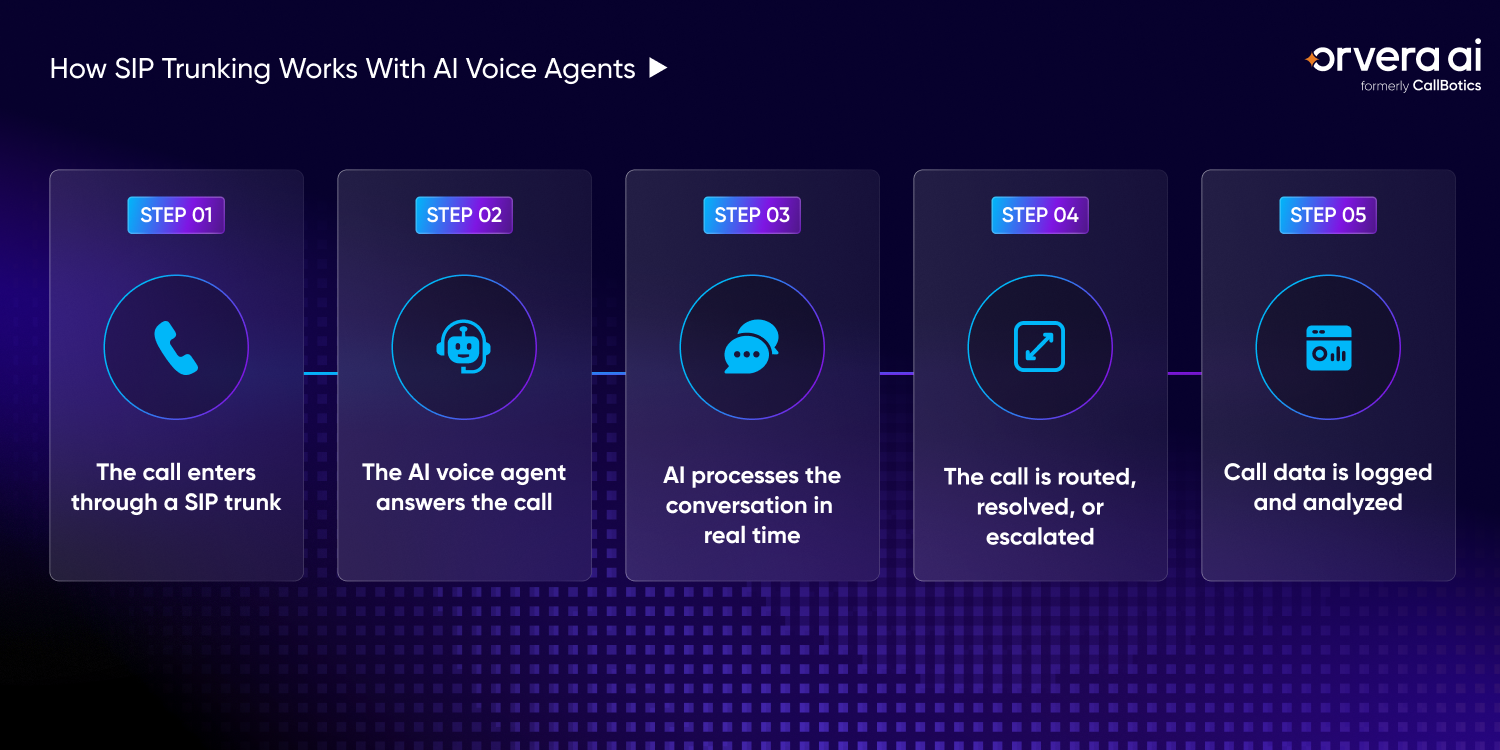
Step 1: The call enters through a SIP trunk
When a customer calls the business, the call first reaches the carrier network. From there, the call enters through a SIP trunk, which carries the call into the business phone system or contact center platform over the internet. This is the point where the phone network hands the call to the systems that decide what should happen next.
This step solves a basic but important problem: getting live customer calls into the right system. Without this connection, an AI voice agent may work in a test environment, but it will not be ready to answer real calls from mobile phones, landlines, or business phone systems. For contact center teams, that difference matters because production calls need stable routing, not only a working test number.
Step 2: The AI voice agent answers the call
Once the call reaches the contact center system, it can be routed to an AI voice agent. The AI agent answers, greets the caller, and starts listening for the reason behind the call. A clear opening matters because callers need to know they reached the right place before they share account or service details.
This is where the caller should be able to speak normally instead of fighting through a long phone menu. The AI agent uses Voice AI to identify the caller’s intent, ask for missing details, and begin the approved workflow tied to that call type. That removes a common pain point for customers who know what they need but do not know which menu option fits their issue.
Step 3: AI processes the conversation in real time
During the call, the AI agent listens to the caller, turns speech into text, understands the intent, prepares a response, and speaks back in natural-sounding voice. This has to happen with low latency, which means the delay between the caller speaking and the AI agent responding should stay short. Low latency matters because even a small pause can make the caller wonder whether the system understood them.
The pain point here is call quality. If the AI agent takes too long to respond, misses the caller’s intent, or repeats the same question, the customer loses trust fast. Real-time processing helps the conversation stay clear, direct, and useful from the first question to the next step.
Step 4: The call is routed, resolved, or escalated
After the AI agent understands the request, it can take the next approved step. The AI agent can complete the workflow, route the caller into another AI flow, or transfer the call through SIP-based routing to a human rep. This gives the contact center a practical way to separate routine calls from calls that need human judgment.
This keeps the call from getting stuck. Routine issues can be resolved without adding to the queue, while complex or sensitive calls move to a rep with the right context attached. That context helps the rep continue the conversation instead of asking the caller to start over.
Step 5: Call data is logged and analyzed
After the call, the system can log call recordings, transcripts, summaries, sentiment, and outcomes. That data can be sent to customer relationship management (CRM), helpdesk, or analytics tools, depending on how the contact center is set up. These records give teams a clear view of what happened before, during, and after the call.
This matters because leaders need a record of what happened, not only a call count. Logged call data helps teams review outcomes, spot repeat issues, coach reps, and understand where AI voice agents are resolving calls or where a human rep is still needed. Over time, this helps teams improve workflows instead of guessing which call types are causing the most pressure.
Why SIP Trunking Matters for AI Voice Agents
AI voice agents need more than speech technology to handle real calls. They need a reliable way to connect with the phone networks customers use every day. A SIP trunk provides that phone path for inbound and outbound calls, so AI voice automation can move from a test setup into live contact center traffic. This is the difference between an AI voice agent that works in a demo and one that can take real customer volume.
For contact centers, the pain point is usually not the demo. It is call volume, routing, handoff, reporting, and the phone infrastructure behind it. A SIP trunk helps teams handle those basics without tying every change to legacy phone hardware. That gives operations and technology teams more control when call patterns change.
It connects AI agents to real phone networks
An AI voice agent can understand a caller inside software, but it still needs telephony connectivity to reach real customers by phone. A SIP trunk connects the AI agent to the public phone network, so customers can call a normal number and reach the right voice system. This matters because customers should not have to change how they call just because the contact center added AI.
- Customers can call from mobile phones, landlines, or business phone systems without changing how they contact the company
- AI agents can answer inbound calls and place approved outbound calls through real phone numbers
- The contact center avoids a common production gap where the AI works in testing but cannot reliably handle live calls
It supports high call volume
Call volume can rise fast during billing periods, outages, appointment windows, seasonal demand, or campaign follow-ups. A SIP trunk makes it easier to support more concurrent calls than fixed traditional phone lines, because call capacity can be adjusted through the telephony provider. That helps teams prepare for peaks without treating every spike like a new hardware project.
- Teams can add capacity without waiting on new physical phone circuits for every change
- AI agents can handle routine call spikes before those calls add pressure to the rep queue
- Contact centers can plan for peak periods with more control over inbound and outbound call capacity
It enables flexible call routing
Calls rarely follow one simple path. A customer may start with an AI agent, move to another AI flow, reach a department, or need a human rep. SIP-based routing helps move calls between AI agents, reps, departments, phone numbers, and contact center platforms. That routing keeps customers from getting trapped in the wrong queue.
- Routine calls can stay with the AI agent when the workflow is clear
- Complex calls can move to a human rep with the caller’s context attached
- Teams can route calls by intent, phone number, department, queue, or contact center setup
It reduces dependence on legacy infrastructure
Legacy phone systems often depend on hardware, physical circuits, and carrier work for basic changes. That slows teams down when they need to add numbers, change routing, or connect AI voice agents to live call traffic. A SIP trunk gives businesses a cleaner path toward cloud-ready voice infrastructure. It also reduces the number of phone-layer changes that need on-site equipment work.
- Contact centers can connect modern voice systems without rebuilding around old phone hardware
- Teams can make routing and capacity changes through provider settings instead of hardware-heavy projects
- AI voice agents can plug into the phone layer more easily when calls already move through internet-based infrastructure
It supports global voice automation
Businesses with customers across regions, numbers, teams, or markets need a phone setup that is easier to manage. SIP trunks can help centralize voice connectivity while still supporting different numbers, call paths, and contact center teams. This gives leaders a clearer way to manage voice operations when calls do not all come from one place.
- Teams can manage multiple phone numbers and call routes through one voice infrastructure model
- Calls can be directed to the right AI agent, team, or location based on region, number, or workflow
- Businesses can support inbound and outbound voice automation across customer markets without building separate phone systems for every team
Common Use Cases of SIP Trunking for AI Voice Agents
A SIP-connected AI voice agent can answer and place calls through the same phone networks customers already use. That makes it useful across sales, support, operations, and customer engagement, especially where teams handle the same call types every day. The setup works best when the call reason, approved actions, and handoff rules are clear before live traffic starts.
The main value is not only automation. It is keeping routine calls moving when reps are busy, follow-ups are late, or customers are waiting for a simple answer. That is where SIP trunking helps, because the AI agent can use real phone numbers and existing call paths instead of sitting outside the phone system.
AI-powered customer support calls
Customer support teams often lose time on repeat questions, basic status checks, and calls that need the same information collected every time. A SIP-connected AI agent can answer those calls, ask for the issue details, and resolve frequently asked questions (FAQs) without sending every caller to the rep queue. This reduces the pressure on reps while keeping customers from waiting for help with routine issues.
When the issue is complex, the AI agent can escalate the call to a human rep with the caller’s reason, account details, and conversation history attached. That keeps the customer from starting over and helps the rep pick up the call with context. The handoff is especially important when the customer is frustrated or the issue needs a judgment call.
Appointment reminders and confirmations
Missed appointments create empty slots, wasted staff time, and extra rescheduling work. Outbound AI agents can call customers through SIP trunks to confirm appointments, remind them of the time, and collect a clear yes, no, or reschedule response. This gives customers a direct way to respond without waiting for a rep to call them manually.
When a customer needs to change the booking, the AI agent can move them into the approved rescheduling workflow. That gives operations teams a practical way to reduce no-shows without asking reps to make the same reminder calls all day. It also helps teams catch scheduling changes earlier, before the appointment slot is lost.
Lead qualification calls
Sales teams often struggle to call inbound leads fast enough, especially when form fills come in after hours or during busy periods. An AI agent can call new leads, ask qualifying questions, capture requirements, and check whether the prospect is ready for a sales conversation. That helps the business respond while the lead is still active and interested.
Qualified leads can then be routed to the right rep with the answers already collected. That means reps spend less time chasing poor-fit leads and more time speaking with prospects who have a clear need. The sales team also gets a cleaner record of what the prospect asked for before the first human conversation.
Payment and billing follow-ups
Billing teams deal with a high volume of reminder calls, account questions, and payment follow-ups. AI agents can place approved outbound calls, remind customers about balances, confirm account updates, and answer basic billing questions. This helps billing teams stay consistent without turning every reminder into manual work.
For sensitive billing conversations, the workflow should be clear and controlled. The AI agent can handle routine steps, but payment disputes, hardship cases, or anything that needs judgment should move to a human rep. Clear escalation rules protect the customer and keep the business from forcing the wrong conversation through automation.
Survey and feedback calls
Many businesses ask for feedback too late, or they rely on messages customers ignore. AI agents can call after purchases, support interactions, deliveries, appointments, or service visits while the experience is still fresh. A short voice call can capture feedback from customers who may never open a survey link.
The AI agent can ask short questions, capture the customer’s response, and log the outcome into the right system. That gives leaders a better view of what customers are saying without asking reps to run manual feedback calls. It also helps teams spot patterns across locations, teams, products, or service types.
Overflow call handling
Peak hours create a simple problem: more callers arrive than reps can answer. SIP-connected AI agents can take overflow calls when queues are full, collect the reason for the call, resolve routine issues, or route the caller to the right next step. This keeps customers from sitting in silence or abandoning the call before anyone can help.
This helps protect the customer experience during spikes without forcing every caller to wait (opens in a new tab). When a call needs a human rep, the AI agent can pass along the context so the rep does not have to rebuild the conversation from the first question. Overflow handling works best when the AI agent is assigned specific call types instead of being treated as a catch-all for every issue.
SIP Trunking vs APIs for AI Voice Agents
Phone-network connectivity and software control are not the same thing. For AI voice agents, SIP trunks connect calls to real phone networks, while a voice application programming interface (API) lets developers build call workflows, call controls, and voice features inside software. Both can support AI voice agents, but they solve different parts of the calling setup. The main question is whether the team needs phone-network connectivity, software control, or both.
The right choice depends on what the business already has. Teams with an existing private branch exchange (PBX), contact center system, carrier setup, or custom routing rules often need SIP-based connectivity. Building a new cloud voice application from scratch may point teams toward voice APIs. Choosing the wrong path can create extra routing work later, especially when live calls need to move between AI agents, systems, and human reps.
When SIP trunking is better
Existing phone infrastructure changes the decision. Businesses that already run calls through a PBX, contact center platform, or another telephony setup usually need SIP-based connectivity to bring AI voice agents into the current call path. This matters when the contact center cannot afford a long phone migration before AI voice agents start handling live calls.
- Existing phone numbers, call queues, departments, and carrier routes can stay in place while AI voice agents are added
- Contact centers can route calls by intent, region, department, or escalation path
- Compliance, reporting, and call-control requirements are easier to manage when AI voice agents connect through the current telephony infrastructure
When voice APIs are better
Voice APIs are often better when a team is building a cloud-native voice workflow or custom application from the ground up. Developers get more direct control over call events, application logic, and workflow design without preserving an older phone system first. This can help when the voice experience is part of a product, portal, or custom automation project.
- Developer-led teams can build custom calling apps, campaign flows, or product-specific voice features
- Cloud-native workflows can trigger actions, collect responses, and connect voice data to other software
- Teams without an existing PBX or contact center system may find a voice API cleaner to start with
Can SIP trunking and APIs work together
Yes. Many businesses use SIP trunks for telephony connectivity and voice APIs for automation, analytics, and application logic. In that setup, the SIP connection handles the phone-network path, while APIs control what happens during and after the call. This gives teams a practical way to keep the carrier path stable while adding modern AI voice workflows.
- Inbound and outbound calls can move between the carrier network, the contact center, and the AI voice agent through SIP-based connectivity
- APIs can trigger workflows, pull account data, update records, log outcomes, and send call data into customer relationship management (CRM) or helpdesk tools
- The combined setup works well when teams need stable phone connectivity and flexible software control in the same AI voice deployment
Technical Requirements for SIP-Based AI Voice Agents
Connecting AI voice agents through SIP-based calling needs more than a phone number and a voice model. The setup has to move live calls between the carrier, the contact center, the AI agent, and a human rep when the call needs judgment. That call path should be planned before the AI agent takes real customer traffic.
The main pain point is production readiness. A demo can work with one test call, but live calling needs stable telephony, low-latency audio, accurate speech tools, clear routing, and access to the systems where customer data lives. If one part is weak, callers feel it before the team sees it in a report.
SIP-compatible telephony infrastructure
A business needs telephony infrastructure that can work with Session Initiation Protocol (SIP). That may include a SIP-compatible private branch exchange (PBX), contact center platform, carrier setup, or voice platform. Without that compatibility, live calls may not route cleanly from the phone network to the AI voice agent. Teams should confirm this early, because telephony gaps often show up late in deployment.
This is where many teams hit delays. The AI agent may be ready, but the phone setup may still depend on legacy routing, fixed carrier rules, or systems that are hard to change. Teams should confirm number routing, inbound call paths, outbound caller IDs, and transfer support before sending live call volume to an AI agent. This check helps avoid the painful moment where the AI works, but calls still fail to reach it.
Low-latency audio streaming
Low latency means the delay between the caller speaking and the AI agent responding stays short. This matters because callers notice pauses quickly, especially on support calls where they are already waiting for an answer. If the delay feels long, the customer may interrupt, repeat themselves, or lose trust in the call. Good latency keeps the conversation moving at the pace customers expect from a phone call.
Audio streaming has to move cleanly between the caller, the SIP connection, the AI voice agent, and any speech systems behind it. Contact centers should test real call conditions, not only clean lab calls. Background noise, mobile networks, accents, and call transfers can all affect how fast and clear the conversation feels. Testing these conditions before launch helps teams catch issues before customers do.
Speech recognition and text-to-speech engines
AI voice agents need accurate automated speech recognition (ASR) to understand callers. They also need natural-sounding text-to-speech (TTS) to respond clearly. If ASR misses the caller’s words or TTS sounds unclear, even a simple workflow can become frustrating. The voice layer has to support the task, not distract the caller from it.
This is not only a voice-quality issue. Poor recognition can send the caller into the wrong workflow, ask for the same detail twice, or escalate a call that the AI agent should have resolved. Teams should test the most common call types, customer phrases, names, account details, and noisy environments before launch. These tests should reflect the real language customers use, not only ideal training examples.
Call routing and escalation logic
AI voice agents need clear rules for what happens when the call cannot stay with the AI agent. Those rules should cover transfers, warm handoff, fallback paths, voicemail, queueing, and escalation. A warm handoff means the human rep receives the call with useful context, not an empty transfer. The caller should feel that the conversation continued, not restarted.
This prevents the worst customer experience: getting stuck with no clear next step. Routine calls can stay with the AI agent, but billing disputes, complaints, urgent requests, or unclear intents may need a human rep. The routing plan should define when to transfer, where to transfer, what context to pass, and what to do when no rep is available. Clear rules protect both the caller and the rep who receives the escalation.
CRM and workflow integrations
Customer relationship management (CRM) and workflow integrations give the AI voice agent access to the information needed to answer accurately (opens in a new tab). That may include customer records, appointment details, order status, billing information, support history, or approved next steps. Without that data, the AI agent can talk to the caller but may not be able to resolve the request. This is where many voice projects fall short: the conversation works, but the action does not happen.
Integrations also matter after the call ends. The AI agent should be able to log summaries, update records, trigger follow-ups, and send outcomes to the right system. This keeps reps from doing manual cleanup and gives leaders a clearer record of what happened on each call. When the record is complete, teams can review outcomes and improve the workflow with less guesswork.
Challenges of Using SIP Trunking for AI Voice Agents
A SIP-based setup can connect AI voice agents to real phone traffic, but the connection needs careful setup. Call quality, routing, security, and monitoring all affect whether the AI agent works well when customers are on the line. The phone layer should be treated as part of the AI deployment, not as a separate technical detail. If the call path breaks, the caller will blame the experience, not the carrier setup behind it.
The pain usually shows up in production. A test call may sound fine, but higher volume can expose latency, failed transfers, poor audio, or gaps in reporting. Teams should plan for these issues before they send live customer calls to an AI agent. Early testing helps prevent customers from becoming the first people to find the problem. A clear launch checklist gives operations, IT, and security teams the same view of what must work before go-live.
Call latency and voice quality issues
Voice quality can make or break an AI voice call. Network problems, poor carrier routing, jitter, and packet loss can cause delays, clipped audio, repeated questions, or missed intent. When that happens, callers lose confidence fast. The AI agent may be working correctly, but poor audio can still make the conversation fail. Teams should test voice quality on the same numbers, routes, and networks customers will use.
- Network quality should be tested under real call conditions, not only with clean internal test calls
- Jitter, packet loss, and poor routing can make the AI agent respond late or misunderstand the caller
- Contact centers should monitor latency, call drops, and audio quality before call volume increases
Complex configuration
A SIP setup can involve several moving parts: carriers, codecs, routing rules, authentication, firewalls, and private branch exchange (PBX) settings. Small configuration gaps can stop calls from reaching the AI agent or break transfers to a human rep. This is why telephony, security, and contact center teams should be aligned before launch. Every call path should be tested from greeting to transfer, not only from connection to answer.
- Carrier settings and routing rules should be confirmed before launch, especially for inbound numbers and outbound caller IDs
- Codec choices matter because they affect audio quality, compatibility, and how clearly the AI agent hears the caller
- Firewall, authentication, and PBX settings should be tested with live-style call flows, including transfer and fallback paths
Security risks
Phone connectivity carries real security risk when it is not configured correctly. Weak SIP controls can expose the business to unauthorized access, call hijacking, toll fraud, or misuse of outbound calling routes. Outbound calling needs extra care because one bad rule can create cost, compliance, and customer trust problems. Security controls should be reviewed before the first outbound workflow is allowed to run.
- Authentication should be locked down so only approved systems can place or receive calls through the SIP connection
- Call permissions should limit where calls can be placed, especially for international or premium-rate numbers
- Security teams should review SIP traffic, access rules, and fraud alerts before live outbound calling begins
Limited visibility without analytics
A SIP connection moves the call, but it does not explain what happened inside the conversation. Without analytics, transcripts, summaries, and reporting, leaders may only see call counts instead of call outcomes. That makes it harder to know whether AI voice agents are resolving routine calls or moving too many calls to reps. Visibility should show both the phone event and the customer outcome.
- Call recordings and transcripts help teams review what the AI agent heard, said, and resolved
- Summaries and outcomes should be logged into customer relationship management (CRM), helpdesk, or analytics tools
- Reporting should show which calls were resolved, routed, escalated, abandoned, or failed
Scaling without proper monitoring
Higher call volume can hide problems until customers start feeling them. As AI voice traffic grows, teams need visibility into concurrent calls, failed calls, latency, answer rates, and AI performance. Monitoring should show both phone-network health and AI workflow performance in one review. That helps teams tell the difference between a carrier issue, a routing issue, and an AI workflow issue.
- Concurrent call monitoring helps teams see whether capacity is keeping up with demand
- Failed call, transfer, and answer-rate reporting helps teams catch routing or carrier issues early
- AI performance should be reviewed by call type, so teams know which workflows are working and which ones need attention
Best Practices for SIP Trunking with AI Voice Agents
Reliable AI voice calling starts with the phone layer. Teams need a SIP setup that can carry calls clearly, route them correctly, protect the connection, and show what happened after each call. That foundation matters because customers judge the whole experience by whether the call connects, sounds clear, and reaches the right next step. A strong setup also gives teams fewer surprises when call volume starts moving from test calls to live customer traffic.
The best approach is to treat SIP trunking as part of the AI voice workflow, not as a separate telecom task. If the call path is weak, even a well-built AI agent can create a poor customer experience. Operations, IT, security, and contact center teams should review the setup together before live traffic starts. This shared review helps every team understand what must happen when a call is answered, routed, escalated, or logged.
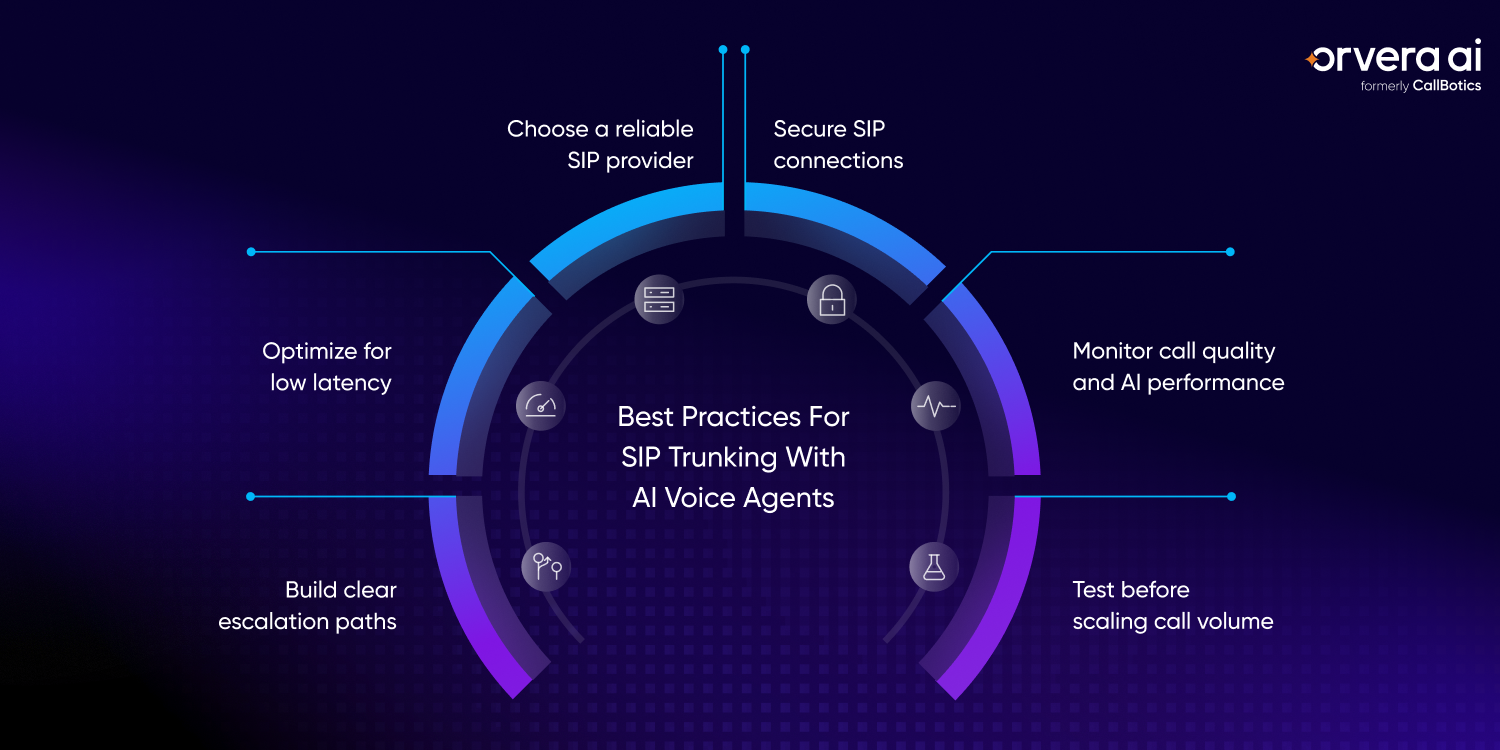
Choose a reliable SIP provider
A SIP provider affects call quality before the AI agent ever hears the caller. Uptime, routing reliability, support response, and coverage all matter because dropped calls, poor audio, or failed routes can make the AI agent look broken even when the software is working. The provider should also be able to support peak call periods without forcing the team into last-minute fixes. This is especially important for outbound campaigns or seasonal spikes, where failed calls can quickly create follow-up backlogs.
The right provider should support the regions, numbers, and call volumes the business needs. Teams should also check how quickly the provider handles routing issues, failed calls, number changes, and support requests during live operations. A provider that is hard to reach during an outage can turn a small routing issue into a customer-facing problem. Before launch, teams should confirm the support process, escalation contacts, and expected response times.
Optimize for low latency
Low latency keeps the conversation moving at a natural pace. Teams should monitor network quality, routing paths, audio codecs, and AI response time so callers do not sit through awkward pauses after every sentence. Even small delays can make callers interrupt, repeat themselves, or assume the system did not understand them. The faster the response loop, the easier it is for the caller to stay in the conversation.
Latency problems can come from more than one place. The issue may be the network, the carrier route, the audio stream, the speech system, or the AI workflow, so teams should measure the full path from caller speech to AI response. This makes it easier to fix the real bottleneck instead of guessing where the delay started. Regular latency checks also help teams catch slowdowns before they turn into repeated customer complaints.
Build clear escalation paths
AI voice agents should not trap callers in a workflow when the issue needs a human rep. Clear escalation paths tell the AI agent when to transfer the call, where to send it, and what information to pass along. The caller should know what is happening before the transfer starts. That clarity reduces frustration, especially when the caller has already explained the issue once.
Those paths should include human reps, queues, voicemail, callbacks, and fallback options for after-hours or high-volume periods. A good handoff keeps the customer from repeating the same details and helps the rep continue the conversation with context. Escalation rules should be tested for routine calls, urgent calls, unclear intent, and unhappy callers. Teams should also define what happens when the preferred transfer destination is unavailable.
Secure SIP connections
SIP connections need security controls because they can carry live customer calls and outbound calling access. Authentication, encryption, IP allowlisting, fraud controls, and access policies help prevent unauthorized use, call hijacking, and toll fraud. Security should be part of the launch plan, not a review after traffic is already live. Weak controls can turn a voice workflow into a financial and compliance risk.
Security teams should review who can connect, which systems can place calls, and which destinations are allowed. This is especially important for outbound AI calling, where weak controls can create cost, compliance, and customer trust problems quickly. Call permissions should be kept narrow so the AI agent can only do what the workflow requires. Access rules should also be reviewed when new numbers, regions, or workflows are added.
Monitor call quality and AI performance
Call monitoring should cover both the phone connection and the AI outcome. Teams should track call completion, failed calls, latency, answer rates, sentiment, containment, and escalation outcomes to understand where the workflow is working and where it is breaking. These metrics help teams separate carrier problems from AI workflow problems. They also show whether the AI agent is helping customers complete the task or sending too many calls to reps.
Phone metrics alone do not show whether the customer got help. AI performance data should show which call types were resolved, which ones were escalated, and where callers showed frustration or repeated the same request. Reviewing both sets of data helps teams improve the call path and the conversation flow together. This makes optimization a regular operating practice, not a one-time launch activity.
Test before scaling call volume
Teams should test call flows before moving large call volume to AI voice agents. That means checking routing, failover, concurrency, transfers, voicemail, callbacks, and AI responses under realistic conditions. The goal is to find weak points while the team can still fix them quietly. A controlled test also helps teams understand how the AI agent behaves when multiple issues happen at once.
Testing should include the messy parts of real calling, not only clean demo calls. Background noise, mobile connections, unclear intent, repeated questions, and unavailable reps can all expose gaps before customers experience them at scale. Teams should also test what happens when systems are slow, queues are full, or a transfer cannot be completed. These tests give teams more confidence before they increase call volume.
KPIs to Track for SIP-Powered AI Voice Agents
SIP-powered AI voice agents need to be measured on both phone reliability and conversation outcomes. A call may connect successfully, but that does not mean the customer got help. Teams should track technical metrics, routing metrics, and customer experience metrics together. This gives leaders a clearer view of whether the issue sits in the SIP connection, the AI workflow, or the handoff process.
The goal is to see whether AI voice agents can handle live call volume without poor audio, failed calls, long pauses, or broken escalations. These KPIs help teams find problems early and improve the workflow before customers feel the same issue again. They also help teams make better scaling decisions instead of increasing call volume without knowing where the weak points are.
Concurrent call capacity
Concurrent call capacity shows how many calls the system can handle at the same time without call quality dropping. This matters during peak hours, outbound campaigns, service outages, or seasonal demand when call traffic can rise quickly. If capacity is not tracked, teams may only notice the limit when callers start hearing delays, failed connections, or poor audio.
- Track the highest number of live calls the system can support without latency, audio issues, or routing failures
- Compare normal call volume with peak call volume so teams know when capacity needs to increase
- Review capacity limits across the SIP provider, contact center system, AI voice agent, and downstream tools
Call completion rate
Call completion rate measures the percentage of calls that successfully connect and complete without failing midway. A low completion rate can point to carrier issues, routing errors, platform problems, or call setup failures. This metric helps teams separate customer behavior from technical failure, which is important when call results look worse than expected.
- Track how many inbound and outbound calls connect successfully from start to finish
- Separate failed calls by reason, such as busy routes, rejected calls, timeouts, or platform errors.
- Review completion rate by campaign, number, region, and call type to find patterns
Latency and response time
Latency and response time show how long it takes for the AI voice agent to respond after the caller speaks. Low delay is important because callers expect a phone conversation to move naturally, not pause after every sentence. When response time is too slow, even accurate answers can feel frustrating to the caller.
- Measure the full response path, including audio capture, transcription, intent detection, response generation, and speech output
- Watch for delays that cause callers to repeat themselves, interrupt, or assume the AI agent did not understand
- Track latency by call type and network route so teams can identify where slowdowns happen
Call drop rate
Call drop rate shows how often calls disconnect before they are completed. Dropped calls are a clear sign that something may be wrong with routing, network stability, carrier performance, or platform reliability. A high drop rate also creates repeat contacts, because many customers call back and restart the same issue.
- Track where calls drop, such as during greeting, authentication, transfer, queueing, or workflow completion
- Compare drop rates across inbound calls, outbound calls, regions, and phone numbers
- Investigate repeated drops quickly because customers may call back frustrated or abandon the issue
AI containment rate
AI containment rate measures how many calls the AI voice agent handles without transferring to a human rep. This metric is useful, but it should be read carefully because containment only matters when the customer’s issue is actually resolved. A high containment rate with poor outcomes can hide customer frustration instead of proving success.
- Track containment by call type, such as status checks, confirmations, reminders, or basic billing questions
- Compare containment with outcomes so teams know whether calls were resolved or only kept away from reps
- Review low-containment workflows to see whether the AI agent needs better data access, clearer prompts, or stronger escalation rules
Escalation success rate
Escalation success rate measures whether calls transferred from the AI voice agent reach the right human rep, queue, voicemail, or callback path. A successful escalation should include enough context so the caller does not have to repeat the same details. This metric matters because a poor handoff can erase the benefit of the AI agent’s earlier work (opens in a new tab).
- Track whether transferred calls reach the correct destination instead of failing, looping, or landing in the wrong queue
- Measure whether the rep receives the caller’s intent, collected details, transcript, and summary before taking over
- Review escalation failures by reason, such as unavailable reps, incorrect routing rules, missing context, or queue overflow
Customer satisfaction score
Customer satisfaction score (CSAT) helps teams understand whether SIP-powered AI calls are creating a good customer experience. Technical metrics can show whether calls connected, but CSAT shows whether the caller felt helped. This is important because customers judge the full call, not the separate systems working behind it.
- Collect CSAT after AI-handled calls, escalated calls, and outbound workflows where feedback is appropriate
- Compare CSAT by call type, outcome, latency, containment, and escalation path
- Use low CSAT scores to review transcripts, call recordings, and routing decisions so teams can fix the real source of frustration
How Orvera AI Supports SIP-Powered AI Voice Agents
Orvera AI helps businesses connect AI voice agents to real telephony workflows, so automated calls can move through the same phone paths customers already use. Once the call reaches the AI agent, Orvera helps manage the conversation, route the next step, and keep a record of what happened. This helps teams move AI voice agents from a controlled test setup into live inbound and outbound call operations.
For contact centers, the value is control. Teams need AI voice agents that can answer, route, escalate, and report on calls without creating more work for reps or supervisors. Orvera supports that full call flow across inbound and outbound voice workflows. That means teams can manage routine calls through AI while keeping a clear handoff path for calls that need human judgment.
AI voice agents for inbound and outbound calls
Orvera helps businesses automate routine inbound and outbound calls through AI voice agents. These workflows can support customer support, lead qualification, follow-ups, reminders, and overflow calls where the call type is clear and the next steps are approved. This is useful for teams that handle repeatable call volume but still need the customer experience to stay clear and controlled.
When customers call in, the AI agent can collect details, answer routine questions, and move the caller to the right next step. For outbound calls, the AI agent can support repeatable workflows such as reminders, confirmations, follow-ups, and qualification calls, so reps are not spending their day on the same calls. This gives reps more time for conversations that need judgment, context, or relationship-building.
Intelligent call routing and escalation
Orvera helps identify caller intent so the call can move to the right AI flow, department, or human rep. This matters because a customer should not get stuck in the wrong path just because they described the issue differently than expected. Better intent detection helps reduce misroutes, repeat transfers, and caller frustration.
When a call needs judgment, Orvera can support escalation to a rep with useful context attached. That handoff helps the rep understand why the customer called, what was already collected, and what needs to happen next. The goal is to make the transfer feel like a continuation of the call, not a restart.
Real-time sentiment and call intelligence
Orvera helps teams understand what is happening inside automated and human-handled calls. Call intelligence can show customer emotion, conversation quality, call outcomes, and points where the caller showed confusion or frustration. This helps leaders see where the workflow is helping customers and where it may be creating friction.
This gives supervisors more than call counts. They can review where the AI agent resolved the request, where the call needed a rep, and where the workflow may need improvement before the same issue repeats across more calls. That visibility makes coaching and workflow tuning more practical.
CRM and workflow integrations
Orvera connects voice conversations with the systems contact center teams already use, such as customer records, tickets, tasks, and follow-up workflows. That connection matters because an AI voice agent needs the right data to give accurate answers and take the next approved action. Without that data layer, the AI agent may be able to talk to the caller but still fail to complete the work.
After the call, Orvera can help log summaries, update records, trigger follow-ups, and send outcomes into the right workflow. This reduces manual cleanup for reps and gives leaders a clearer record of what happened on each call. It also helps teams track whether the next step was completed after the conversation ended.
Analytics for scaling voice automation
Orvera helps teams monitor how AI voice automation performs as call volume grows. Leaders can review AI performance, escalation trends, call volume, and customer experience across automated calls instead of relying on isolated call samples. This helps teams catch problems before they spread across a larger share of customer calls.
Those analytics help teams decide which workflows are ready for more volume and which ones need tuning. As SIP-powered calling scales, Orvera gives teams the visibility to improve escalation and call outcomes with less guesswork. That makes scaling a measured operating decision, not a blind increase in automation.
Conclusion
SIP trunking gives AI voice agents the telephony foundation they need to make, receive, route, and scale real phone calls. It connects AI voice software to the public phone network, so customers can call normal numbers and still reach an AI agent, contact center system, or human rep. That connection matters because voice automation only works in production when the call path is stable. Without the right SIP setup, even a strong AI voice agent can struggle with routing, transfers, call quality, and scale.
With the right SIP setup and AI platform, businesses can automate voice workflows more reliably across inbound and outbound calls. Teams can route routine calls to AI agents, escalate complex cases to human reps, and log call outcomes into the systems they already use. The goal is not to force every call through automation, but to give each call the right path. When telephony, AI workflows, routing, and analytics work together, voice automation becomes easier to manage and safer to scale.
Frequently asked questions
For AI voice agents, SIP trunking provides the phone network connection needed to make, receive, and route calls over internet-based telephony. It gives the AI agent a reliable path into live contact center workflows.
AI voice agents need some form of telephony connection to handle live calls. SIP trunking is a common option when a business wants AI agents to work with existing phone systems, routing rules, and contact center infrastructure.
A live call travels between the customer, the phone network, and the AI voice agent through the SIP connection. The AI agent can listen, respond, follow the workflow, and route the call to a human rep when the conversation needs judgment.
The better choice depends on the business’s phone setup and call workflow. SIP-based connections often fit teams that need more control over existing telephony, while voice APIs can work well for faster app-based calling setups.
Orvera helps businesses run Voice AI agents across live contact center workflows with call context, workflow execution, smart escalation, and performance visibility. The first AI agent goes live within 3 to 6 weeks of kickoff, and Orvera runs the white-glove implementation itself rather than handing it to the customer's team.

Written by
Anindita Majumder
Anindita Majumder is a communications professional with nearly four years of experience in public relations, corporate communications, and journalism. She creates content that helps brands communicate their vision, products, and expertise through press releases, thought leadership, and editorial pieces. Outside of work, she is a vocalist, which keeps her creativity flowing.

