Genesys Alternatives for Enterprise Customer Experience
A useful Genesys alternatives shortlist starts with a defined customer experience requirement and that...


Key highlights
Key Highlights
- Enterprises should evaluate Genesys alternatives based on their CX requirements, existing systems, workflow complexity, and the work that needs to be completed
- Amazon Connect Customer, Five9, NiCE CXone, Talkdesk CX Cloud, and Webex Contact Center offer different capabilities across AI workflows, customer engagement, agent assistance, and workforce operations
- Vendor demonstrations should test how AI agents execute business actions, preserve context across handoffs, and handle requests that require human approval
- Buyers should assess channel continuity, workflow completion, approved knowledge, quality evidence, and operational ownership when comparing platforms
- Orvera AI combines omnichannel AI agents, Agent Assist, governed workflows, and quality checks that connect conversation evidence with completed actions in business systems
- The recommended evaluation is to test the same customer request across every shortlisted platform, including successful completion, human approval, and failed actions, before making a decision
A useful Genesys alternatives shortlist starts with a defined customer experience requirement and that is the work to complete, the systems involved, and who takes responsibility when a request needs human judgment.
This guide uses Genesys Cloud, also named Genesys Cloud CX, as its baseline. Genesys already offers AI capabilities for customer experience. Its September 2, 2026 announcement identifies Contextual Intelligence and the AI Control Plane as available, giving the evaluation an established starting point for context and governance.
Start With the Scope of Your Genesys Evaluation
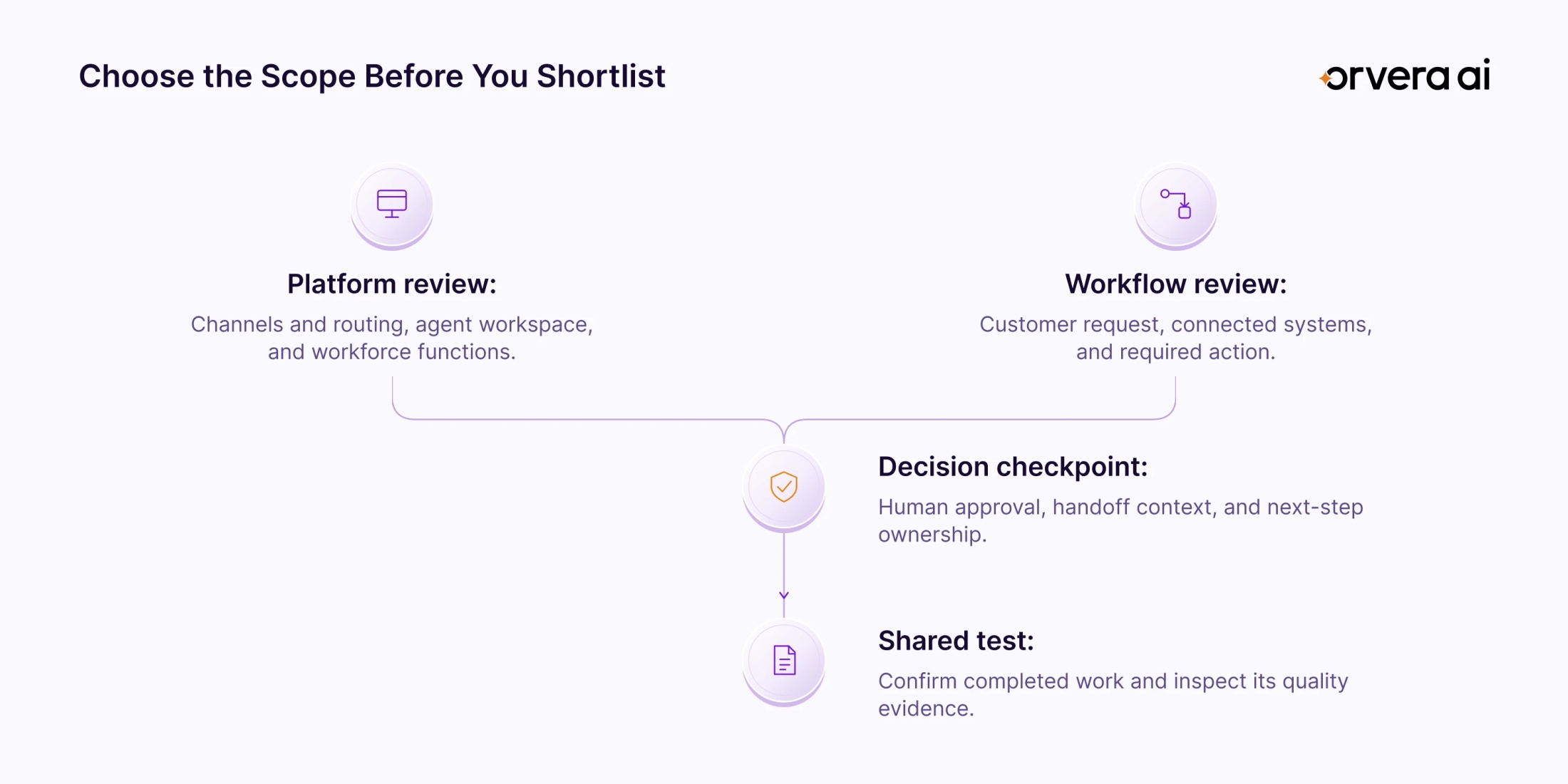
Write down what you want to change before reviewing Genesys Cloud alternatives.
A contact-center platform review examines the environment your operation runs on. Record your requirements for voice and digital channels, routing, the agent workspace, workforce functions, and connected business systems. Identify which capabilities must be working at launch and which existing systems will stay.
A workflow review starts with a customer request. For a refund, define the eligibility check, the system that applies the refund, the approval point, and the information a human agent receives during an escalation. Then evaluate how that work will run across the systems you retain.
These decisions can overlap. Give each its own requirements and acceptance criteria so everyone evaluates the same proposed scope. A vendor meeting should end with a clear record of what was demonstrated and what still needs validation.
For category context, read CCaaS vs UCaaS vs CPaaS (opens in a new tab). For related pricing research, see Genesys Cloud pricing (opens in a new tab).
Genesys Alternatives to Evaluate
The five platforms below give you a focused starting point for evaluating alternatives to Genesys. Each has documented capabilities relevant to customer conversations, AI execution, human-agent support, or workforce operations. The order is alphabetical.
The table identifies one area to examine for each platform. It summarizes selected capabilities, with demo questions that you can adapt to your requirements. The demo questions are editorial recommendations for your own evaluation.
Amazon Connect Customer
Amazon Connect Customer, previously known as Amazon Connect, supports customer experiences across voice, chat, and digital channels. The current name appears in the April 2026 product announcement.
Its September 22, 2026 release adds collaboration between specialized AI agents during a live interaction. The announcement describes context passing between agents and a contact record showing what each agent said, which tools it used, and how long each step took.
For your evaluation, follow a request that needs more than one action. Ask the team to show where responsibility moves between agents and how the interaction record represents that transition. Then introduce an exception that requires a person.
Inspect the record from the receiving agent's perspective and from the reviewer's perspective. Confirm that the proposed configuration supports the channels and deployment regions your operation requires. The useful decision is whether the demonstrated coordination matches the request you need to complete.
Five9 Intelligent CX Platform
Five9's Intelligent CX Platform provides a contact-center environment for customer interactions. Its June 23, 2026 Voice AI Agents release describes AI agents that connect to enterprise systems to authenticate customers, update records, and complete service tasks, with context-rich handoffs to human agents.
The release also introduces AI Agent Studio for building, testing, deploying, and monitoring those agents. Five9 documents call testing, version control, rollbacks, and post-call evaluations within that environment.
An evaluation should connect these capabilities to the same service request. Watch the AI handle the conversation, inspect the resulting system action, and then request a human handoff. Check what the receiving person knows about the work already attempted.
Also ask the team to demonstrate a workflow change. Review how the change is tested and how the previous version would be restored. This gives your operation a concrete view of both execution and the process for maintaining it.
NiCE CXone
NiCE CXone's workforce suite brings workforce management, quality, performance, and AI operations into a shared operating model for people and AI agents. NiCE announced the suite as available on June 9, 2026.
The documented functions cover forecasting and scheduling, coaching insights, shared dashboards, and summarized quality evaluations. The announcement describes common goals and quality standards across interactions handled by people and AI agents.
Evaluate this scope when your platform decision spans service delivery and the way the workforce is managed. Bring a quality criterion from your operation and ask how it applies to an AI-handled interaction and a human-handled interaction.
Then inspect the review process. Who can examine the evidence behind a result? How does a finding become a coaching decision or an operational change? Keep scheduling requirements visible alongside quality requirements, and ask the team to demonstrate the proposed configuration against both sets of needs.
Talkdesk CX Cloud
Talkdesk CX Cloud provides a cloud contact-center environment. For workflow evaluation, examine the Customer Experience Automation capabilities proposed alongside it and identify the exact functions in scope.
Talkdesk's February 23, 2026 announcement introduced Automation Flows for coordinating multistep work across business systems. It also extended Autopilot's agentic AI capabilities to email, describing actions such as checking information, updating accounts, and communicating a resolution.
Use an email-based service request as the demonstration. Ask how the message becomes a defined task, which connected system performs the action, and how the resulting status returns to the customer conversation.
Include a request that remains open while another decision is pending. Ask the team to show how that unfinished work is represented and what happens next. Keep the evaluation tied to the specific CX Cloud, Autopilot, and Automation Flows configuration being proposed, so each demonstrated capability has a clear place in the implementation.
Webex Contact Center
Webex Contact Center's AI Assistant supports human agents during customer interactions. Its spring 2026 release page labels real-time transcription, suggested responses, and AI Agent Transfer Context Summaries as generally available.
These functions give you a practical way to examine the receiving agent's experience. Begin with a conversation handled by an AI agent, then transfer it to a person. Read the summary the person receives and compare it with the request, the questions already answered, and the action still pending.
During the human-handled portion, examine how transcription and suggested responses support the conversation. Ask which information informs the suggestion and what the agent does when the customer changes the request.
Confirm the status of each feature in the proposed Webex Contact Center configuration. Keep the demonstration focused on the contact-center product and the specific assistance functions your team will use. That makes the handoff review directly relevant to the agent's daily work.
How to Compare Genesys Alternatives
Apply the same checks to your current Genesys configuration and every shortlisted option. The sections below are an evaluation method. Use them to record demonstrated behavior, open questions, and required follow-up.
Platform scope and channel continuity
Map the channels a customer uses for the request. During the demonstration, move from chat to voice or resume a paused conversation. Inspect which details remain available, what the customer must repeat, and which person or agent owns the next step.
Keep routing, agent-workspace, and workforce requirements visible. Record the exact functions you are evaluating and the systems that support them.
Workflow completion and human handoff
Define the business action that counts as completion. For a refund request, ask to see the refund status in the operational system and the confirmation given to the customer.
Then test an approval-required request. Identify the point where execution pauses, who can authorize the next action, and what reaches a human agent. Include a failed-action path so the demonstration shows how unfinished work remains visible.
Live assistance grounded in approved knowledge
Ask a policy question during the human-handled conversation. Check the source behind the suggested answer and confirm that it matches the approved policy used in the test.
Change a relevant detail, such as the order date. Inspect how the guidance responds. Also establish whether the person approves the suggested action or the customer-facing AI executes it under a predefined rule. Record that decision authority explicitly.
Quality evidence and review
Choose a criterion from your own scorecard and follow it through an evaluation. Inspect the evidence behind the result, the process for disputing it, and how a reviewer records a decision.
Where completed work is a requirement, request the related business-system record. Check how critical compliance failures appear alongside scored criteria, and ask which standards apply across human-handled and AI-handled interactions.
Deployment and ongoing ownership
Record who maps the workflow, connects each system, and tests the configuration. Establish who approves launch and who maintains the workflow afterward.
Use a practical change request, such as a revised refund policy. Ask who updates the knowledge, changes the decision rule, tests the new path, and reviews the interactions that follow. The evaluation should produce a clear operating plan as well as a product shortlist.
For broader evaluation context, read our guide to reasons to switch to AI voice agents (opens in a new tab).
Where Orvera Fits in a Genesys Evaluation
Orvera AI is an agentic AI platform for enterprise customer experience, built, deployed, integrated, and run by Orvera on the customer's behalf. Its governed workflows run on the customer's existing systems, with full-coverage quality across every channel for human-handled and AI-handled conversations.
AI agents and live human-agent support
Our omnichannel AI agents (opens in a new tab) handle customer-facing work across voice, chat, and digital channels. They act in connected systems to complete workflows such as order-status inquiries, refund requests, and appointment scheduling. Autonomous execution applies to well-bounded, non-sensitive work. Sensitive actions require human confirmation, and exceptions route for review or handoff.
Agent Assist supports the people handling live conversations with next-step guidance, knowledge suggestions that carry citations, and interaction summaries. A handoff carries a structured summary and next steps by default, with the full transcript available on demand.
For the evaluation, bring a request that moves from AI handling to a person. Review the action already taken, the guidance available to the person, and the next decision the workflow requires.
Quality connected to completed work
Orvera builds automated scorecards from the customer's own evaluation forms. Criteria, weights, thresholds, and pass-or-fail rules remain configurable. Calibration uses the customer's own evaluators and real conversations to establish the grading standard.
A criterion can examine conversation behavior and the action completed in the customer's system. For a promised refund, that means evaluating the relevant operational record alongside the conversation. Each criterion result links to its evidence. Critical compliance checks remain separate from the weighted score.
Voice of Customer surfaces conversation themes and drivers. Quality findings also feed coaching, AI-agent changes, and workflow refinement, with subsequent conversations evaluated to see what changed.
Build, deploy, integrate, and run
Orvera performs discovery and process mapping, solution design, build, integration, testing, and go-live. Our team works alongside the customer's operations and quality teams through implementation and ongoing operation. Managed Build-Run and transfer to the enterprise to operate are both supported delivery choices.
Orvera integrates with Genesys and Genesys Cloud. Use Orvera's Genesys integration (opens in a new tab) as a starting point for a discussion of your environment, required workflow, and connection scope. The implementation plan should identify the systems, actions, and handoffs to be demonstrated.
Test One Customer Request From Start to Finish
Use a hypothetical retail refund request as a common evaluation scenario. Supply the same approved policy and test order details to each team, and agree on what counts as a completed action before the demonstration.
Begin with an eligible request. Check how the agent establishes identity, retrieves the order, and applies the policy. Follow the action into the order or case system, then read the confirmation the customer receives.
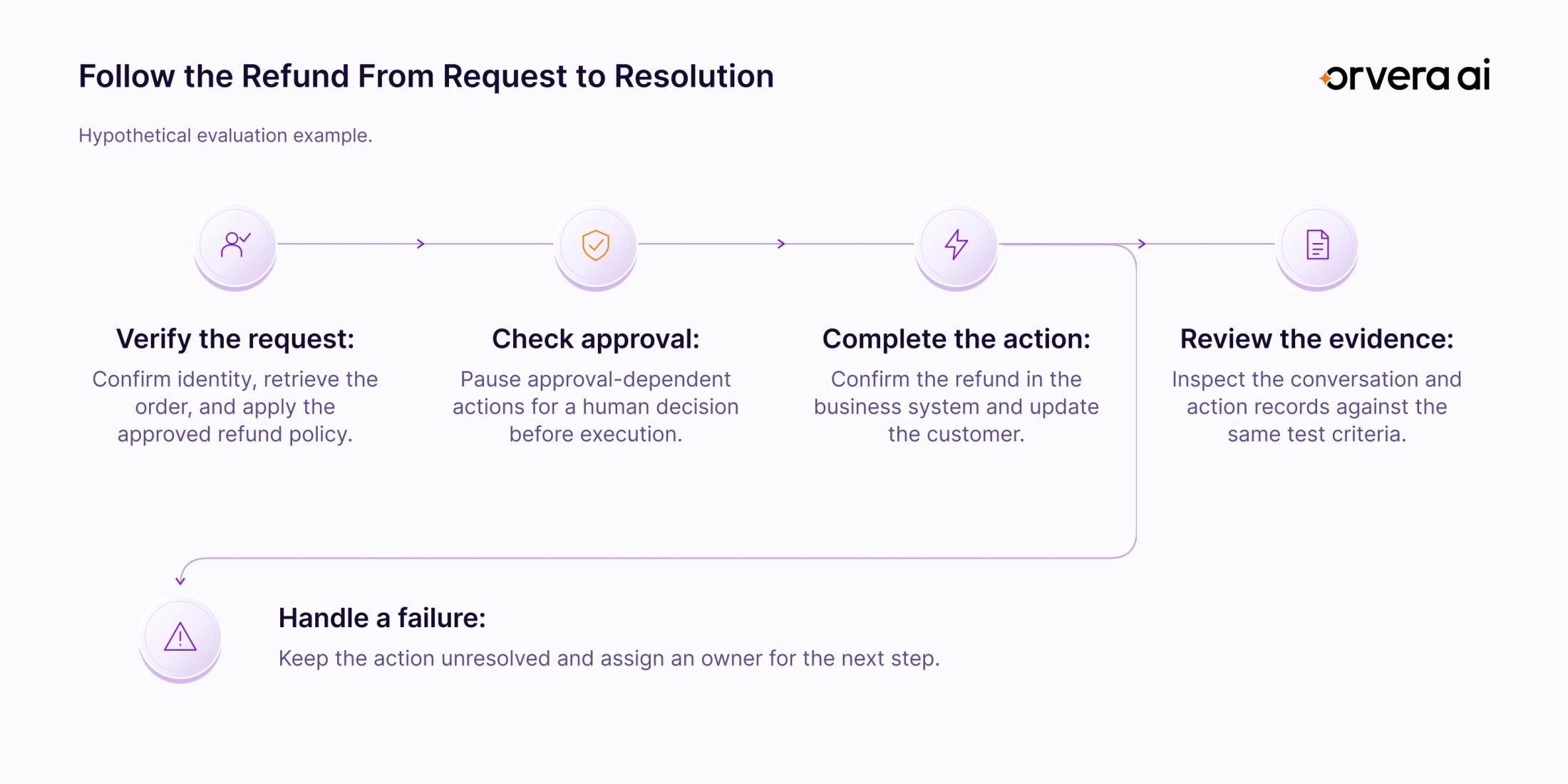
Next, introduce an approval requirement. The demonstration should show where the action pauses, how the pending decision is represented, and how the receiving person understands the request. Ask what happens after approval and what happens when approval is declined.
Finally, make the action fail. Inspect whether the request remains unresolved, whether the customer receives an accurate explanation, and whether the next action has an owner. A completion label should agree with the operational record.
Review the conversation and action evidence together. Record which parts passed, which required clarification, and which need another test. This gives the selection team a common basis for the next decision and a useful starting point for implementation acceptance criteria.
Bring Your CX Workflow Into the Evaluation
Choose your next evaluation around a customer request, its connected systems, and the evidence that will show it was handled correctly. Give the team a shared test and a clear decision to make afterward.
Explore Orvera case studies (opens in a new tab).
Bring one customer request to your Orvera demo. Review the workflow, system actions, human handoffs, and quality checks your operation needs.
Book a Demo
Frequently asked questions
The shortlist in this guide covers Amazon Connect Customer, Five9 Intelligent CX Platform, NiCE CXone, Talkdesk CX Cloud, and Webex Contact Center. Use the table to identify the relevant evaluation area for each. Decide which options to investigate further against your channel, workflow, workforce, and operational requirements. Their alphabetical order carries no performance ranking.
Yes. A workflow-focused evaluation can start with the systems you intend to retain. Orvera builds and runs CX workflows on existing contact platforms and business systems, with Genesys and Genesys Cloud among its integrations. Define the required action and confirm the connection scope for your environment before moving into implementation.
Set acceptance criteria for the customer request, relevant context, work already attempted, completed actions, and pending decisions. The receiving agent should know what to do next. Orvera's handoff carries a structured summary with next steps by default and provides the full transcript on demand.
Run the same request through a normal path, an approval-required path, and a failed-action path. Inspect the conversation, the resulting system record, and the human handoff. Ask each team to identify the exact product configuration and feature status demonstrated. Record unresolved questions before advancing an option to the next stage.

Written by
Anindita Majumder
Anindita Majumder is a communications professional with nearly four years of experience in public relations, corporate communications, and journalism. She creates content that helps brands communicate their vision, products, and expertise through press releases, thought leadership, and editorial pieces. Outside of work, she is a vocalist, which keeps her creativity flowing.