The First Ten Days: How AI Voice Agents Resolve the Learner Access Crunch
The first ten days of a term concentrate every access fault across every learner into a window too short to staff and too repetitive to...

Key highlights
The First Ten Days: How AI Voice Agents Resolve the Learner Access Crunch
- The first ten days of a term concentrate every access fault across every learner into a window too short to staff and too repetitive to ignore.
- The tickets worth automating first are those tied to defined, repeatable actions your operation already performs daily, rather than those arriving in the highest volume.
- A voice AI agent resolves the password reset on the call, in the system of record, and confirms access to the learner before the conversation ends.
- An AI agent resolves MFA re-enrollment by verifying the learner's identity first, then completing the re-enrollment action inside the connected system, or routing to a human rep where operator policy requires it.
- Identity is verified before any credential action. That rule does not bend based on queue depth, term week, or the learner's stated urgency.
- A learner who cannot see their courses after enrolling is most often caught between two systems that have not yet agreed on their status.
- The AI agent stops and routes the learner to a person the moment the resolution requires an action the system is not authorized to take, a fault the learner cannot fix, or an identity that could not be confirmed.
- An AI agent that resolves a learner's access issue performs the action in the system of record and confirms the outcome before the call ends. A phone menu routes the caller. A support bot reads them an answer.
- A learner services leader should track two directions of travel across the first ten days: tickets resolved without a human, and how deep the queue grows before it clears.
Why do the first ten days of a term break a learner support operation?
The first ten days of a term concentrate every access fault across every learner into a window too short to staff and too repetitive to ignore.
Every new term opens the same way. Learners arrive at the login screen, hit the MFA prompt, and pull up the course list inside the same narrow window. The work does not arrive as a steady curve your floor can absorb. It arrives as a spike, built from the same three actions repeated by every enrolled learner at roughly the same moment.
The three access faults that fill the first-ten-days queue: credential failures that require a student self service password reset, MFA re-enrollment that has stalled or expired, and course access that shows nothing because enrollment has not reached the LMS yet.
Staffing to that spike is not a clean answer. The peak is ten days. Trained coverage cannot be hired and ramped for a window that short, and the tickets themselves repeat the same resolution steps enough times that the work is volume, not complexity. Bring in temporary help and you spend more on ramp than on resolution.
The stake for your operation is more than just a satisfaction score. A learner who cannot reach a course on day one may reconsider their enrollment. That decision rarely reverses itself cleanly.
The sections that follow name which tickets qualify for AI-driven resolution first, and where a person must take over.
Which learner access tickets are worth automating first?
The tickets worth automating first are those tied to defined, repeatable actions your operation already performs daily, rather than those arriving in the highest volume.
Volume alone is a poor selection filter. A ticket that arrives often but resolves differently each time demands judgment. The better filter combines two criteria: the action that resolves it is already defined, and the fault originates inside the learner's own account rather than in a connected system. Apply both criteria and three ticket types qualify clearly.
- Password resets. The learner cannot access their account because their credentials have expired or been locked. The resolution is a defined action taken in the system of record. An AI voice agent for student password reset works here because the resolution path does not require judgment about a variable outside the learner's account.
- MFA re-enrollment. The learner's second-factor device has changed or their enrollment has lapsed. The resolution is a specific reconfiguration, not a diagnostic conversation. The condition that makes it a candidate is that the action has a clear start state and a clear end state.
- Course access that fails because enrollment has not synced between systems. The learner is enrolled on record but the course platform has not reflected that status yet. Where the sync is pending and the record is clean, a resolution action is available.
The disqualifier matters as much as the three candidates. Where the fault originates upstream, in a connected system or in an active outage, no account-level action resolves it. That ticket is a routing case. A person takes it, with full context already in hand.
Can a voice AI agent actually reset a learner's password, or does it just take a message?
The reset runs in the system of record while the learner is on the line. Identity is verified before any credential action is taken, and only after that verification does the agent proceed with the reset.
This reflects in the learner's experience. One call, spoken in plain language, with no menu tree to navigate. The learner describes what is wrong, the agent locates the account, and the reset runs against the system that governs course access. The learner hears confirmation before the call ends. And if something in that sequence cannot be completed automatically, because a policy boundary or an upstream fault makes it inappropriate for the agent to proceed, the learner is not left without direction. A person receives the case, with context, and the learner knows who has it.
That distinction matters for directors evaluating automated MFA resolution for edtech support. A system that creates a record is not the same as a system that creates access. The measure is whether the learner can log in when the call is over, not whether the queue is shorter.
How does an AI agent handle MFA re-enrollment when a learner has lost their factor?
An AI agent resolves MFA re-enrollment by verifying the learner's identity first, then completing the re-enrollment action inside the connected system, or routing to a human rep where operator policy requires it.
MFA re-enrollment is a different case from a password reset, and the distinction matters. In a reset, the learner can still reach the account. In an MFA re-enrollment, the learner has typically lost access to the factor they originally enrolled with, so the account itself is intact but unreachable. The ticket looks similar in the queue. The resolution path is not.
LMS access failure automation works here because the steps the agent takes are defined and bounded. What the agent does on a re-enrollment call:
- Verifies the learner's identity before any credential action proceeds, without exception.
- Confirms the account state in the connected system of record.
- Initiates re-enrollment where the operator's policy permits the action to run without a human rep.
- Stops and routes to a human rep where policy reserves the action for a person, rather than working around that boundary.
Identity is verified before any credential action. That rule does not bend based on queue depth, term week, or the learner's stated urgency.
Where the fault sits upstream of the learner's account, the agent names the system that is behind and routes rather than attempting a resolution it cannot complete. The next category of access tickets follows the same logic.
Why can a learner not see their courses after enrolling?
A learner who cannot see their courses after enrolling is most often caught between two systems that have not yet agreed on their status.
The enrollment record resides in one system. The course list is served from another. When those two systems have not reconciled, the learner lands in a valid account with no visible content. That is not a forgotten step on their part. It is a system-state problem, and it has a different resolution path than a straightforward credential failure.
The fault divides into two distinct categories. The first is a genuine access fault: the learner's enrollment did not propagate at all, the record is incomplete, and a person must correct it in the system of record. The second is a sync lag: the record exists and is correct, but the course list has not yet reflected it. Treating a sync lag like an access fault sends the learner into a queue unnecessarily. Treating an access fault like a sync lag and telling the learner to wait is worse.
“These two call types look identical to the learner and sound identical in the queue. Routing them to the same answer produces one correct outcome and one frustrated callback. The distinction has to be made before any action is taken, not after.”
Agentic AI for higher education help desk operations addresses this by verifying enrollment state in the configured systems. If the record is present and the fault is a sync condition, the AI agent names that clearly and sets an expectation. If the record is missing or incomplete, the call goes to a person with a summary of what was checked and what remains open. The learner does not retell the story. That boundary, covered in the next section, is where the model's value becomes most visible.
When should the AI agent stop and hand the learner to a person?
That boundary is not an edge case. It is a design decision, and it belongs in writing before the first call runs. Support automation is built around explicit limits, not around hoping a situation never arises. When the boundary is published and tested, your team can stand behind every automated action the system does take.
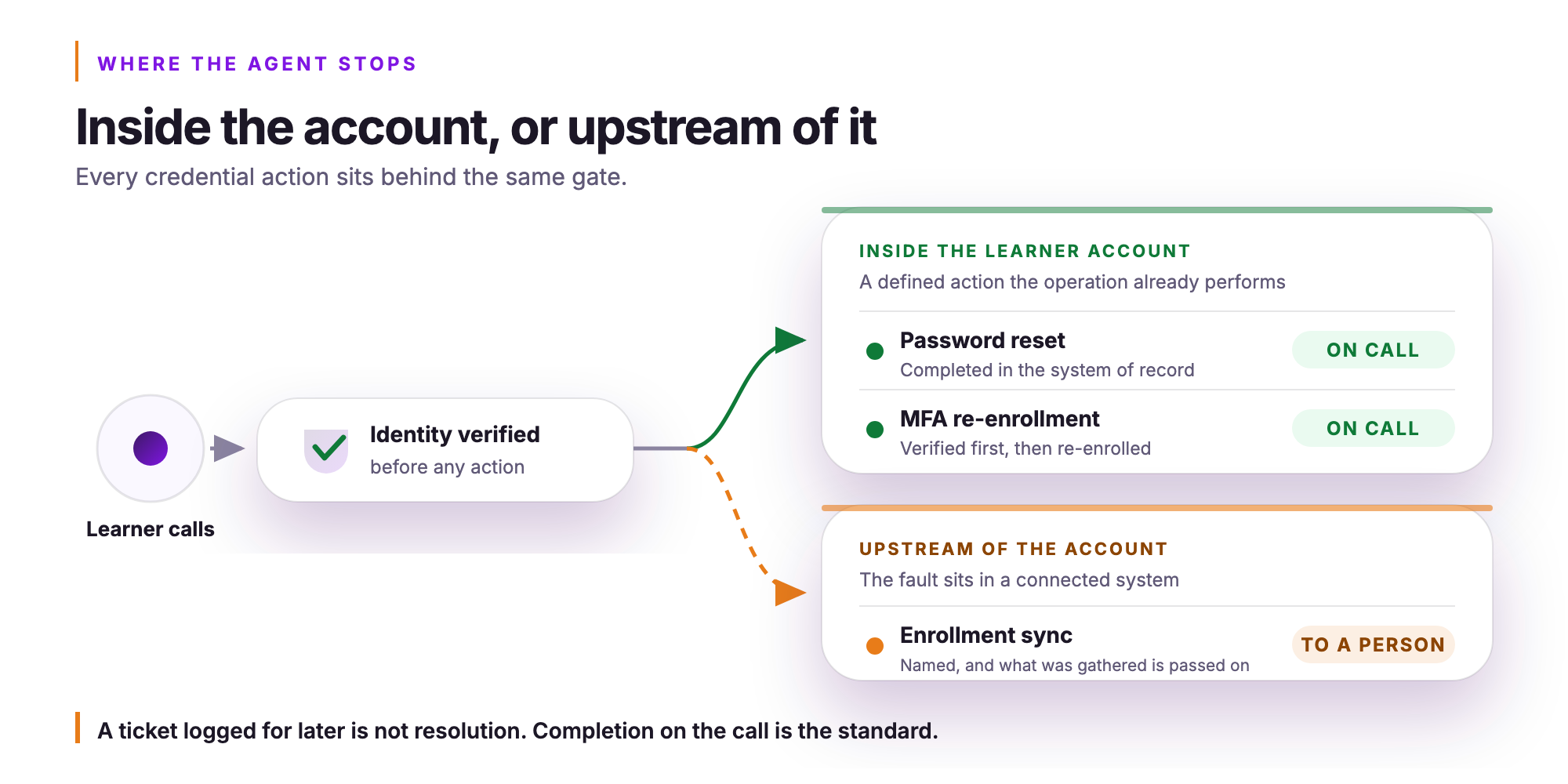
The conditions that trigger a handoff are:
- Identity not established. No credential action proceeds. The learner moves to a person without exception.
- Fault upstream of the account. If the issue lives in provisioning, a system integration, or a configuration your team controls, the AI agent names that plainly and routes to someone who can act on it.
- Policy reserves the action. When your operator policy designates a step for human review, the system does not work around that designation.
- Resolution remains open. If the AI agent completes its authorized steps and the problem persists, it does not loop. It transfers.
What the person receives on handoff matters as much as the handoff itself. The rep gets what the learner asked for, what was checked, and what remains unresolved. The learner does not repeat themselves. That is the difference between a handoff that saves time and one that compounds frustration.
How is this different from an automated phone menu or a support bot?
An AI agent that resolves a learner's access issue performs the action in the system of record and confirms the outcome before the call ends. A phone menu routes the caller. A support bot reads them an answer.
The distinction matters because routing and reading leave the learner exactly where they started. A menu can transfer the call to a queue that is already full. A bot can surface a knowledge article the learner already tried. Neither one touches the credential, updates the enrollment record, or closes the ticket. The learner calls back tomorrow, and the queue grows.
“Answering a learner means giving them information. Resolving for a learner means changing their state in the system and confirming it before the conversation ends.”
Orvera AI is a customer experience platform run as a managed operation on your behalf. The AI agent is deployed, configured, and governed before the first call of the term arrives. Orvera custom-trains its own contextualization models on de-identified data, which is what allows the agent to recognize patterns specific to your programs, your learner population, and your support policies. No additional build falls to your team.
That distinction, between a tool and a run operation, is what the first ten days actually test. And knowing what the operation produces is the next question worth asking.
What should a learner services leader measure across the first ten days?
A learner services leader should track two directions of travel across the first ten days: tickets resolved without a human, and how deep the queue grows before it clears.
Neither figure needs to be a rate, a multiple, or a percentage to be useful. The direction is the claim. A ticket type that routes to a human rep every time is telling you something about scope coverage. A queue that deepens further into the window than it did last term is telling you something about whether the operation scaled correctly. Both signals are actionable before a single percentage point is calculated.
The more important habit is measuring against your own previous term, not against any external standard. Your learner population, your LMS, your MFA configuration, and your staffing model are not the same as anyone else's. A figure drawn from another operator's environment does not describe your queue. What describes your queue is what happened in your queue, term over term.
Two things worth watching:
- Tickets resolved without a human. Is the number moving in the right direction compared to the same window last term?
- Queue depth across the first ten days. Does the backlog clear sooner, and does the peak sit lower than it did before?
Those two directions, measured against your own prior baseline, tell you whether the operation improved. That is the measure that matters. Establishing that baseline clearly is also what makes the next conversation, about what the operation should do before the following term starts, worth having.
What does it take to have this running before the next term starts?
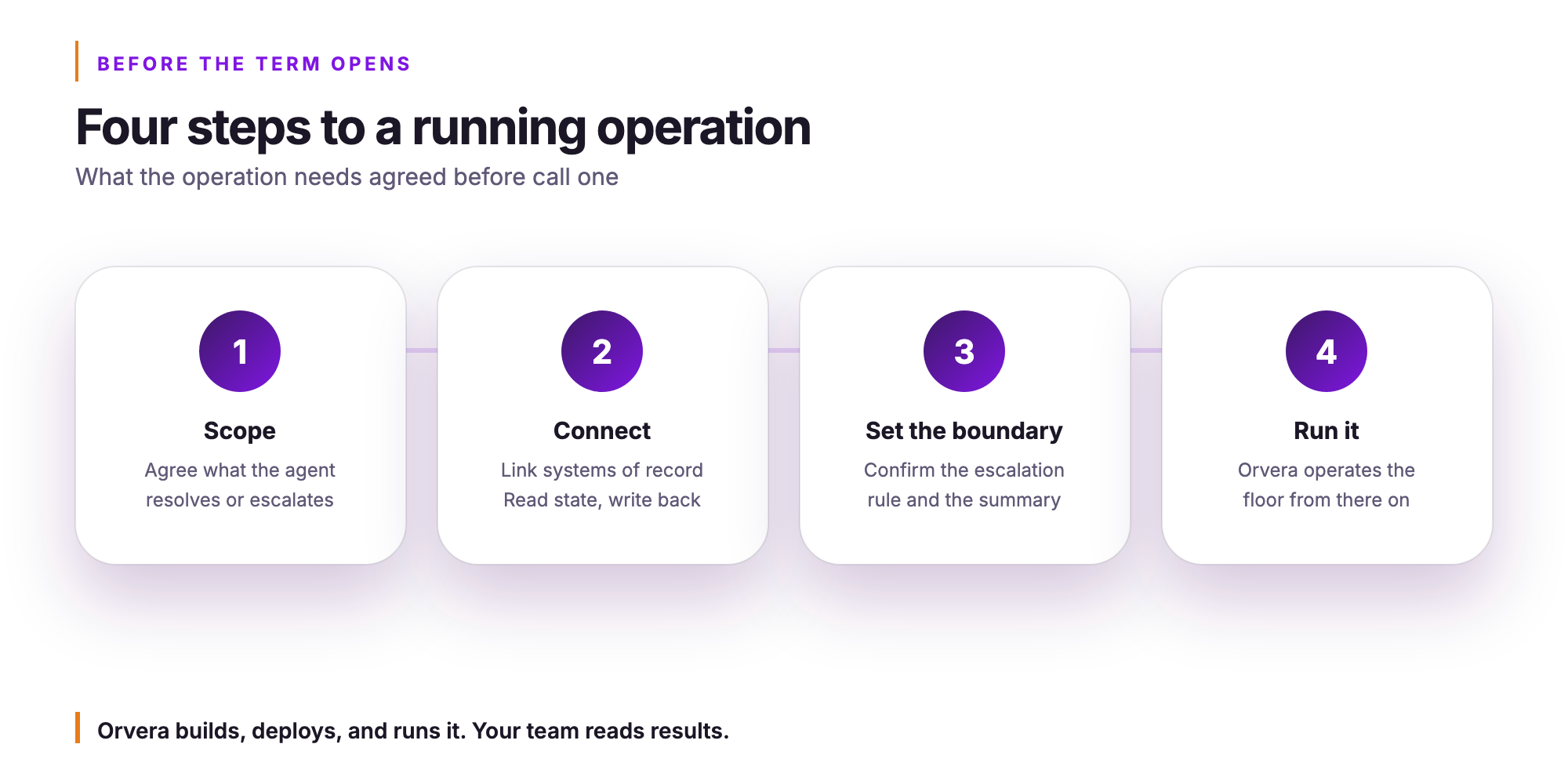
Getting Orvera AI running before your next term opens requires four steps: scope the ticket types, connect your systems of record, set the handoff boundary, and run it.
The scope conversation is the starting point. You identify which ticket types belong to the AI agent, which require a human representative from the first word, and which can start with the AI agent and transfer with a full summary. Login failures, MFA re-enrollment, and course-access blocks are the obvious candidates. A learner whose access issue traces back to a registration hold or a system-side fault gets routed to a person, and that boundary gets documented before a single call arrives.
Connection to your systems of record comes next. The AI agent reads enrollment status and account state, verifies identity before any credential action, and writes the outcome back. Orvera runs that integration work. You do not configure it or staff it.
Then the handoff boundary is confirmed against your own escalation policy, tested against the call types your queue actually sees, and the operation opens.
The four steps in order:
- Scope: agree which ticket types the AI agent resolves, which it escalates, and which go directly to a human representative
- Connect: link your systems of record so the AI agent reads account state and writes outcomes back
- Set the boundary: confirm the escalation rule and the summary format your representatives receive at transfer
- Run it: Orvera operates the floor from that point forward
Orvera AI builds, deploys, and runs the operation. You read the results rather than standing up the infrastructure. To observe how it handles call types during the first ten days of a term, contact the team.
Frequently asked questions
An AI agent can reset a learner's password on the phone, and the reset completes in the system of record before the call ends.
An AI agent can guide a learner through MFA re-enrollment on a phone call, provided identity is verified first and the operator's policy permits the action without a human rep.
A learner who has enrolled but cannot see their courses is almost always caught between two systems that have not reconciled the enrollment record yet.
When identity cannot be confirmed, the AI agent stops, takes no credential action, and routes the learner to a human rep along with everything gathered on the call.
The AI agent distinguishes a system outage from a credential problem by checking the state of connected systems before taking any action on the learner's account.
Orvera AI is a managed agentic AI platform with AI agents across voice, chat, email and every other channel, Agent Assist for the human team, Auto QA, and governed model orchestration. Orvera builds, deploys, and runs automated learner support as a managed operation, so your team reads results.

Written by
Anindita Majumder
Anindita Majumder is a communications professional with nearly four years of experience in public relations, corporate communications, and journalism. She creates content that helps brands communicate their vision, products, and expertise through press releases, thought leadership, and editorial pieces. Outside of work, she is a vocalist, which keeps her creativity flowing.