How to Optimize Latency for Conversational AI (Practical Guide for 2026)
Latency decides whether a conversational AI system feels responsive or unreliable to the people using it. This practical guide explains how to optimize latency for conversational AI so conversations keep their structure and callers keep their trust.

Key highlights
What Actually Reduces Latency in Conversational AI
- Latency is determined by the entire pipeline, not just model speed, including STT, routing, integrations, and TTS
- Voice systems require tighter latency control than chat due to real-time turn-taking expectations
- Streaming across STT, response generation, and TTS significantly reduces perceived latency
- Tool calls and external integrations are often the largest contributors to delays in production systems
- Prompt size and structure directly impact model response time and overall system performance
- Caching common queries and pre-fetching data reduces unnecessary processing and improves responsiveness
- Faster initial responses can be achieved by routing simple queries to lightweight models before escalation
- Geographic deployment and routing decisions influence network latency and system responsiveness
- Consistency in response time matters more than occasional fast responses for maintaining conversational flow
- Measuring latency at p50 and p95 levels by intent reveals real bottlenecks hidden by averages
- Workflow-level optimization delivers greater latency improvements than isolated model-level tuning
- Perceived latency can be improved through streaming, early responses, and natural conversational cues
- Systems that continuously track and optimize latency across interactions achieve more stable performance at scale
Latency is not a minor technical detail in conversational AI. It is the difference between a system that feels responsive and one that feels unreliable.
When responses take too long:
- Users interrupt mid-sentence
- Conversations lose structure
- Trust drops quickly
- Call resolution declines
In voice environments, this effect compounds. Even small delays disrupt the natural rhythm of interaction, making conversations feel mechanical instead of fluid.
As conversational AI moves from pilots to production, latency has become one of the most important factors influencing performance, customer experience, and operational efficiency.
This guide explains how to optimize latency conversational AI systems end-to-end, with a focus on practical improvements that directly impact real-world performance across voice and chat.
To see how these systems operate in production environments, it helps to understand how modern AI contact centers are structured and deployed. (opens in a new tab)
What “Latency” Means in Conversational AI
Latency refers to the time between a user input and a meaningful system response.
In simple terms:
- A user speaks or types
- The system processes the input
- A response is generated and delivered
Latency is the total time across that entire sequence.
This includes:
- Audio capture
- Speech recognition
- Processing and reasoning
- External data retrieval
- Response generation
- Output delivery
It is important to understand that users experience latency as a single delay, even though it is composed of multiple stages.
Voice Latency vs Chat Latency
Voice interactions have fundamentally different expectations than chat.
In chat:
- Users tolerate pauses
- Responses can take a few seconds
- Turn-taking is flexible
In voice:
- Timing must feel natural
- Delays interrupt flow
- Even sub-second pauses are noticeable
Human conversation operates on tight timing loops. When those loops break, conversations feel unnatural.
This is why voice systems require stricter latency control than chat systems.
End-to-End Latency vs Model Latency
A common misconception is that latency is primarily a model problem.
In reality:
- Model inference is only one component
- The majority of the delay often comes from the surrounding pipeline
End-to-end latency includes:
- Network delays
- Audio processing
- Workflow routing
- Tool calls
- Output rendering
Focusing only on model speed often leads to limited improvements. The most effective optimizations come from analyzing the full system.
This is why implementation architecture (opens in a new tab) plays a critical role in performance, not just the underlying model.
Where Latency Comes From (The Full Pipeline)
To improve latency, it must first be broken down.
A typical conversational AI pipeline includes multiple stages, each contributing to the total response time.
Audio Capture and Network Time
The process begins before AI systems are even involved.
Delays can occur due to:
- Device performance
- Microphone input buffering
- Network transmission time
- Packet loss or instability
In distributed environments, network latency alone can introduce significant delays before processing begins.
This stage is often overlooked but can meaningfully impact total response time.
Speech-to-Text (STT)
Speech recognition converts audio into text.
Latency at this stage depends on:
- Audio quality
- Model architecture
- Processing method (batch vs streaming)
Batch processing requires the system to wait for the full utterance before transcription begins. This creates noticeable delays.
Streaming STT, on the other hand, processes audio incrementally, allowing downstream systems to begin earlier.
This shift alone can significantly reduce perceived latency.
Intent Detection and Routing
Once text is available, the system must determine what the user wants.
This involves:
- Classification models
- Intent detection
- Workflow routing
Each additional step adds processing time.
In complex systems:
- Multiple classifiers may run sequentially
- Routing logic may involve decision trees or orchestration layers
While each step may seem small, the cumulative effect can be substantial.
LLM Response Generation
The core reasoning step involves generating a response.
Latency here depends on:
- Model size
- Prompt length
- Token generation speed
Long prompts increase:
- Processing time
- Memory requirements
- Cost
Response generation also scales with output length.
While this stage is important, it is rarely the only bottleneck.
Tool Calls and Database Lookups
External integrations often introduce the largest delays.
These include:
- CRM queries
- Order status checks
- Payment systems
- Scheduling systems
Each call introduces:
- Network latency
- Processing delays in external systems
- Potential retries or failures
When multiple tool calls occur sequentially, latency increases rapidly.
In many production systems, this stage contributes more to the delay than model inference.
Text-to-Speech (TTS)
For voice systems, responses must be converted back into audio.
Latency here depends on:
- Voice model complexity
- Audio generation method
- Output streaming capabilities
Batch TTS waits for the full response before playback begins.
Streaming TTS allows audio playback to start immediately as content is generated, improving perceived responsiveness.
Pipeline Reality: Latency is Additive
Each stage may add milliseconds or seconds.
Individually, these delays may seem manageable.
Collectively, they determine whether the system feels:
- Immediate
- Acceptable
- Slow
Understanding this pipeline is the foundation for any meaningful optimization strategy.
Latency Benchmarks (What “Good” Feels Like)
Latency is not just a number. It is a perception.
Two systems with the same measured latency can feel completely different depending on how responses are delivered.
This is why benchmarks must be tied to human experience, not just system metrics.
Natural Turn-Taking Targets
In voice interactions, users expect timing that mirrors human conversation.
As a general guide:
- < 300 ms → Feels immediate
- 300 to 800 ms → Feels natural
- 800 to 1,500 ms → Noticeable but acceptable
- > 1500 ms → Feels slow and disruptive
The key is not just speed, but consistency.
A system that responds in 800 ms consistently will feel better than one that fluctuates between 200 ms and 2 seconds.
Unpredictability breaks conversational flow faster than steady delay.
How to Measure Properly
Average latency is not enough.
Production systems should track:
- p50 latency → Typical experience
- p95 latency → Worst-case for most users
- Max latency → Failure scenarios
Latency should also be measured by:
- Intent type
- Workflow complexity
- Channel (voice vs chat)
For example:
- Balance inquiry → fast, predictable
- Claims processing → slower, multi-step
Without segmentation, averages hide the real problems.
12 Practical Ways to Reduce Conversational AI Latency
Improving latency is not about applying all fixes at once.
The most effective approach is:
- Measure end-to-end latency
- Identify the largest bottleneck
- Optimize that stage first
The following strategies are ordered based on real-world impact.
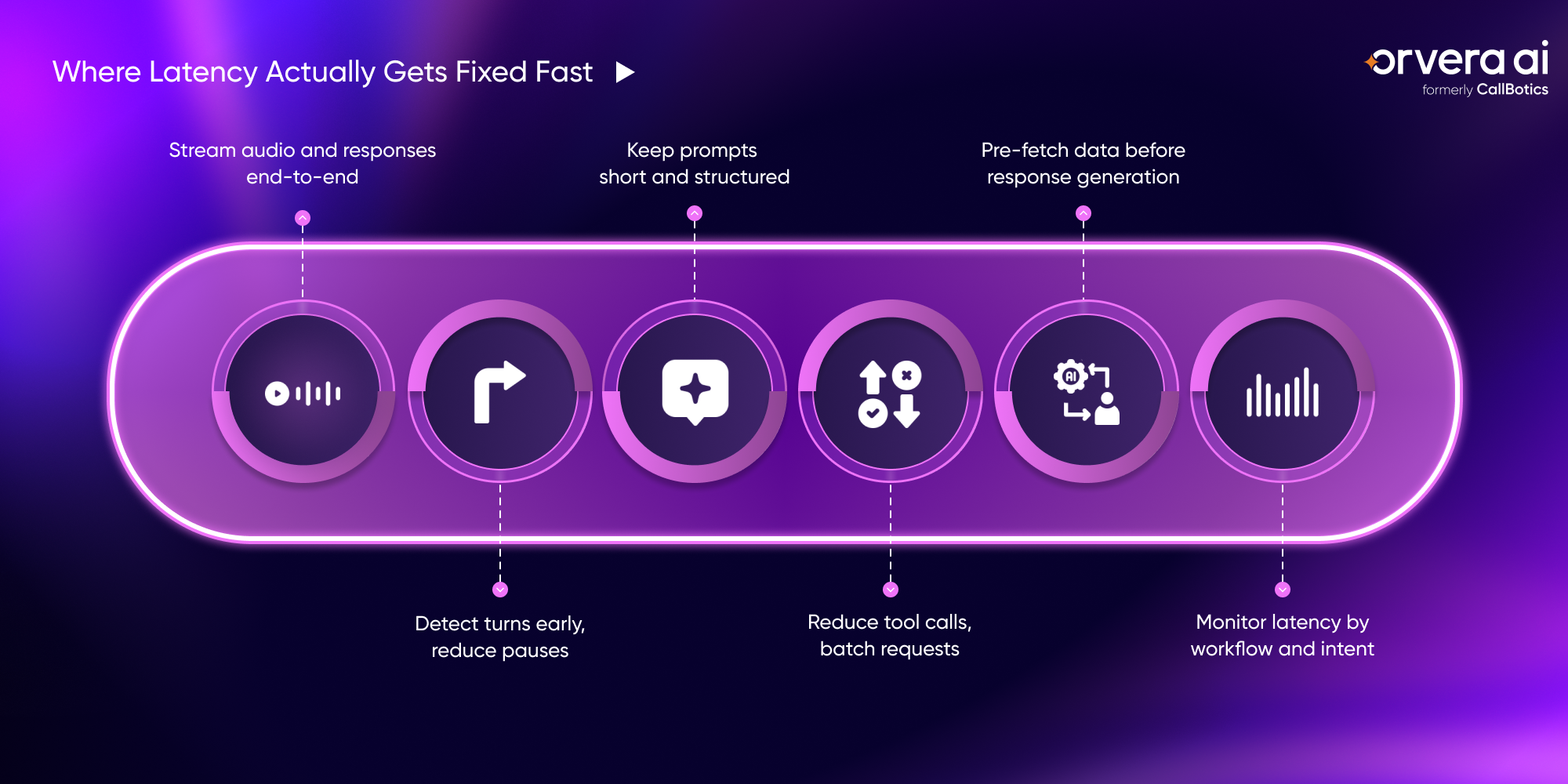
1) Stream Audio to STT (Don’t Wait for Full Utterances)
Streaming speech recognition allows transcription to begin while the user is still speaking.
This enables:
- Earlier intent detection
- Faster response preparation
Instead of waiting for silence, the system moves in parallel with the user.
This reduces perceived latency significantly.
2) Use Voice Activity Detection (VAD) and Fast End-of-Turn Detection
Turn-taking is critical in voice systems.
Without accurate end-of-turn detection:
- Systems respond too late
- Or interrupt prematurely
VAD helps detect when a user has finished speaking, allowing faster response initiation.
Small improvements here can dramatically improve conversational flow.
3) Stream the AI Response (Token Streaming)
Instead of waiting for a complete response, token streaming delivers output incrementally.
Benefits:
- Users hear responses sooner
- Conversations feel more dynamic
- Perceived latency drops
Even if total generation time remains the same, early partial output improves experience.
4) Keep Prompts Short and Structured
Large prompts increase:
- Processing time
- Token generation latency
- Cost
Effective prompts:
- Focus on the necessary context
- Avoid redundant instructions
- Use structured formats
Reducing prompt size is one of the simplest ways to improve response speed.
5) Cache Common Answers and Policies
Not every query requires model inference.
Frequently repeated queries such as:
- Business hours
- Policy explanations
- Basic FAQs
can be cached and served instantly.
This reduces:
- Model load
- Response time
- System cost
6) Use a Fast Model for First Response, Then Escalate if Needed
A two-stage approach improves both speed and quality.
Step 1:
- Use a fast model for initial handling
Step 2:
- Escalate to a more powerful model if complexity increases
This ensures:
- Quick responses for common cases
- Deeper reasoning only when required
7) Reduce Tool Calls and Batch Requests
Each external call introduces a delay.
Instead of:
- Multiple sequential API calls
Use:
- Batched requests
- Parallel execution
Reducing dependency chains is critical for latency optimization.
8) Pre-Fetch Likely Data When Intent Is Clear
Once intent is detected, systems can prepare data proactively.
Examples:
- Fetch order status immediately
- Load account details in advance
This removes waiting time during response generation.
9) Keep Integrations Close to the AI (Region and Routing)
Geographic distance matters.
Latency increases when:
- Systems are deployed across regions
- Routing is inefficient
Optimizing:
- Data center location
- API routing paths
can significantly reduce response times.
10) Use Faster TTS Voices and Stream Audio Output
Text-to-speech can become a bottleneck.
Optimizations include:
- Using low-latency voice models
- Streaming audio output
This ensures playback begins immediately rather than waiting for full synthesis.
11) Add Natural “Thinking” Patterns (Without Artificial Delays)
When unavoidable delays occur, conversational cues can maintain engagement.
Examples:
- “Let me check that for you.”
- “One moment while I pull that up.”
These should be:
- Natural
- Contextual
- Minimal
The goal is not to mask latency, but to maintain conversational continuity.
12) Monitor Latency by Intent and Fix the Worst Flows First
Not all workflows are equal.
Some flows:
- Involve multiple integrations
- Require complex logic
- Have higher failure rates
Prioritizing high-impact workflows ensures faster improvements.
Ultimately, latency optimization contributes directly to higher first call resolution by enabling faster and more accurate interactions. (opens in a new tab)
Key Insight: Perceived vs Actual Latency
The most effective systems do not just reduce latency.
They manage how latency is experienced.
This includes:
- Streaming responses
- Predictive data fetching
- Consistent timing
- Natural conversational pacing
In many cases, improving perceived latency delivers greater impact than reducing actual processing time.
Common Latency Mistakes (What Slows Systems Down the Most)
Latency issues rarely come from a single decision. They accumulate from small design choices across the system.
The most common patterns include:
Excessive Context in Prompts
Adding more context than necessary increases processing time without improving outcomes proportionally.
Too Many Sequential Tool Calls
Chained API calls introduce compounding delays, especially when dependent on each other.
No Caching Strategy
Repeated queries unnecessarily hit the model or backend systems instead of returning instantly.
Lack of Streaming Across the Pipeline
Batch processing at any stage creates visible pauses. This includes STT, LLM responses, and TTS.
Slow or Distant Integrations
External systems deployed in different regions or with poor response times become hidden bottlenecks.
Measuring Averages Instead of Edge Cases
Average latency hides the real experience. Tail latency (p95 and above) is what defines perceived reliability.
These issues are not isolated. They often appear together, reinforcing each other and degrading the overall experience.
A Simple Latency Testing Checklist
Before deploying or optimizing a system, structured testing is essential.
Test Worst-Case Scenarios
Latency should be tested under stress conditions:
- Long prompts
- Multiple integrations
- Complex workflows
Systems that perform well under ideal conditions may fail under real usage.
Test on Real Network Conditions
User environments vary significantly:
- Mobile networks
- Variable Wi-Fi quality
- Geographic distribution
Testing only in controlled environments leads to misleading results.
Track p95 and Failure Timeouts
Focus on:
- High percentile latency
- Timeout thresholds
- Failure rates
The goal is to ensure consistency, not just peak performance.
How Orvera Helps Reduce Latency in Voice AI
Latency optimization is not achieved through isolated improvements. It requires coordination across the full interaction lifecycle.
Orvera approaches this as a system problem, aligning workflow design, model execution, and operational visibility to reduce delays while maintaining conversational quality. This approach is informed by 18+ years of contact-center experience, where real-world constraints such as call volume spikes, routing inefficiencies, and agent workflows directly impact response times.
At a foundational level, the platform focuses on:
- Efficient call flows that minimize unnecessary steps
- Intelligent routing that avoids redundant processing
- Streaming-based interaction models for faster turn-taking
This ensures that conversations feel responsive without compromising depth or accuracy.
Operational Capabilities That Directly Impact Latency
Orvera integrates latency optimization into its core platform capabilities.
100 Percent Automated QA
Every interaction is evaluated for correctness, compliance, and policy adherence.
Sentiment Analysis
Detects emotional tone, escalation triggers, and shifts during conversations.
Custom Dashboards And Reports
Organizations can track metrics such as conversion rates, outcomes, and handling patterns.
Churn Intelligence
Identifies at-risk customers based on behavior and sentiment signals.
Live Monitoring
Supervisors can listen in real time, provide guidance, or intervene when necessary.
Latency Tracking
Measures delays across the interaction pipeline to detect performance bottlenecks.
Multi-Tenancy Architecture
Supports companies managing multiple teams or clients.
These capabilities create a feedback loop where:
- Latency is continuously measured
- Bottlenecks are identified quickly
- Workflows are optimized based on real interaction data
This aligns directly with the earlier principle: latency must be managed at the system level, not just the model level.
Why This Matters in Practice
In production environments:
- Conversations are not linear
- Workflows vary in complexity
- External systems behave unpredictably
A platform that combines:
- Workflow intelligence
- Real-time visibility
- Continuous optimization
It is better positioned to maintain consistent performance across these variables.
A Way Forward
Latency in conversational AI is not a single variable to optimize. It is the result of multiple interconnected systems working together.
The most effective improvements come from:
- Streaming across the pipeline
- Reducing unnecessary processing
- Minimizing external dependencies
- Structuring prompts efficiently
- Measuring performance at a granular level
Organizations that treat latency as a system-level concern can:
- Improve conversational flow
- Increase resolution rates
- Deliver more consistent user experiences
As conversational AI continues to scale across voice and chat, latency will increasingly define not just performance, but trust.
Frequently asked questions
Under ~800 ms for initial response and under ~1.5 seconds overall, with consistency being more important than raw speed.
External tool calls and integrations typically contribute more latency than the AI model itself.
Generally, yes, but prompt design and system architecture can influence latency as much as model size.
Each tool call adds network and processing delay, and sequential calls compound latency significantly.
Use streaming, caching, structured prompts, and model routing to deliver faster responses without sacrificing depth.
Because voice relies on real-time turn-taking, where even small delays disrupt conversational flow.
Actual latency is system response time, while perceived latency is how fast the interaction feels to the user.

Written by
Anindita Majumder
Anindita Majumder is a communications professional with nearly four years of experience in public relations, corporate communications, and journalism. She creates content that helps brands communicate their vision, products, and expertise through press releases, thought leadership, and editorial pieces. Outside of work, she is a vocalist, which keeps her creativity flowing.