
How an AI Agent Triages Claims Document Intake for Insurance Carriers
Carriers re-request documents they already hold because each one sat unmatched in a shared inbox or was filed under the wrong claim or document type, so the outstanding-item flag on the claim file stayed open.

Key highlights
- Carriers re-request documents they already hold because each one sat unmatched in a shared inbox or was filed under the wrong claim or document type, so the outstanding-item flag on the claim file stayed open.
- Claims document intake triage is the work of matching each document that arrives for a claim to that claim, naming its document type, filing it to the claim file, and clearing the outstanding item it answers.
- An insurance claims AI agent reads the full message and every attachment, identifies the claim, classifies and indexes each document, and clears the outstanding item the document answers.
- When a policyholder replies to an adjuster's request, the agent matches the reply to the open claim, files each attachment under the carrier's document types, and clears the outstanding items those documents answer.
- The claims team can review any filing and any cleared flag afterward in the interaction record, which holds the source email, the extracted fields, and the action taken.
- A carrier has Orvera build and run the intake agent because the agent has to run inside the systems the carrier already operates, under controls a security reviewer can check, and stay supported after go-live.
- Four measures, each read against the carrier's own baseline from the weeks before launch, show whether intake triage is holding.
- A VP of Claims Operations should take four points to claims leadership, IT, and compliance, covering what insurance claims workflow automation changes at the intake step and what stays with the carrier.
Why do carriers re-request claims documents they already received?
Carriers re-request documents they already hold because each one sat unmatched in a shared inbox or was filed under the wrong claim or document type, so the outstanding-item flag on the claim file stayed open.
Picture the shared claims inbox an hour after an adjuster's request goes out. A policyholder replies with a photo of a repair estimate. A claimant's attorney sends a demand package. Another carrier forwards a subrogation file. Each message waits in queue until an intake specialist opens it, finds the claim, names the document type, and files it to the claim file.
While a document waits, the claim file reports nothing. The same holds when the document is filed under the wrong claim or the wrong document type. The adjuster's diary still treats the item as missing, the outstanding-item flag stays open, and a second request goes out to a claimant who already sent it.
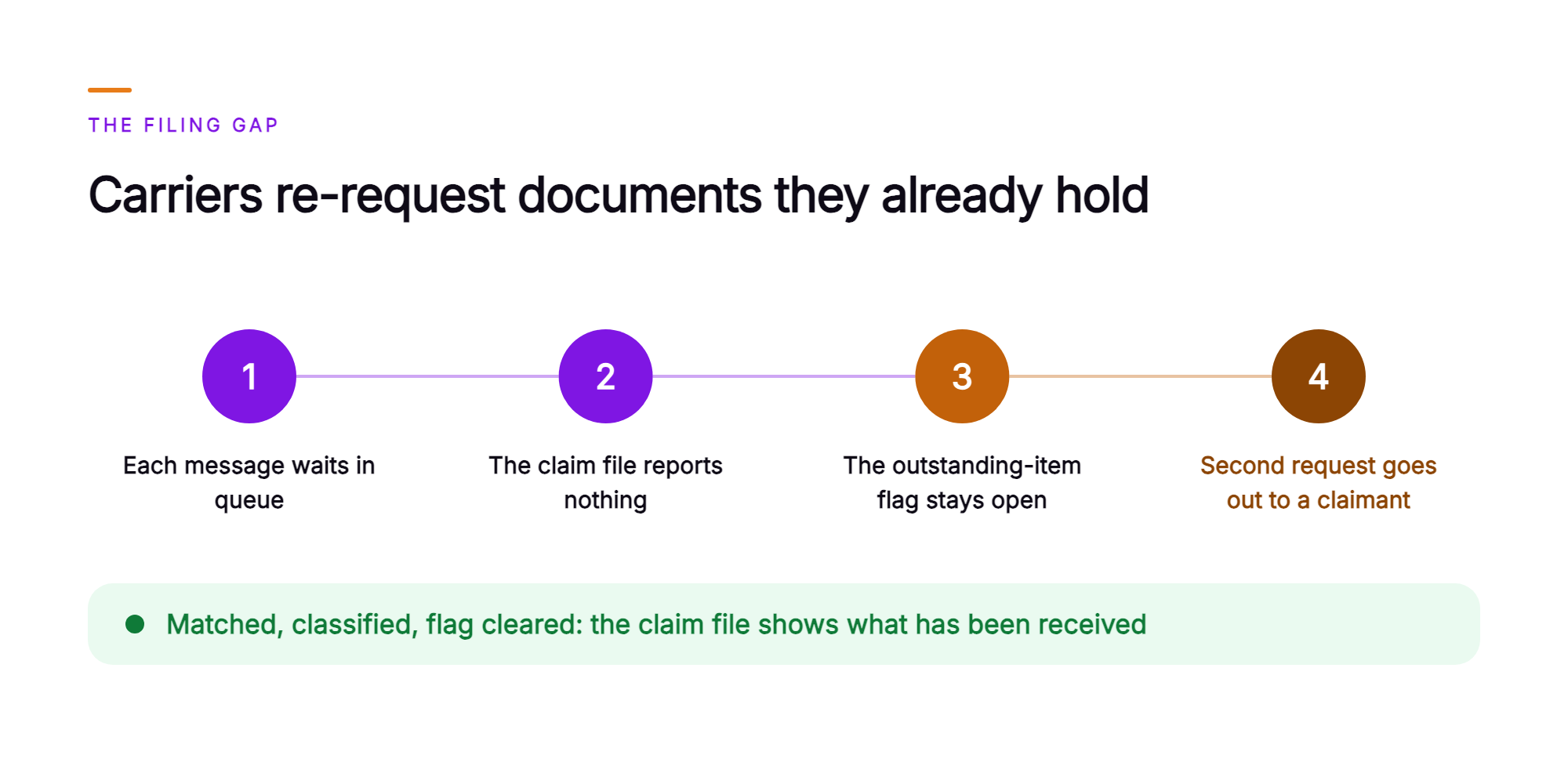
A re-request starts as a filing gap: the document is sitting in the inbox, and the claim file still reports the item as outstanding.
When an incoming document is matched to its claim, classified against the carrier's own document types, and the flag it satisfies is cleared, the adjuster works from a claim file that shows what has been received. The adjuster decides the claim. For an enterprise carrier, an AI intake agent runs governance-first, under the carrier's own rules, with explicit controls and full auditability.
What is claims document intake triage?
Claims document intake triage is the work of matching each document that arrives for a claim to that claim, naming its document type, filing it to the claim file, and clearing the outstanding item it answers.
The same work is also called claims document indexing or claims email triage. It covers every document that reaches the carrier on a digital channel for an open claim, from first notice of loss (FNOL) document intake onward: emailed attachments, portal uploads, faxes that arrive as PDFs, and files forwarded by another carrier or an attorney.
Claims document intake triage has three parts:
- Identifying the claim the document belongs to.
- Classifying and indexing the document against the carrier's own document types.
- Clearing the outstanding-item flag that document satisfies.
Done by hand, each part costs an intake specialist minutes of reading and clicking, and that cost grows with every document that arrives. The claim files, the document type list, and the indexing rules belong to the carrier, and every claim decision stays with the adjuster.
What does an AI agent do with each document that reaches the claims inbox?
An insurance claims AI agent reads the full message and every attachment, identifies the claim, classifies and indexes each document, and clears the outstanding item the document answers.
Start with a single email in the shared claims inbox. The agent reads the subject line, body text, and each attachment. Body text matters here, because the identifying detail often sits in a signature block or a forwarded thread.
Next, the agent identifies the claim. It matches the claim number, policy number, insured or claimant name, and date of loss against open claims in the carrier's claim system, and it requires agreement on the fields the carrier's matching rules name.
Then the agent classifies each attachment under the carrier's own document types and indexes it to that claim file.
Finally, the agent checks the claim's outstanding items and clears the flag the document satisfies.
Every step runs inside the carrier's own inboxes and systems. The email, the fields the agent read, and each filing it made remain in the interaction record Orvera keeps, with a summary and a report log a claims manager or an auditor can open later.
The carrier's indexing rules determine where each document is filed, and the adjuster decides the claim.
What happens when a policyholder emails the documents an adjuster asked for?
When a policyholder replies to an adjuster's request, the agent matches the reply to the open claim, files each attachment under the carrier's document types, and clears the outstanding items those documents answer.
Identification. On an open auto claim, a policyholder replies to the adjuster's request with three attachments: a signed proof of loss, a police report, and a rental car receipt. The claim number is nowhere in the message. The policy number sits in the email signature, and the body references the date of the accident. The agent matches the policy number, policyholder's name, and date of loss to the one open claim on that policy.
Classification and indexing. The agent classifies the three attachments under the carrier's document types, reading the content of each document, since the file names arrive as scanner output. It indexes each one to that claim file in the document store, in the location the carrier's indexing rules specify for that document type.
Outstanding items. The claim file lists two outstanding items, the signed proof of loss and the police report. The agent clears both flags and files the rental car receipt as a receipt on the claim. The adjuster's diary now shows both items received, with the documents attached. The adjuster reviews them and determines what the claim needs next.
Who decides where a document is filed and which open item it satisfies?
- The carrier's matching rules. The agent identifies the claim when the fields those rules name agree.
- The carrier's document type list. The agent classifies each document under one of those types.
- The carrier's indexing rules. The agent files the document to the claim file location those rules specify.
- The carrier's outstanding-item rules. The agent clears the flag for the item that a document of that type satisfies.
- The carrier's routing for unmatched or illegible documents. The agent hands the document to the intake team's queue with the fields it read and the candidate claims it found, so the specialist starts with the evidence already gathered. On a live inbox, this exception path is where claims routing automation returns the decision to a person.
“The carrier writes the rules, the AI agent applies them document by document, and the adjuster decides the claim.”
The claims team can review any filing and any cleared flag afterward in the interaction record, which holds the source email, the extracted fields, and the action taken.
Why would a carrier have Orvera build and run the intake agent?
A carrier has Orvera build and run the intake agent because the agent has to run inside the systems the carrier already operates, under controls a security reviewer can check, and stay supported after go-live.
Orvera AI is an agentic AI platform for enterprise customer experience. Orvera builds, deploys, and runs the AI claims intake agent on the shared claims inboxes, claim system, and document store the carrier already operates, drawing on 500+ integrations with enterprise systems of record. A full enterprise deployment goes live in three to six weeks.
Orvera brings 18+ years of contact-center operations experience to the build. AI Quality Management audits every conversation, human-handled and AI-handled, across every channel. The platform is SOC 2 Type II certified, HIPAA compliant, and GDPR compliant.
The agent works in four places the carrier already runs:
- Shared claims inboxes. The agent reads each incoming message, its body text, and its attachments.
- Claim system. The agent matches the document to an open claim and clears outstanding-item flags.
- Document store. The agent files and indexes each document under the carrier's document types.
- Intake team's queue. The agent hands over unmatched or illegible documents with the fields read and the candidate claims.
Which numbers show the intake agent is working?
Four measures, each read against the carrier's own baseline from the weeks before launch, show whether intake triage is holding.
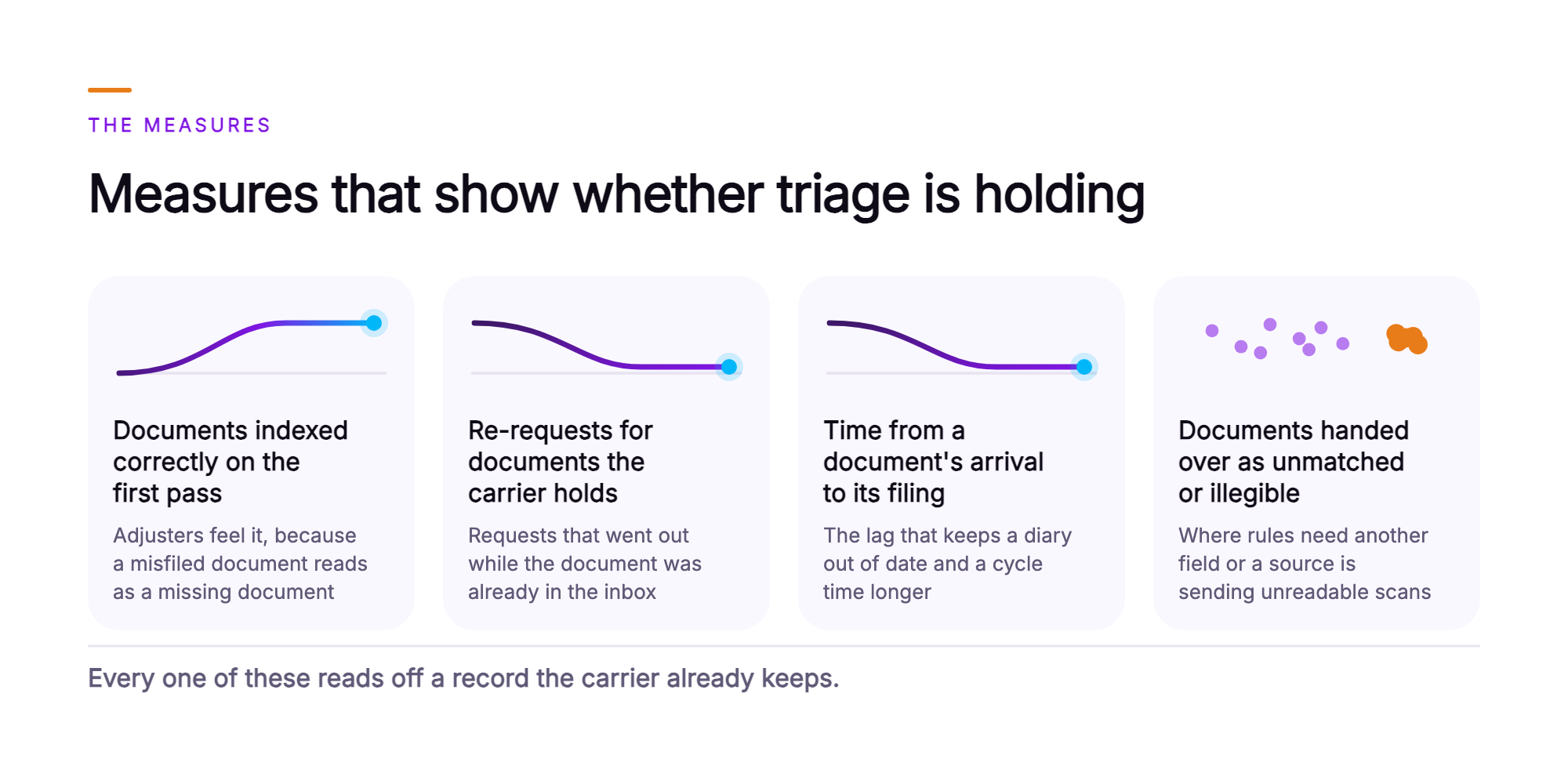
- Documents indexed correctly on the first pass. Sampled from the claim file index, this is the measure adjusters feel, because a misfiled document reads as a missing document.
- Re-requests sent for documents the carrier already holds. Pulled from the outstanding-item log, this counts the requests that went out while the document was already in the inbox or filed elsewhere.
- Time from a document's arrival to its filing on the claim file. Timestamped at both ends, this is the lag that keeps a diary out of date and a cycle time longer than it needs to be.
- Documents handed to the intake team as unmatched or illegible. Counted from the intake queue, this shows where the carrier's matching rules need another field or where a document source is sending unreadable scans.
Every one of these reads off a record the carrier already keeps. Any disputed number can be traced through the interaction record back to the document that produced it.
What should a VP of Claims Operations take to the leadership team?
A VP of Claims Operations should take four points to claims leadership, IT, and compliance, covering what insurance claims workflow automation changes at the intake step and what stays with the carrier.
- The carrier keeps its claim files, document types, and indexing rules, and the adjuster decides the claim.
- The AI agent identifies the claim each incoming document belongs to and classifies and indexes the document against the carrier's own document types. It works from what the message and each attachment say.
- The agent clears the outstanding-item flag the document satisfies, so the adjuster's diary shows what has already arrived. That is the step the carrier's re-request rate tracks.
- Orvera builds, deploys, and runs the agent on the systems the carrier already operates, lands full enterprise deployment in three to six weeks, and audits every conversation. Adoption runs in stages on one platform, and the carrier's claim system stays in place.
What does claims document intake look like once the agent is running?
Claims inbox automation files each document the agent can match to its claim and hands the rest to the intake team with the evidence already gathered.
Documents a policyholder emails are matched to their claims and filed under the carrier's own document types. The outstanding items those documents answer show as received in the adjuster's diary, with the source document attached. Intake specialists spend their day on the documents the agent hands them, the unmatched and the illegible, working from the fields already read and the candidate claims already found. Adjusters open the morning diary to the documents the agent matched overnight, filed and ready for review.
The claim remains with the adjuster. The rules remain with the carrier. What changes is that the filing keeps pace with the mail.
To scope an intake agent against your own claim system, document types, and indexing rules, talk to the team (opens in a new tab).
Frequently asked questions
Orvera's AI agent reads the claim number, policy number, insured name, claimant name, and date of loss from both the email and its attachments, then matches those fields against open claims in the carrier's claim system. The carrier's matching rules define which fields must agree before a match counts. On a live intake queue, an AI agent for insurance claims reads every part of the inbound email: the subject line, the body, the signature, and each attached document. When an email arrives without a claim number, the agent matches on whichever fields the carrier's rules permit, such as policy number paired with date of loss. When a carrier integrates AI claims processing with its core claim system, the matching runs on those same fields. Orvera AI integrates with the claim system the carrier already runs, drawing on 500+ integrations with enterprise systems of record, so the matching logic reads the carrier's own claim records.
When no confirmed match exists, the AI agent places the document in the intake team's queue, attaches every field it read, and surfaces any candidate claims it identified so an intake specialist can make the final call. Insurance claims intake automation routes the exceptions by the carrier's rules, just as it files the documents that match cleanly. The document is indexed, and any outstanding item it answers is cleared, once the intake specialist confirms the claim. Until that point, the document stays in the specialist's queue, visible and actionable. An illegible page follows the same path. The agent routes it to the intake team's queue with a notation for the intake specialist.
The agent classifies and indexes documents under the carrier's own document type list, the same types the carrier's claims staff file against today. AI can triage emailed claims documents that arrive as mixed attachments in one message. The agent classifies each attachment separately, so a single email carrying three files receives three classifications. Document types the agent handles include signed proofs of loss, police and incident reports, shop and contractor invoices, receipts, signed authorization forms, and correspondence from a claimant, an attorney, or another carrier. The carrier's indexing rules decide where each type is filed on the claim. The AI agent applies those rules document by document.
When a matched document arrives, the agent checks the claim's open outstanding items and clears the flag for the item that the incoming document's type satisfies under the carrier's rules. The adjuster's diary then reflects the item as received. The document sits indexed on the claim file, ready for the adjuster to review straight from the diary. This same logic applies whether the document arrives as a standalone email or as one attachment inside a multi-document upload, such as a first notice of loss (FNOL) upload, with each attachment indexed on its own. A document that falls outside the claim's open items follows a different path. The agent indexes it to the claim file and leaves the open items exactly as they were. The adjuster reviews the indexed document and decides the next action on the claim. The agent resolves the document question, and the adjuster resolves the claim.
Orvera AI builds, deploys, and runs the connections to the claim system, shared claims inboxes, and document store the carrier already operates, drawing on 500+ enterprise system integrations. The agent reads incoming email from the shared inboxes, queries open claims and outstanding items from the claim system, indexes each document in the document store, and clears, in the claim system, the outstanding-item flag each matched document satisfies. Every action runs on the systems already in production, so the agent goes live on the carrier's current stack. For claims operations leaders asking whether claims document intake triage is secure, the answer starts with the platform: Orvera AI is SOC 2 Type II certified, HIPAA compliant, and GDPR compliant, and it is governance-first by design, with explicit controls and full auditability. Certification documentation goes to the carrier's procurement team on request.
Orvera builds, deploys, and runs the agent on the systems the carrier already operates, and full enterprise deployment lands in three to six weeks. The carrier sets the matching rules, document types, indexing rules, and outstanding-item rules the agent applies. Orvera handles integration, onboarding, and change management. Adoption runs in stages on one platform. Orvera brings 18+ years of contact-center operations experience to every rollout, and it knows what it means to answer for a live floor. To see the agent scoped to your own claims operation, talk to the team.

Written by
Anindita Majumder
Anindita Majumder is a communications professional with nearly four years of experience in public relations, corporate communications, and journalism. She creates content that helps brands communicate their vision, products, and expertise through press releases, thought leadership, and editorial pieces. Outside of work, she is a vocalist, which keeps her creativity flowing.