How to Automate Appointment Scheduling Calls
Learn how AI voice agents automate appointment scheduling calls with real-time booking, rescheduling, and reminders.


Key highlights
TL;DR: How AI Voice Agents Handle Booking, Changes, and Reminders
- Automating appointment scheduling calls uses AI voice agents to handle booking, rescheduling, cancellations, confirmations, reminders, and waitlist management without requiring manual front-desk intervention.
- Appointment call automation connects caller intent, real-time calendar availability, and structured confirmation workflows to complete transactions accurately in a single interaction.
- AI voice agents interpret natural language requests such as booking new appointments, moving existing appointments, confirming visits, or requesting same-day availability.
- Real-time API integration with scheduling systems, CRM platforms, and practice management software ensures accurate slot selection and prevents double booking.
- Structured data collection improves scheduling accuracy by capturing service type, provider preference, duration requirements, customer details, and policy acknowledgments during the call.
- Automated policy enforcement applies cancellation rules, buffer times, reschedule limits, deposits, and time-sensitive booking restrictions consistently across every interaction.
- Post-call automation triggers confirmation messages, reminder calls, preparation instructions, and reschedule options to reduce no-shows and improve attendance rates.
- Intelligent escalation logic transfers urgent, complex, or exception-based scheduling requests to human staff with full context, preserving continuity and customer experience.
- Industries with high call volumes, such as healthcare, insurance, automotive services, home services, and utilities, benefit most from appointment-scheduling call automation.
- When combined with quality monitoring, sentiment analysis, and scheduling analytics, appointment automation becomes a measurable operational infrastructure that improves slot utilization, reduces staff workload, and increases revenue efficiency.
Appointment scheduling calls are among the most repetitive and operationally intensive interactions in many organizations. Healthcare clinics, financial services firms, automotive service centers, legal offices, home services businesses, and retail appointment desks all manage a constant flow of booking, rescheduling, cancellation, confirmation, and reminder calls.
These calls are necessary. They directly impact revenue utilization, customer experience, and operational efficiency. Yet they are highly structured, rule-driven, and time-consuming.
When handled manually, scheduling calls creates predictable challenges:
- Missed bookings during peak hours
- Staff pulled away from higher-value work
- Inconsistent follow-ups and reminders
- Limited availability outside business hours
- No clear visibility into scheduling patterns
Automation changes this equation.
Modern AI voice agents allow organizations to automate appointment scheduling calls while maintaining structured workflows, policy enforcement, and calendar accuracy. Booking, rescheduling, confirmations, reminders, and escalation logic can be handled in real time without expanding headcount.
The result is not simply faster call handling. It is better slot utilization, fewer no-shows, improved customer convenience, and measurable operational efficiency.
If voice remains a primary booking channel for your organization, appointment call automation is no longer optional infrastructure. It is an operational multiplier.
What Does It Mean to Automate Appointment Scheduling Calls?
Automating appointment scheduling calls means using AI voice agents (opens in a new tab) to handle structured scheduling interactions without requiring a human agent to manage every step.
Automation can manage:
- New appointment booking
- Rescheduling existing appointments
- Cancellations
- Appointment confirmations
- Reminder calls
- Waitlist notifications
- Pre-visit instructions
Instead of manually checking availability, collecting customer details, and confirming appointments over the phone, AI voice agents follow predefined workflow logic and business rules.
At its core, scheduling automation connects three elements:
- Caller intent
- Real-time availability
- Confirmation and follow-up
When properly implemented, the system mirrors how a trained front-desk team member operates, while applying policies consistently across every interaction.
For a broader look at how AI transforms call-heavy workflows, read about how to use AI agents to analyze phone calls and find insights. (opens in a new tab)
Why Businesses Automate Appointment Scheduling Calls
The shift toward automation is driven by scale, consistency, and customer expectations.
Scheduling calls is predictable. Volume fluctuates by time of day and season. Staff capacity does not.
Automation helps stabilize that imbalance.
Reduce Missed Bookings and Lost Opportunities
When lines are busy, callers hang up. When after-hours calls go unanswered, booking intent is delayed or lost. Even small gaps in responsiveness compound over time.
AI voice agents answer instantly. Every call is acknowledged. Booking intent is captured even during peak demand.
For organizations in industries like healthcare, insurance (opens in a new tab), or retail services, missed calls directly translate to unused time slots and lost revenue.
Save Staff Time on Repetitive Calls
Front desk teams spend a significant portion of their time on routine scheduling tasks. These interactions follow structured scripts:
- Identify the customer
- Ask for preferred dates
- Check availability
- Confirm slot
- Repeat policies
Automation handles this structured work consistently, allowing staff to focus on complex inquiries, in-person interactions, and high-value conversations.
The goal is not replacement. It is workload optimization.
Improve Customer Convenience with 24/7 Booking
Customers increasingly expect flexibility. They want to book or reschedule:
- Outside business hours
- During weekends
- After receiving reminder messages
- While managing other commitments
When scheduling systems are accessible only during office hours, friction increases.
AI voice agents enable continuous booking availability without increasing payroll or expanding shifts.
This is especially impactful in industries such as:
- Healthcare appointment management
- Financial advisory scheduling
- Automotive service centers
- Home services dispatch
- Legal consultation booking
Reduce No-Shows with Confirmations and Reminders
Unconfirmed appointments lead to empty slots. Empty slots impact revenue and operational efficiency.
Automated reminder flows:
- Confirm attendance
- Offer easy rescheduling options
- Provide preparation instructions
- Send location or documentation reminders
Structured reminder workflows consistently improve attendance rates.
Organizations often underestimate the cumulative cost of no-shows until they measure it systematically.
How Appointment Scheduling Call Automation Works (Step by Step)
Appointment automation is not a basic answering system. It is a structured operational workflow that replaces a predictable portion of front-desk labor with consistent, policy-driven execution.
To understand how it works, it helps to examine the full lifecycle of a scheduling interaction.
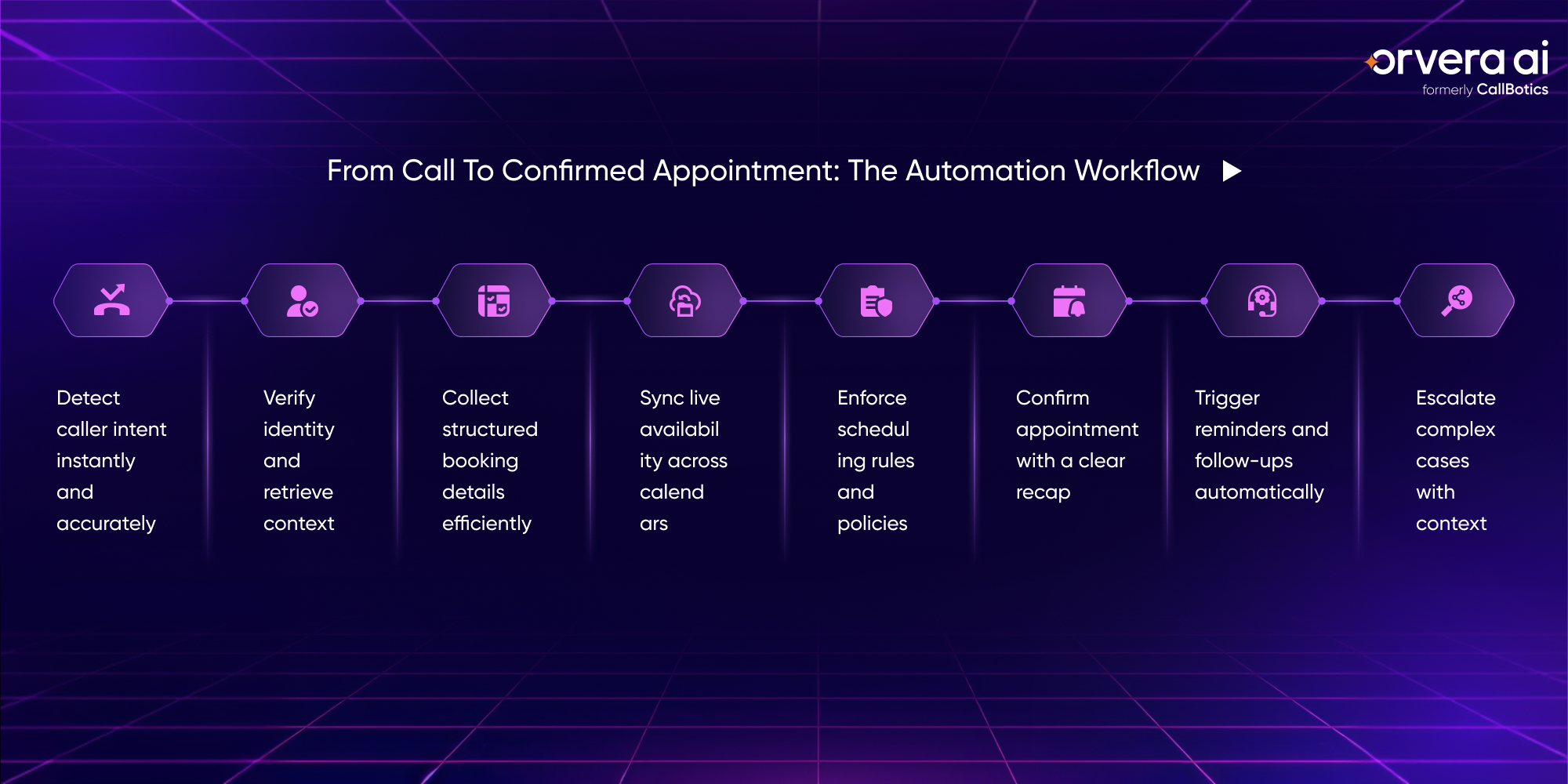
1. Capture Caller Intent
Every appointment call begins with a classification problem.
Is the caller:
- A new customer booking for the first time?
- An existing customer rescheduling?
- Calling to confirm?
- Cancelling?
- Checking availability before deciding?
- Calling about a same-day urgent slot?
Traditional IVR systems rely on menu trees. Modern AI voice agents interpret natural language input. A caller might say:
“I need to move my appointment from Friday.” “Do you have anything earlier next week?” “I want to book a consultation.” “I’m confirming my appointment for tomorrow.”
The system maps this language to structured intent categories.
Accurate intent detection reduces routing errors and eliminates the need for rigid prompt navigation. It also ensures that the workflow branch selected matches the operational action required.
In high-volume environments, this first step directly impacts resolution rate.
2. Retrieve or Create Customer Context
Before gathering booking details, the system must establish identity and context.
For existing customers, this includes:
- Name verification
- Phone number match
- Appointment lookup
- Provider association
- Historical booking patterns
For new customers, this includes:
- Creating a customer record
- Capturing primary contact details
- Validating phone and email
- Applying data formatting rules
Context matters. A returning patient in a healthcare clinic may require eligibility verification. A financial advisory client may need regulatory disclosures. An automotive service customer may have vehicle data tied to prior appointments.
Automation becomes reliable only when it understands the surrounding customer data environment.
3. Structured Information Collection
Once intent and identity are clear, the system moves into structured data collection.
For new bookings, this typically includes:
- Service or appointment type
- Provider or location preference
- Time window preference
- Duration requirements
- Required documents
- Insurance or account information
- Special instructions
Well-designed automation does not simply ask open-ended questions. It narrows options intelligently.
For example: Instead of asking “What time would you like?”, the system may ask: “Would you prefer morning or afternoon?”
This reduces ambiguity and improves scheduling efficiency.
Structured prompts improve:
- Handling time
- Calendar fit accuracy
- Downstream preparation
- Policy compliance
4. Real-Time Calendar Synchronization
This is the operational backbone of scheduling automation.
The AI voice agent connects via API to:
- Practice management systems
- CRM scheduling modules
- ERP calendars
- Custom booking platforms
It evaluates:
- Provider availability
- Location capacity
- Buffer times between appointments
- Blocked dates
- Holidays
- Overlapping resource constraints
For example, in healthcare (opens in a new tab): A 30-minute appointment may require a 10-minute buffer before the next patient.
In automotive services: A tire rotation may require 45 minutes, but a full diagnostic requires 90 minutes and access to specific equipment.
In financial advisory: Initial consultations may be longer than follow-ups.
Automation must apply these operational rules dynamically.
Without real-time integration and rule enforcement, automation cannot guarantee accuracy.
5. Policy Enforcement During Booking
Scheduling teams rely on defined business rules. Automation ensures those rules are applied consistently across every interaction.
Common policy checks include:
- Cancellation notice requirements
- Deposit thresholds
- Reschedule limits
- Time-sensitive booking cutoffs
- Same-day appointment restrictions
- Provider-specific limitations
For example: “If you cancel within 24 hours, a cancellation fee applies.” “We cannot reschedule more than twice without approval.” “Same-day appointments are subject to availability.”
Embedding these policies into the workflow reduces manual error and ensures uniform enforcement.
6. Confirmation and Recap Logic
After a valid slot is selected, confirmation is more than repetition.
Effective confirmation includes:
- Appointment date and time
- Time zone clarification
- Provider or department
- Location details
- Required preparation steps
- Cancellation policy reminder
This structured recap reduces downstream confusion and follow-up calls.
Automation can also trigger immediate digital confirmation via SMS or email, including calendar invites.
7. Post-Call Workflow Automation
Scheduling automation extends beyond the live call.
Post-call workflows may include:
- Multi-stage reminder cadence
- Pre-visit checklists
- Document upload links
- Payment reminders
- Intake forms
- Pre-authorization instructions
For example: A healthcare clinic may send a reminder 48 hours before, followed by a same-day reminder with fasting instructions.
An automotive center may send a reminder with drop-off instructions.
A legal (opens in a new tab) office may send documentation requirements.
These workflows improve appointment preparedness and reduce no-shows.
8. Exception Handling and Escalation Design
No scheduling system is complete without exception logic.
Escalation may trigger when:
- The caller expresses urgency
- No matching slots exist
- The caller disputes a policy
- Complex multi-service bundling is requested
- Regulatory disclosures require human review
- Identity verification fails
Escalation should include:
- Full context transfer
- Captured customer details
- Intent classification
- Partial booking data
This ensures that staff do not repeat previously gathered information.
High-performing deployments treat escalation as a structured branch, not a failure.
Common Use Cases for Automated Appointment Calls
Appointment automation is most effective when applied to predictable, repeatable scheduling interactions.
New Appointment Booking
When a customer calls to book for the first time, the conversation usually starts broadly and becomes more specific.
They may say, “I need to see someone about an earache,” or “I’d like to schedule a consultation.”
From there, the system guides them naturally through the right questions, confirming the service type, preferred dates, provider availability, and any required details.
Instead of jumping between screens or manually checking rules, the workflow quietly handles intake, record creation, slot matching, and policy checks in the background. The caller experiences a smooth conversation. The business gets a complete, structured booking with confirmation sent immediately.
This approach works especially well in healthcare scheduling, insurance consultations, financial advisory appointments, automotive service centers, and home services dispatch, where accuracy and completeness matter.
Rescheduling and Cancellations
Rescheduling often takes longer than a new booking because it requires context. Traditionally, staff must locate the original appointment, review the service type, confirm policy eligibility, and then search for new availability.
In a conversational automated flow, that context is retrieved instantly. The system confirms the existing booking, checks cancellation windows, offers alternative slots, and updates the calendar in real time.
For the caller, it feels like a simple adjustment. Operationally, it prevents voicemail build-up and reduces callback queues that typically follow high reschedule volume periods.
Appointment Confirmations
Confirmation calls are not just reminders. They are moments to reinforce clarity.
A conversational confirmation can verify attendance, repeat key details, remind the caller of preparation requirements, and even offer rescheduling options if needed. If confusion or hesitation is detected, the workflow can escalate appropriately.
This proactive confirmation approach improves attendance predictability and helps teams plan staffing with greater confidence.
Reminder Calls Before Appointments
Reminder flows become more effective when they are contextual rather than generic.
A routine check-up may require a simple reminder, while a high-value consultation or historically high no-show appointment may trigger additional prompts.
The system can adapt based on appointment type, risk profile, and past behavior patterns, ensuring the right level of follow-up without overwhelming the customer.
Waitlist and Slot-Fill Calls
When cancellations occur, the opportunity cost of an empty slot can be high. Instead of manually calling down a list, the system can automatically identify waitlisted customers, contact them conversationally, confirm acceptance, and update the calendar instantly.
The process feels effortless to the caller, while the business benefits from higher utilization and improved revenue efficiency.
What You Need Before You Automate Appointment Calls
Automation succeeds when foundational systems are aligned.
1. Real-Time Scheduling Infrastructure
Live calendar access is non-negotiable.
Static exports or delayed synchronization introduce booking conflicts.
Ensure API connectivity and bidirectional updates.
2. Clearly Defined Scheduling Policies
Document:
- Booking windows
- Cancellation thresholds
- Reschedule rules
- Provider constraints
- Deposit policies
- Exception scenarios
Ambiguous rules create inconsistent automation behavior.
3. Structured Customer Records
Maintain:
- Clean contact details
- Unique identifiers
- Historical booking logs
- Communication preferences
Automation relies on structured data integrity.
4. Defined Escalation Ownership
Establish:
- Escalation routing rules
- Live transfer capability
- Callback SLA
- Supervisor visibility
Clear escalation of ownership ensures continuity.
Common Mistakes to Avoid
Appointment automation delivers the best results when it is implemented with operational discipline. The most common challenges are not technical limitations, but configuration gaps.
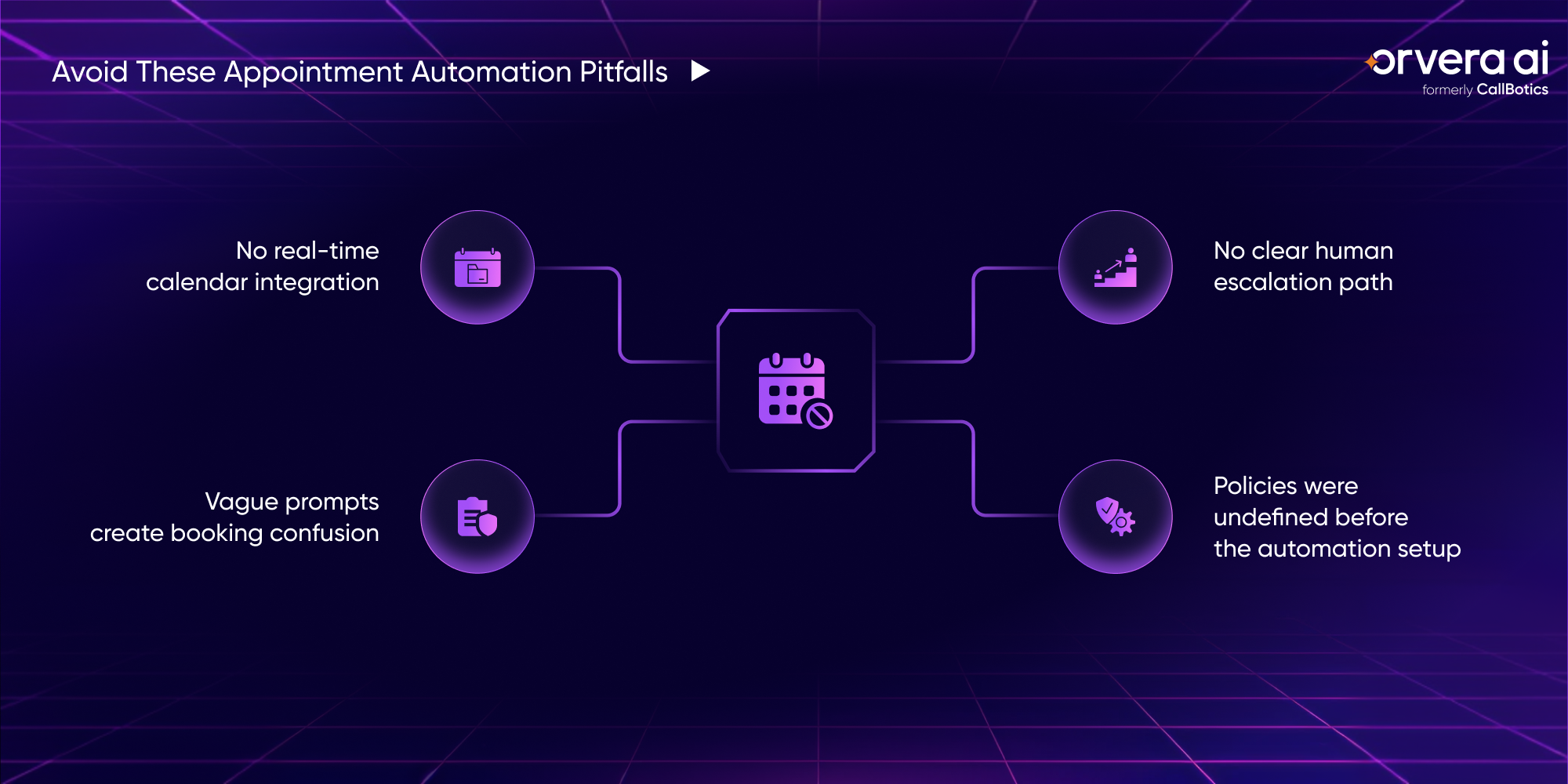
No Real-Time Calendar Integration
Automation without live calendar access creates scheduling conflicts. If availability is not synced through APIs, the system risks offering outdated time slots or requiring manual correction. Real-time synchronization is foundational for transactional reliability.
Overly Broad or Unstructured Prompts
Scheduling conversations works best when guided. Open-ended prompts increase ambiguity and call duration. Structured, narrowing questions improve slot matching, reduce confusion, and increase first-call resolution.
No Defined Escalation Path
Not every call should be fully automated. Urgent cases, policy disputes, and exception-heavy requests require a clear transfer process. Escalation logic must be predefined and include full context handoff.
Automating Without Policy Alignment
If booking windows, cancellation rules, deposits, and buffer times are not clearly defined, automation will reflect that ambiguity. Consistency depends on well-documented operational rules.
For more on designing structured AI workflows, you should read: How to Use AI Agents to Analyze Phone Calls for Insights. (opens in a new tab)
How Orvera Helps Automate Appointment Scheduling Calls
Automating scheduling at scale requires more than answering calls. It requires workflow precision, real-time integration, quality oversight, and measurable outcomes.
Orvera (opens in a new tab) delivers production-ready AI voice agents built specifically for structured, call-heavy operations.
Production-Ready Appointment Workflows
Orvera (opens in a new tab) converts SOPs, training materials, and operational documentation into live AI voice agents in 3 to 6 weeks. Appointment logic, provider rules, buffer policies, and cancellation workflows are embedded directly into the system.
This enables fast deployment without extended development cycles.
100 Percent Automated QA
Every scheduling interaction can be automatically evaluated for correctness, compliance, and policy adherence. This ensures booking accuracy and consistent rule enforcement across all calls.
Sentiment Analysis
The system detects emotional tone, escalation triggers, and conversational shifts. This helps identify booking friction, hesitation, or dissatisfaction during scheduling conversations.
Custom Dashboards and Reports
Organizations gain visibility into booking conversion rates, cancellation trends, reminder performance, and escalation patterns. Workflow performance becomes measurable and optimizable.
Churn Intelligence
Repeated cancellations or a negative tone during scheduling may signal risk. Churn intelligence surfaces these patterns early so teams can intervene appropriately.
Live Monitoring
Supervisors can listen in real time, provide guidance, or intervene when necessary. This is especially useful during peak periods or operational updates.
Latency Tracking
Latency tracking measures delays across the interaction pipeline, helping identify integration bottlenecks or performance slowdowns.
Multi-Tenancy Architecture
Companies can manage multiple locations, providers, or brands within one system while maintaining distinct scheduling rules and centralized reporting.
The Way Forward
Appointment scheduling calls are structured, repetitive, and operationally critical.
When connected to live calendar systems and clear business rules, AI voice agents can automate appointment scheduling calls with consistent accuracy. The result is improved slot utilization, reduced staff workload, fewer missed bookings, and greater customer convenience.
The most effective deployments combine workflow automation, quality monitoring, and analytics within a single system. Scheduling automation then becomes a measurable operational infrastructure rather than a standalone answering tool.
Frequently asked questions
Yes. When integrated with scheduling software through APIs, AI voice agents can check live availability, reserve time slots, and update the calendar in real time.
The system verifies the caller, retrieves the existing appointment, applies relevant policies, and updates the booking instantly after selecting a new slot or confirming cancellation.
Organizations with structured, high-volume booking workflows, such as healthcare providers, insurance services, automotive centers, utilities, and home services operations, typically see the strongest impact.
Automated confirmation and reminder workflows reinforce appointment details, provide preparation instructions, and offer simple rescheduling options, which collectively improve attendance rates.
You should have real-time calendar integration, clearly defined booking and cancellation policies, structured customer data, and a defined escalation process to ensure reliable automation.
Written by
Tania Chakraborty
Tania is a Senior Growth Marketing Specialist at Orvera, where she focuses on developing data-driven marketing strategies that drive brand visibility, audience engagement, and business growth. Her work spans growth marketing, content strategy, search engine optimization, demand generation, and digital campaigns for B2B technology audiences. She is particularly interested in the intersection of artificial intelligence, customer experience, and business technology, translating complex ideas into clear, insightful content that connects business challenges with practical solutions. Through her work, she explores emerging industry trends, evolving customer expectations, and the role of AI in transforming how businesses engage with their customers.

