How an AI Agent Runs Document Intake and Completeness Checks for Admissions
A transcript, a parent tax return, or a signed verification worksheet lands in the portal queue and waits, not because the institution lost it, but because a staff member has not yet opened it, compared it to the checklist item in the SIS, and confirmed it clears.

Key highlights
- Document intake is the act of receiving a submitted file, whether it arrives through the applicant portal, an email attachment, or a mobile photo, and classifying it into the category the checklist expects.
- The AI agent runs three steps in a fixed sequence: classify the file, compare it to the checklist item in the SIS, and write a pass or a specific reject reason back to the system of record.
- The agent's authority is bounded: it clears or rejects a checklist item against the institution's rule and records why. The admission or aid decision that follows stays with staff.
- Scaling document intake with a managed Agentic AI platform means every file gets its completeness check at the moment of submission, whatever hour that is.
- The institution writes the rules for every completeness check, and the AI agent executes inside them, nothing more and nothing less.
- What an institution needs is someone to build the workflow, connect it to the systems already running, and keep it accurate as the checklist changes.
- Four counts tell the enrollment leader whether the student document verification workflow is performing, and each one reads against the institution's own prior weeks as the baseline.
- Files routed to a person, with the reason attached
Why does an applicant's file sit at received for days before anyone confirms it is complete?
A transcript, a parent tax return, or a signed verification worksheet lands in the portal queue and waits, not because the institution lost it, but because a staff member has not yet opened it, compared it to the checklist item in the SIS, and confirmed it clears.
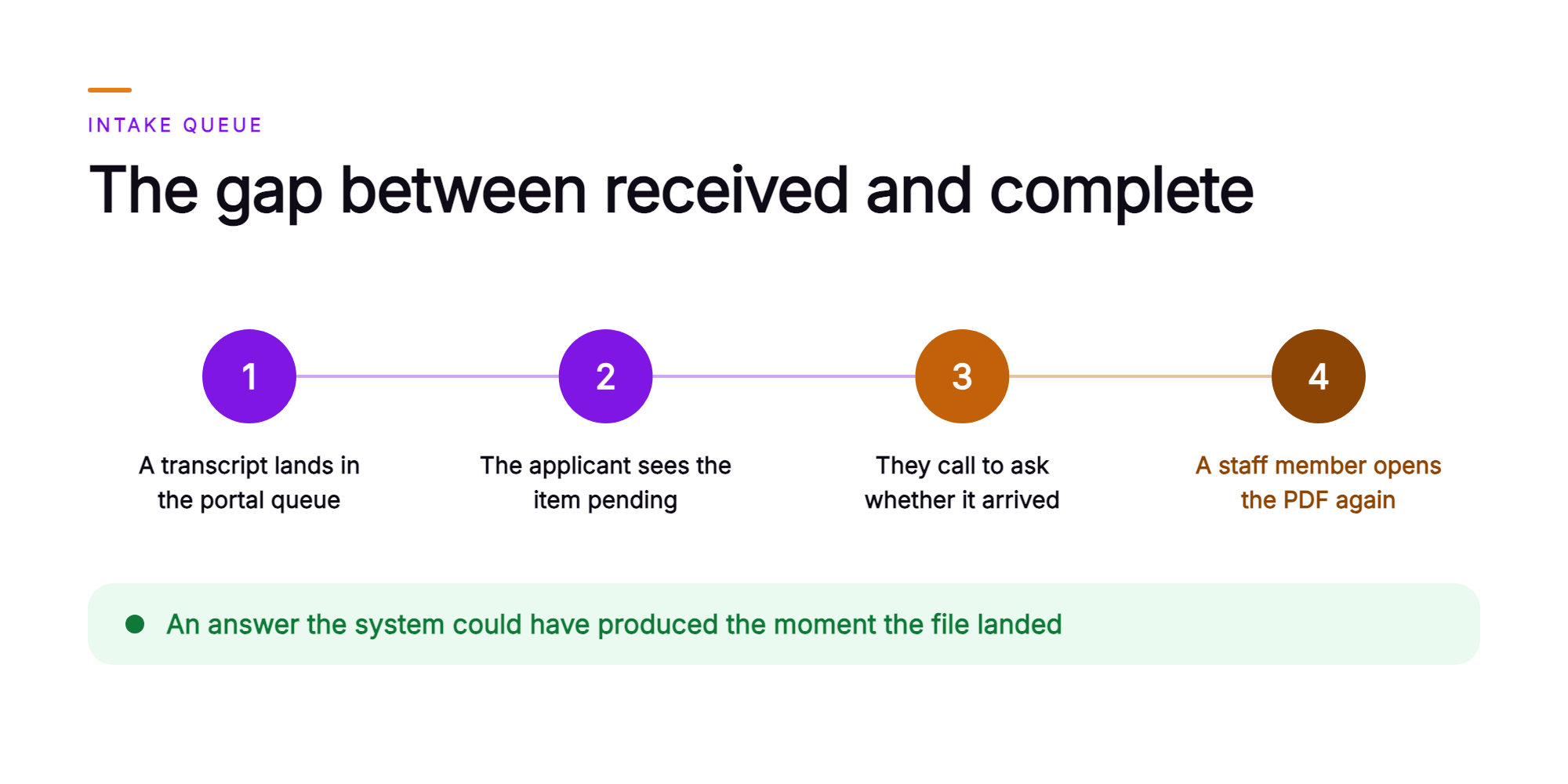
That gap between received and complete is where the friction lives. The applicant sees a checklist item still showing as pending. They call or email to ask whether it arrived. A staff member opens the same PDF again, checks the same fields, and gives an answer the system could have produced the moment the file landed.
The completeness check is a defined comparison against the institution's own checklist. Right document type, right person, right year, all pages present, signed where a signature is required. The file and the checklist carry everything that comparison needs. AI document processing runs it the minute the file lands, returns a clear pass or a specific reject reason, and lets your staff spend their time on the decisions only they can make. The next section defines what that check covers and where it stops.
What is a document intake and completeness check in admissions and financial aid?
Document intake is the act of receiving a submitted file, whether it arrives through the applicant portal, an email attachment, or a mobile photo, and classifying it into the category the checklist expects.
Classification is the first step. A file that arrives without a label must be matched to a checklist item before anything else happens. Is it a transcript, a federal tax return, a signed verification worksheet, a government-issued ID, or an enrollment form? That match determines which completeness rules apply to it.
The completeness check is a comparison against the institution's own requirement for that checklist item. Right document type, right person, right aid year, every page present, legible enough to read, and signed where the checklist requires a signature. The check confirms the item or rejects it, and it records the specific reason. A missing signature on a verification worksheet and a tax return filed for the wrong aid year each carry their own reject reason, and the missing-document letter sent to the applicant needs to name the one that applies.
Where the check stops matters just as much. Aid eligibility, award amounts, and the admission decision itself remain with the institution's staff and its own review process. The automated document intake workflow handles the defined comparison against the rule. Every judgment that requires professional context stays in the SIS, the CRM, or the document imaging queue where your staff can act on it.
What does the AI agent decide and execute when a document arrives?
The AI agent runs three steps in a fixed sequence: classify the file, compare it to the checklist item in the SIS, and write a pass or a specific reject reason back to the system of record.
Classification happens the moment the file lands, whether the applicant submitted it through the portal, an email attachment, or a chat message. The agent identifies the document type and maps it to the correct checklist item before any field-level reading begins.
Field comparison follows. The agent reads the required fields on that document and checks them against the institution's rule for that item. A parent tax return needs to match the aid year on file. A verification worksheet needs a signature on the designated line. An identification document needs to be current. The automated completeness check for student records runs against the institution's own checklist, item by item, so the comparison reflects the rules your office has set.
Write-back closes the loop. The agent either clears the checklist item or rejects it with a stated reason. Reject reasons the agent names include wrong tax year, missing signature, missing page, unreadable scan, document belonging to a different applicant, and expired ID. The result, and the reason behind it, is recorded against the file before staff open the queue.
The agent's authority is bounded: it clears or rejects a checklist item against the institution's rule and records why. The admission or aid decision that follows stays with staff.
The applicant receives the outcome in the same channel and language they used to submit. What was accepted, what was rejected, and what to send next. That specificity is what turns the message into a next action, because one read shows which item failed and what correction clears it.
How does the check run on one applicant's file, from upload to cleared?
Scaling document intake with a managed Agentic AI platform means every file gets its completeness check at the moment of submission, whatever hour that is.
Consider one applicant. At 9:47 PM on a Tuesday, she uploads two files through the applicant portal: a parent federal tax return and a signed verification worksheet. The AI agent classifies both the moment each file lands. The tax return matches the document type on the checklist and the aid year the institution has defined as required. It clears. The agent reads the signature line on page two of the verification worksheet as blank. The item is rejected for the missing signature.
The rejection message the applicant receives is specific. It names the item, identifies page two, and states what is missing. Her fix fits in one exchange. She opens the message on her phone, signs the printed page, and re-uploads the corrected worksheet before 10:30 PM.
The second submission clears. By the time the financial aid office opens the next morning, both checklist items read cleared in the SIS. The reason for the earlier reject, unsigned page two of the verification worksheet, is recorded against the file. Staff see a resolved sequence, start to finish.
The counselor who picks up the file for the aid decision starts from a checklist that reads complete. That comparison is already done, and the record shows how it resolved. The counselor's time goes to the decision the institution owns.
That sequence holds across every file the institution receives. The steps stay fixed at any volume. Each file moves through classification, comparison, and write-back in the same order, and each outcome is recorded with the same specificity. The next section covers how the institution sets the rules that govern every step.
Which rules does the institution set, and which actions does the agent take?
The institution writes the rules for every completeness check, and the AI agent executes inside them, nothing more and nothing less.
That division of authority is the architecture, set that way by design. The institution controls what is accepted, and the agent controls whether a submitted document meets the definition. The pairs below make that boundary concrete:
- Checklist item and acceptance criteria. The institution defines which documents are required and what qualifies as a valid version. The agent classifies the submission and compares it to that definition.
- Accepted tax year. The institution sets the aid year the return must cover. The agent rejects a return from any other year and records the specific year mismatch in the file.
- Signature requirements. The institution decides which forms require a wet or electronic signature. The agent checks for it and names the exact page where it is absent.
- Legibility standard. The institution sets the threshold for a readable scan. The agent requests a clearer image from the applicant and identifies which page failed the check.
- Escalation conditions. The institution names the situations that require a person: an unrecognized document type, a conflict between two submitted files, or an applicant who asks to speak with someone. The agent routes on those conditions and attaches the file and the recorded reason.
Every rule in that list belongs to the institution. The agent does not revise criteria, override a threshold, or introduce a judgment the institution did not authorize. What the institution configures is what runs. That governance structure is what makes the workflow auditable, and it is why enrollment operations staff retain full authority over every admission and aid decision.
Why would an institution want the platform built and run for it?
What an institution needs is someone to build the workflow, connect it to the systems already running, and keep it accurate as the checklist changes.
Orvera AI builds, deploys, integrates, and runs the agent as a managed service. Full deployment, end to end, lands in three to six weeks. Enablement spans onboarding, knowledge-base setup, rep training, and change management, so enrollment operations staff get a live intake process and Orvera keeps it current. The team that stands up the agent has 18 or more years of contact center operations behind it. That heritage is why the document intake workflow is configured against the real checklist logic an enrollment office applies to each submission.
The agent connects to the systems the institution already runs. Its 500-plus integrations reach the SIS, CRM, document imaging platform, and applicant portal. Every checklist status and reject reason writes back to the system of record. Staff read the outcome in the same place they read the rest of the applicant's file. It is waiting there when they open the queue.
Governance is built into the delivery model. The agent is grounded in the institution's approved checklist and knowledge. Auto QA audits every intake conversation. The platform is SOC 2 Type II certified, HIPAA compliant, and GDPR compliant. Those credentials are what regulated buyers require before they allow an AI agent to handle applicant documents. Institutions that need to show an auditor exactly what ran, when, and on whose authority, can.
The next question is how the enrollment leader knows the workflow is performing. That answer lives in four specific numbers.
Which numbers tell the enrollment leader the intake is working?
Four counts tell the enrollment leader whether the student document verification workflow is performing, and each one reads against the institution's own prior weeks as the baseline.
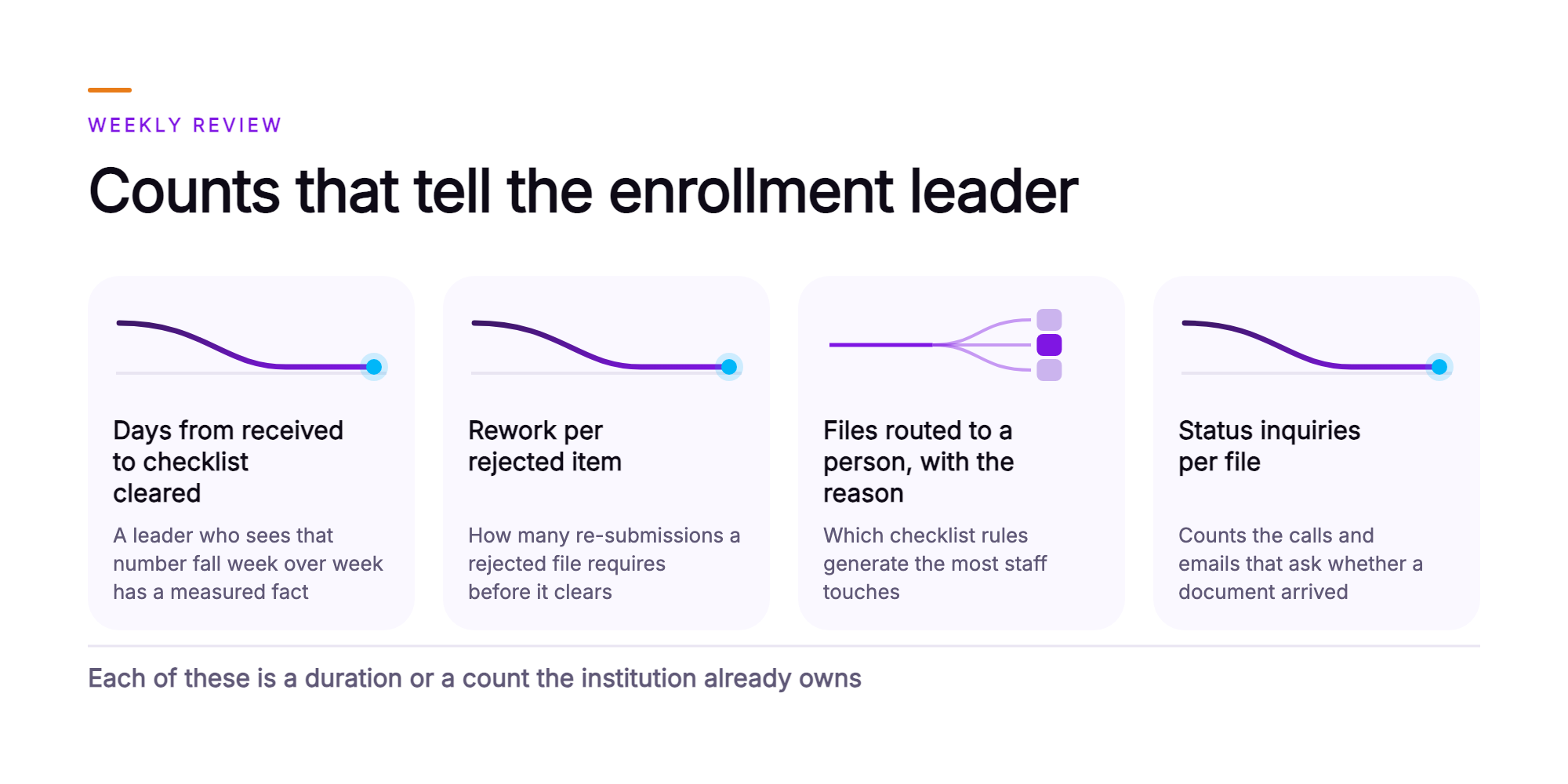
Rework per rejected item measures how many re-submissions a rejected file requires before it clears. A high count traces to the reject message, which leaves the applicant guessing what to send. The fix lives in the wording of that message, and the checklist rule behind it stays as written.
Files routed to a person, with the reason attached is a count and a reason distribution. It shows which checklist rules generate the most staff touches and whether the criteria governing those rules need to be sharper. A leader who sees one reason dominating the routed files knows exactly where to start.
Status inquiries per file counts the calls and emails that ask whether a document arrived. Each inquiry is a cost and a signal. When that number falls, the applicant-facing confirmation message is doing its job. When it stays flat, the confirmation still has work to do.
Each of these four is a duration or a count the institution already owns. The platform records them. What the enrollment leader takes to the leadership team is a set of before-and-after comparisons the institution produced from its own data.
What does the enrollment leader take to the leadership team?
The document review workflow produces four counts the institution already owns, and those counts are what an enrollment leader brings to leadership as evidence that the operation changed.
The first piece of that evidence is the comparison itself. An AI agent runs the completeness check the minute a document lands, confirms or rejects it with the specific reason, and writes the status directly to the SIS. Leadership sees that sequence in the audit log, timestamped as it happened.
The second piece is timing. Applicants learn what was accepted, what was rejected, and what to send next in the same channel and language they used to submit. That exchange happens during evening and weekend hours when applicants actually upload. Files that arrive in those hours move while the building is empty. The before-and-after comparison on days from received to checklist cleared is a number leadership can verify.
The third piece is staff focus. Admission and aid decisions stay with your people. The agent clears the checklist so a counselor opens a complete file and spends the whole review on the decision. Routed file counts and the reasons attached to each tell leadership exactly where the checklist rules need refinement.
And the fourth piece is the operating foundation behind all of it. Orvera AI builds, deploys, and runs the agent on the systems the institution already runs in three to six weeks. Every intake conversation is audited. The platform is SOC 2 Type II certified, HIPAA compliant, and GDPR compliant. Those credentials are what the compliance officer and the institution's leadership team need to see before a workflow touches applicant records.
The full operating picture, what a document experiences from the moment it lands to the moment it clears, comes together in the final section.
What does intake look like once the agent runs it?
A document lands, the agent classifies it, checks it against the checklist, and the applicant receives a specific outcome in the same conversation, while the SIS shows the item confirmed or rejected and the reason recorded before the next morning.
The operating picture is that clean. A transcript arrives through the application portal or by upload. The agent reads it, matches it to the checklist item it was submitted against, and runs the completeness comparison. The applicant hears back in the channel they used: what cleared, what was rejected, and exactly what to resubmit. The message names the document and its outcome, and it answers the applicant's status question on the spot. And the SIS record reflects the updated status before staff walk in the next day.
The queue your counselors open holds the exceptions the institution's escalation conditions name. Each routed file carries the reason it was flagged, so a counselor reads the context before they touch the document. The agent confirms receipts and writes reject notices, and counselor hours run on applicants and decisions. That shift is what the workflow produces. Staff do the work only staff can do.
The weekly review reads four counts against the checklist rules. Days from received to cleared. Rework per rejected item. Files routed to a person. Status inquiries per file. When any count moves in the wrong direction, the checklist rule behind it is the place to look. The leader manages the rules that govern the backlog. Each change reaches every file that follows.
That is automated document intake running on a live enrollment floor. If you want to see how it maps to your own checklist and SIS, talk to the team (opens in a new tab).
Frequently asked questions
An AI agent platform handles document intake by classifying each file, checking it against the institution's checklist criteria, and writing a pass or reject result to the record, while your staff owns the admission or award decision. When a transcript, tax form, ID, verification worksheet, or enrollment form arrives, the AI agent identifies the document type, applies the acceptance rules your team configured for that item, and confirms or rejects it with a stated reason. The result writes directly to the SIS or CRM checklist. How AI agents integrate with student information systems matters here: every status update lands on the same record your staff reads, so the checklist reflects the file's true state in real time. The agent's authority ends at completeness. Admission decisions, aid eligibility, and award amounts stay with your staff.
When a document fails a completeness check, the AI agent names the specific item, states the exact reason, and tells the applicant what to submit to clear it. A document completeness check in admissions is a rule-based review of each submitted file against the criteria your team configured, for example the correct tax year, a visible signature, a full page count, a legible scan, and a valid expiration date. When a file fails any criterion, the agent delivers the rejection with the fix, in the same channel and in the applicant's preferred language. The applicant re-uploads from that same conversation. The agent applies the identical rule to the new file and clears the checklist item when it passes. Routine resubmissions run end to end through the agent. Every rejection and its stated reason is recorded against the file. Your staff and the applicant read the same history, which keeps follow-up calls shorter and shows what was asked and when. Some cases call for a person, though. The next section covers the conditions that move an applicant from automated intake to a human rep.
The AI agent transfers an applicant to a human rep when the case reaches a condition the institution defined in advance, carrying the full file, checklist status, and transfer reason so the counselor begins from an informed position. Four conditions typically trigger a transfer: - A document type the checklist does not recognize - A conflict between two submitted files, such as mismatched enrollment dates across records - An item that fails after the maximum configured resubmission attempts - An applicant who requests a person directly Institutions also flag certain item types for immediate routing to staff. Appeals and special-circumstance documentation are the most common examples. AI agents verify student transcripts for completeness: the agent classifies the file and checks it against the checklist item. Transcript authenticity review, where policy requires human judgment, routes to a counselor by design. Every transfer passes the full history to the receiving rep. The applicant resumes the conversation where it stopped. That handoff record, and every other intake decision, feeds the reporting layer. The next section covers how those records are stored and reviewed.
Every classification, confirmation, and rejection is written to the applicant's file with a stated reason and timestamp, and the checklist status updates in the system of record at the moment the decision is made. Directors frequently ask how AI agents keep missing document detection on a single audit trail. The answer is that the record itself is the trail. Each decision writes to the same record your staff reads, so the file is always current. Auto QA audits every intake conversation, whether a human rep or an AI agent handled it. Full transcripts and summaries are available for every interaction, which keeps the review record complete. Leaders review the reason distribution across rejections to identify which checklist rules produce the most resubmissions. That view shows where rule wording is ambiguous and where an applicant population consistently misreads a requirement. Tightening those rules reduces rework. And it keeps counselor capacity on cases that need judgment, which is where that time changes an applicant's outcome. Those records also feed the connection layer. The next section covers how the platform reads from and writes back to the systems your institution already runs.
The AI agent reads the applicant's checklist directly from the SIS and writes every status update and rejection reason back to the same record, so your institution keeps a single source of truth inside its own system of record. The platform connects to the SIS, CRM, document imaging system, and applicant portal your institution already runs. Orvera does that integration work, and maintains each connection after go-live. A question that comes up at this stage is who answers for the applicant data the agent reads. When the platform operates within your existing SIS permissions and writes only to records the institution controls, the data handling stays inside the boundary your compliance team already governs. Those connection records feed directly into what deployment looks like. The next section covers how quickly the platform goes live and what Orvera manages to get it there.
Orvera AI builds, deploys, integrates, and runs the AI agent platform for your institution, and full deployment lands in three to six weeks. Enablement spans onboarding, knowledge-base setup grounded in your checklist rules, agent training, and change management. Your team reads results. Orvera manages the infrastructure. A question that surfaces before go-live is: what happens if an AI agent cannot read a student document? The agent flags the file as unreadable, states that reason on the applicant's record, and asks the applicant for a clearer image of the page that failed. A case that meets one of the institution's escalation conditions routes to a counselor with the full history attached. The platform is SOC 2 Type II certified, HIPAA compliant, and GDPR compliant. Every intake conversation is audited without exception. Talk to the team to walk through what deployment covers for your institution's document intake operation.
Written by
Anindita Majumder
Anindita Majumder is a communications professional with nearly four years of experience in public relations, corporate communications, and journalism. She creates content that helps brands communicate their vision, products, and expertise through press releases, thought leadership, and editorial pieces. Outside of work, she is a vocalist, which keeps her creativity flowing.


