Best Agent Assist Software in 2026: 11 Tools Compared
Eleven agent assist tools described by what each is built for, with the criteria to test them on and vendor facts checked October 31, 2026.

Key highlights
TL;DR: Best Agent Assist Software in 2026
- Agent assist software listens to a live voice call or reads a live chat, then shows the human agent the approved answer, the next step and any compliance prompt the moment it applies.
- The 11 agent assist tools below include assist features from contact center platform vendors, specialists that sit on top of a platform, and cloud services a team builds into its own agent desktop.
- A fair agent assist pilot puts every tool on the same team, the same queue, the same knowledge base and a measurement period of the same length, with a baseline taken from that team's own numbers before anything is switched on.
- Ask each vendor to run the demo on your knowledge, your scenarios and your contact center platform, and to show you what happens when the knowledge runs out.
- The metrics that show agent assist is working are the ones your floor already reports: average handle time, after-call work, first-contact resolution, compliance adherence, new-hire ramp time and suggestion acceptance rate.
- A team needs both when routine contacts should finish without a person and complex contacts should reach a human agent who is already guided.
This guide compares 11 agent assist tools for contact centers. We read each vendor's own site on October 31, 2026, for the facts. Orvera AI publishes this guide, so the other tools run alphabetically, and our own product comes last with a label. Judge ours on the same criteria as the others.
What does agent assist software do during a live conversation?
Agent assist software listens to a live voice call or reads a live chat, then shows the human agent the approved answer, the next step and any compliance prompt the moment it applies. The customer is still on the line, so the agent reads the guidance while the conversation carries on.
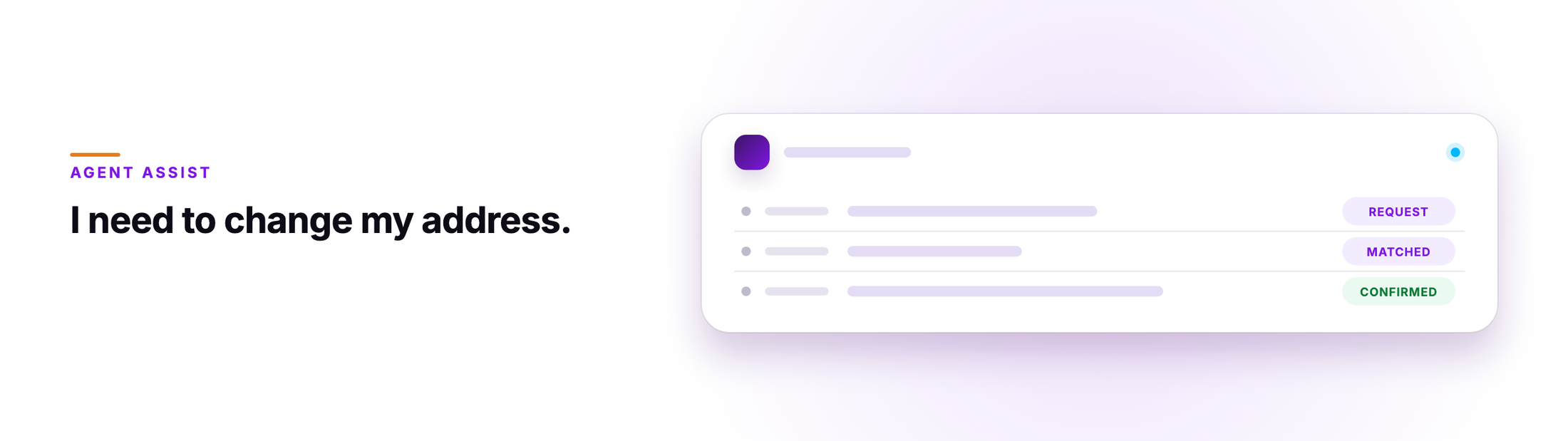
Picture a billing call. A customer asks to change the mailing address on the account. Before the agent touches the record, the screen asks for identity verification, shows the questions the policy requires and pulls up the account-change article from the approved knowledge base. When the call ends, the summary is already written and attached to the case.
The agent stays in control. They can accept a suggestion, edit it to fit what the customer said, or dismiss it and keep going. Good contact center agent assist software makes that choice quick and easy to undo. What goes away is the search and the blank summary field at the end.
Which criteria separate one agent assist tool from another?
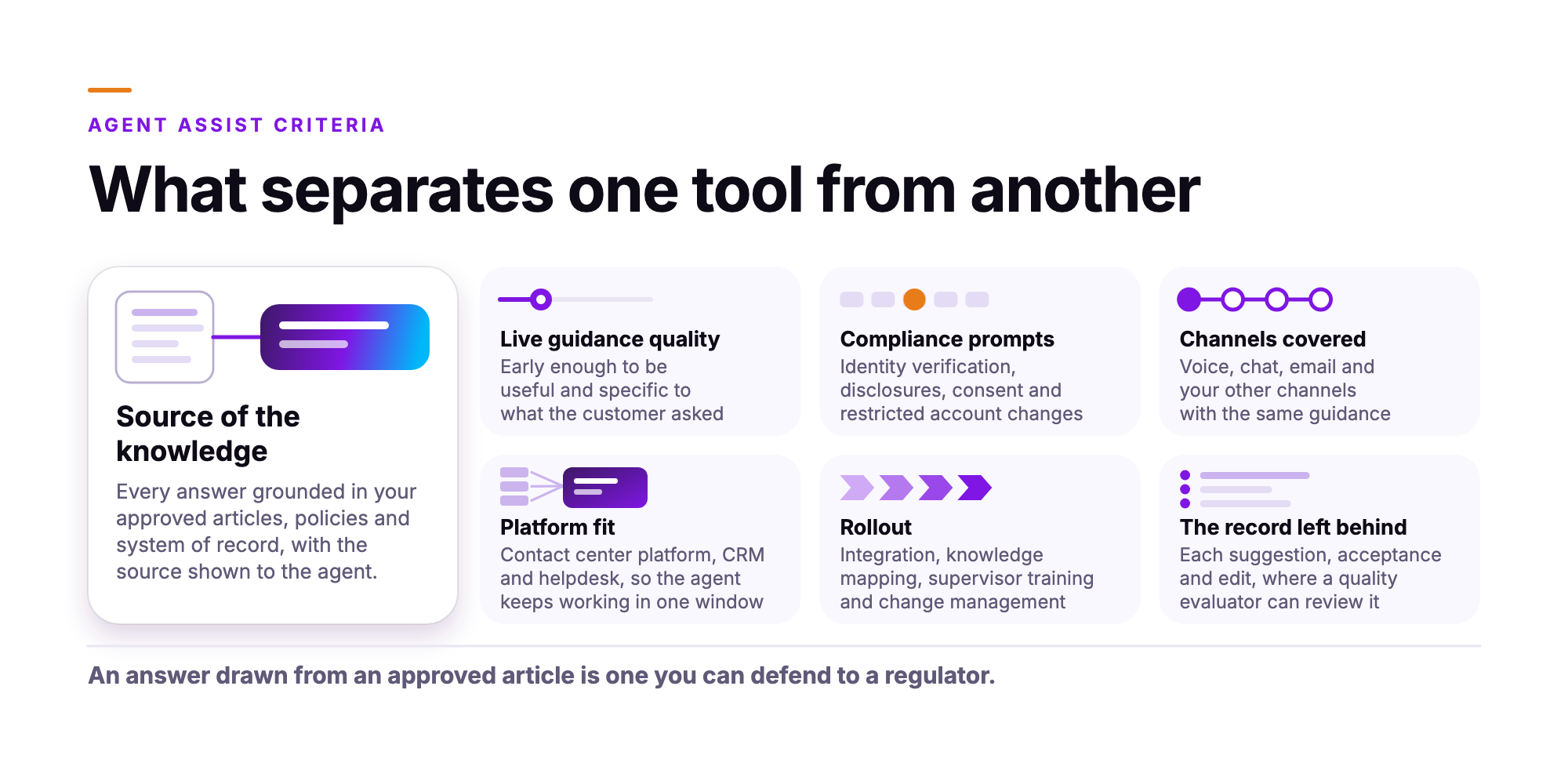
What separates real-time agent assist software is where the answers come from, what fires on a risky action, which channels are covered, how it connects to the contact center platform you already run, and what record each suggestion leaves for quality review.
- Live guidance quality. Does the suggestion arrive early enough to be useful, and is it specific to what the customer asked?
- Source of the knowledge. Is every answer grounded in your approved articles, policies and system of record, with the source shown to the agent?
- Compliance prompts. Does the software prompt on the actions that carry regulatory weight, such as identity verification, disclosures, consent and restricted account changes?
- Channels covered. Does it support voice, chat, email and your other channels with the same guidance?
- Platform fit. Does it connect to your contact center platform, CRM and helpdesk, so the agent keeps working in one window?
- Rollout. Who does the integration, the knowledge mapping, the supervisor training and the change management?
- The record left behind. Does each suggestion, acceptance and edit land somewhere a quality evaluator can review?
The source of the knowledge matters most. An interface can be learned in an afternoon. An answer drawn from an approved article is one you can defend to a regulator, point to in an audit and correct at the source when the policy changes.
We read each vendor's own product and documentation pages against these criteria on October 31, 2026. Every vendor figure below is the vendor's own and is labeled that way. We ran none of the other tools on a live floor for this guide, so treat the entries as a shortlist to test.
Which agent assist tools should be on a 2026 shortlist?
The 11 agent assist tools below include assist features from contact center platform vendors, specialists that sit on top of a platform, and cloud services a team builds into its own agent desktop.
| Tool | What the vendor says it does live | Channels the vendor names | Where it runs |
|---|---|---|---|
| Balto Real-Time Agent Assist | Next-step guidance, sourced answers, call summary | Call, chat, email, SMS | Lists 60+ integrations |
| Cresta Agentic Assist | Source-backed answers, moment detection, summaries | Live conversations, chat, email | Lists Amazon Connect, Avaya, Cisco, Five9, Genesys, NiCE, Salesforce |
| Five9 AI Agent Assist | Guidance cards, checklists, call summaries | Calls on the assist page, more on the platform page | Five9 platform |
| Genesys Agent Copilot | Scripting, next action, knowledge, summaries | Digital and voice | Genesys Cloud |
| Google Cloud Agent Assist | Coaching, next-best action, summaries | Chat and voice | Embedded modules, with Salesforce and Genesys Cloud guides |
| Level AI Agent Assist | In-call guidance, cited answers, call summaries | Voice and chat | Widget in CRM and contact center platforms |
| NiCE Copilot for Agents | Knowledge, next-best actions, summaries | Call, chat, email, message | NiCE Agent Workspace |
| Observe.AI Companion Agent | Pre-call brief, next action, live checklists, wrap-up | Calls and live conversations | Embedded in agent workflows, lists 250+ integrations |
| Talkdesk Copilot | Sentiment, next action, scripts, notes and dispositions | Voice, chat, email | Talkdesk Workspace |
| Zendesk Copilot | Next steps, reply drafts, approved actions | Tickets in the workspace | Zendesk workspace |
| Orvera AI Agent Assist (our product) | Approved knowledge, next action, compliance flags, summaries | Voice, chat, digital | Browser extension, webhooks, Genesys Cloud AudioHook |
Table sources, read October 31, 2026: Balto (opens in a new tab), Cresta (opens in a new tab), Five9 (opens in a new tab), Genesys (opens in a new tab), Google Cloud (opens in a new tab), Level AI (opens in a new tab), NiCE (opens in a new tab), Observe.AI (opens in a new tab), Talkdesk (opens in a new tab), Zendesk (opens in a new tab), Orvera AI (opens in a new tab).
Balto Real-Time Agent Assist
Balto describes its Real-Time Agent Assist (RTG3) as following each live conversation and surfacing the next step in real time. Its workspace brings knowledge, real-time search, customer history and supervisor communication together, and answers come back with verified sources. Balto writes the call summary and saves notes to the CRM, and a supervisor can whisper to an agent without the customer hearing it. Balto's site names call, chat, email and SMS, and lists 60+ integrations, including NiCE CXone, Five9, Genesys Cloud, Amazon Connect and Talkdesk. Balto reports more than 600 million guided calls. It also sells an AI agent called Togo.
Best suited to teams that run on an existing contact center platform or dialer and want one agent workspace for live guidance, knowledge and supervisor communication.
Sources, read October 31, 2026: Balto Real-Time Agent Assist (opens in a new tab), Balto channels (opens in a new tab), Balto integrations (opens in a new tab).
Cresta Agentic Assist
Cresta calls this product Cresta Agentic Assist and describes it as real-time AI for human agents during live customer conversations. It surfaces source-backed answers from the live conversation and on-screen context, detects moments such as a churn signal or a compliance trigger, and generates reply suggestions for chat and email. Live summaries update during the conversation and sync to the CRM afterward. Cresta says the models are trained on the customer's own conversations, and that business teams can build and test workflows on historical conversations without writing code. Cresta's integrations page lists Amazon Connect, Avaya, Cisco, Five9, Genesys, NiCE and Salesforce. The product shares a platform with quality management, coaching and training.
Best suited to teams that want guidance tuned to their own conversation data, with assist, quality management, coaching and training on one platform.
Sources, read October 31, 2026: Cresta Agentic Assist (opens in a new tab), Cresta integrations (opens in a new tab).
Five9 AI Agent Assist
Five9 AI Agent Assist gives agents real-time guidance cards and checklists, real-time transcription and custom call summaries, and it can prompt on likely upsell opportunities. Managers get insights on customer trends and coaching opportunities. Five9's FAQ adds suggested responses, knowledge base articles and customer insights during live interactions. Five9 reports that the product has helped reduce handle time by 30 seconds. The voice, chat, email and SMS coverage and the 100+ languages for transcription and translation appear on the Five9 Genius platform page, so ask which of them reach the agent assist screen.
Best suited to teams on Five9 that want guidance cards, checklists and call summaries from their platform vendor.
Sources, read October 31, 2026: Five9 AI Agent Assist (opens in a new tab), Five9 FAQ (opens in a new tab), Five9 Genius AI (opens in a new tab).
Genesys Agent Copilot
Genesys describes the on-queue Agent Copilot as real-time assistance while agents work with customers. It provides custom scripting, surfaces the right tool or form in the moment, and suggests the agent's next action. Genesys says digital and voice conversations come standard, along with automatic knowledge, insights, next-best action support, translation and summarization. Supervisor copilots, such as Genesys Cloud Copilot, sit alongside it on the same platform.
Best suited to teams already on Genesys Cloud that want on-queue agent help and supervisor copilots in one platform.
Sources, read October 31, 2026: Genesys copilots (opens in a new tab).
Google Cloud Agent Assist
Google lists Agent Assist under Gemini Enterprise for Customer Experience and describes in-the-moment coaching and next-best action guidance for customer care representatives. Knowledge comes from the customer's website, knowledge base, documentation and CRM, and Gemini models write the summary. Google's documentation describes prebuilt UI modules that a team embeds in any web application, with setup guides for Salesforce and Genesys Cloud. The Salesforce guide names chat and voice conversations. An AI Trainer feature adds simulations and personalized training. Google says Agent Assist can help service reps handle 28% more conversations.
Best suited to teams with engineering capacity on Google Cloud that want to build assist features into their own agent desktop or Salesforce.
Sources, read October 31, 2026: Google Cloud Agent Assist (opens in a new tab), UI modules (opens in a new tab), Salesforce guide (opens in a new tab), Genesys Cloud guide (opens in a new tab).
Level AI Agent Assist
Level AI Agent Assist gives agents in-call guidance, the next-best action and the right knowledge article. Its knowledge bot, Phi, answers questions mid-conversation with a cited answer inside the agent desktop. Level AI transcribes voice calls in real time and analyzes chat text as it unfolds, and it writes automated call summaries. It ships as a configurable widget embedded in CRM and contact center platforms, including Salesforce, Zendesk and Five9. Managers see each agent's call status, duration and sentiment as it happens.
Best suited to teams that want a voice and chat assist widget inside their existing CRM or contact center screen, with a live view for frontline managers.
Sources, read October 31, 2026: Level AI Agent Assist (opens in a new tab), Level AI integrations (opens in a new tab).
NiCE Copilot for Agents
NiCE Copilot for Agents delivers knowledge, context and next-best actions to agents, along with real-time summaries and workflow support. NiCE names calls, chat, email and messaging. When a customer moves from a self-service bot to a live agent, NiCE says the context follows them. NiCE also offers Automated Summary on its own, for teams that want to begin there. NiCE says Copilot works best when paired with a knowledge system such as NiCE Knowledge Management, and that it connects to a knowledge hub a team already has.
Best suited to teams that want agent copilot features from their contact center platform vendor, with a knowledge system and agent workspace from the same vendor.
Sources, read October 31, 2026: NiCE Copilot for Agents (opens in a new tab), NiCE Agent Workspace (opens in a new tab).
Observe.AI Companion Agent
Observe.AI calls this product Companion Agent. It briefs the agent before the call from the customer's history, recommends the next best action and the fields to capture as the call unfolds, reminds agents of required disclosures with live checklists, and summarizes the call and recommends the disposition when it ends. It also receives context from AI-to-human transfers. Observe.AI lists 250+ integrations and reports a 65% reduction in after-call work on the product page. The page describes calls and live conversations, so confirm chat and email coverage in a demo.
Best suited to teams that want assist across the whole call, from a pre-call brief through live compliance prompts to wrap-up, on a platform that also runs AI agents.
Sources, read October 31, 2026: Observe.AI Companion Agent (opens in a new tab), Observe.AI integrations (opens in a new tab).
Talkdesk Copilot
Talkdesk Copilot analyzes conversations in real time for sentiment and intent, then surfaces contextual answers, next best actions or scripted guidance. It suggests replies in chats and emails, gives real-time transcription and Smart Scripts on live conversations, and generates call notes and dispositions. Talkdesk says specialized AI agents work behind the scenes to retrieve information and draft responses, and it reports after-call work of 2 seconds or less. Supervisors can oversee and validate what the AI does.
Best suited to teams on Talkdesk that want live guidance, reply suggestions and summaries inside Talkdesk Workspace.
Sources, read October 31, 2026: Talkdesk Copilot (opens in a new tab).
Zendesk Copilot
Zendesk Copilot gives human agents and admins guidance grounded in the team's knowledge, policies and service context. In the Zendesk workspace it suggests next steps, drafts responses and, with agent oversight, carries out approved actions such as updating fields and processing returns, in Zendesk or in third-party systems. It classifies each request by topic, sentiment and language. The page centers on tickets and reply drafting, so ask Zendesk about live voice guidance if your floor runs on calls.
Best suited to teams running tickets in Zendesk that want reply drafts, procedure-following actions and admin recommendations in one workspace.
Sources, read October 31, 2026: Zendesk Copilot (opens in a new tab).
Orvera AI Agent Assist (our product)
Orvera AI Agent Assist is the live guidance layer of our platform for human agents. It surfaces approved knowledge, suggests the next action from what's being said, and flags compliance requirements before a risky action. When escalation signals appear, it prompts for empathy, and after the call it writes the summary. It runs across voice, chat and digital channels. Agents can accept, edit, copy or dismiss each suggestion, and every event lands on a timestamped timeline that supervisors and QA can search. We deploy it as a browser extension or webhook, or through Genesys Cloud AudioHook, and we do the build, deployment and integration. A floor-wide rollout takes 2 to 4 weeks, depending on knowledge base size and integration scope. Across our customer engagements, average handle time falls 8% to 15% within the first 90 days, largely through Agent Assist. Those are averages, and results vary by engagement. Assist shares one platform with our AI agents, AI Quality Management across AI-handled and human-handled conversations, and Voice of Customer. We're SOC 2 Type II certified, HIPAA compliant and GDPR compliant.
Orvera AI fits teams that want live guidance for human agents on one platform with AI agents and quality management, run by Orvera on the stack the team already uses.
More detail: Orvera AI Agent Assist (opens in a new tab), and how Orvera's Agent Assist works during a support call (opens in a new tab).
How do you run a fair agent assist pilot?
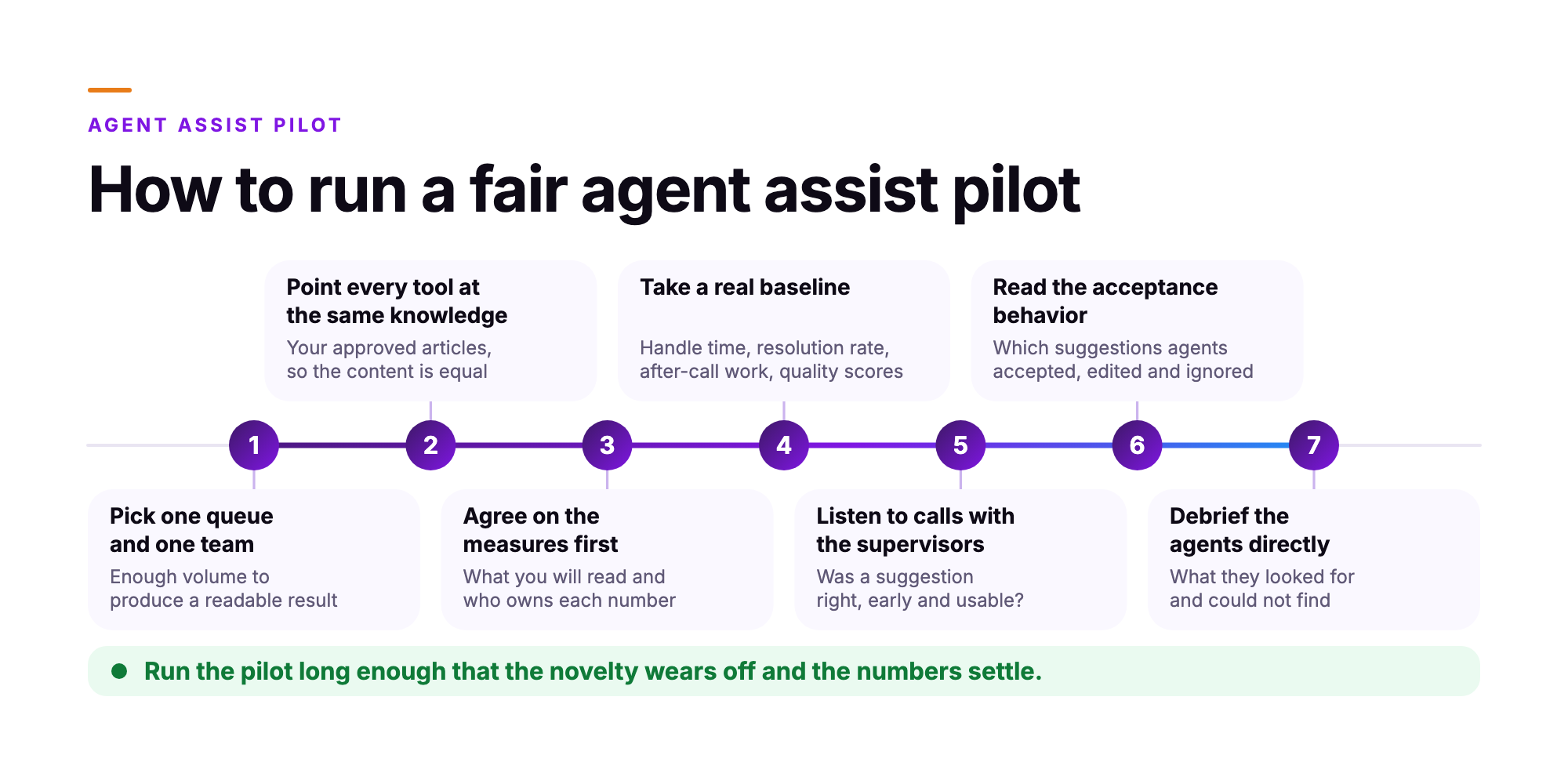
A fair agent assist pilot puts every tool on the same team, the same queue, the same knowledge base and a measurement period of the same length, with a baseline taken from that team's own numbers before anything is switched on.
- Pick one queue and one team. Choose a queue with enough volume to produce a readable result and enough complexity that guidance matters. Billing, claim status and account changes work well.
- Point every tool at the same knowledge. Run each tool on your approved articles, so you are comparing software on equal content.
- Agree on the measures first. Write down what you will read and who owns each number before the first call. A measure that changes mid-pilot makes the result unusable.
- Take a real baseline. Pull the team's own handle time, resolution rate, after-call work and quality scores from the period before the pilot.
- Listen to calls with the supervisors. The people who coach this team will tell you whether a suggestion was right, early and usable.
- Read the acceptance behavior. Look at which suggestions agents accepted, which they edited and which they ignored. A suggestion ignored on every call tells you something about the knowledge behind it.
- Debrief the agents directly. Ask what they looked for and could not find.
Run the pilot long enough that the novelty wears off and the numbers settle. For what this looks like on a real queue, read how agent assist supports seasonal hires in retail (opens in a new tab).
What should you ask each vendor in the demo?
Ask each vendor to run the demo on your knowledge, your scenarios and your contact center platform, and to show you what happens when the knowledge runs out.
- Show it running on our approved knowledge base, with our article set loaded.
- Show a compliance prompt firing on a risky action, such as an identity verification step, a required disclosure or a restricted account change.
- Show what the supervisor sees after the call ends, including which suggestions the agent accepted, edited or dismissed.
- Show how the guidance connects to our contact center platform and our CRM, and name the integration.
- Show what happens when the approved knowledge has no answer for the customer's question.
- Show the same conversation on voice and on chat.
- Show how a wrong or outdated answer gets corrected, and how long it takes to reach the floor.
- Show the audit record for a single conversation, start to finish.
The fifth item on that list is usually the most revealing. A tool that says when it has no answer is safer on a regulated floor than one that produces a confident answer from nowhere.
Which metrics show agent assist is working?
The metrics that show agent assist is working are the ones your floor already reports: average handle time, after-call work, first-contact resolution, compliance adherence, new-hire ramp time and suggestion acceptance rate.
Two outside numbers set the context. A study of 5,172 customer support agents, published in The Quarterly Journal of Economics in 2025, found that access to AI assistance raised issues resolved per hour by 15% on average. Metrigy found that over 55% of companies were using agent assist in the third quarter of 2025 and another 32.3% were planning to, as Metrigy's Beth Schultz wrote in TechTarget on August 25, 2026. Your own numbers decide whether either holds on your floor.
Sources: Brynjolfsson, Li and Raymond, The Quarterly Journal of Economics, 2025 (opens in a new tab), TechTarget on agent assist (opens in a new tab).
Average handle time and after-call work show whether the search and the summary are being removed. First-contact resolution shows whether the guidance was correct. Compliance adherence, read from your quality scorecards, shows whether the prompts fire on the right actions and whether agents act on them. New-hire ramp shows whether a less experienced agent can reach the floor standard faster with guidance on screen. Suggestion acceptance tells you whether agents trust what they are being shown.
Read handle time together with quality, always. A call that ends sooner and generates a callback the next day has moved the work to tomorrow. The pairing to watch is handle time falling while first-contact resolution holds or rises.
When does a team need AI agents as well as agent assist?
A team needs both when routine contacts should finish without a person and complex contacts should reach a human agent who is already guided. Agent assist supports a person through a conversation. An AI agent holds the conversation itself: it verifies the customer, reads the system of record, completes the action and closes the case.
The two meet at the handoff. When an AI agent passes a conversation to a human agent, the person inherits the context, the verification already done and live guidance on what comes next. Several vendors on this list sell both, so ask how the handoff works on a live conversation. For the category behind this question, read our guide to what an omnichannel AI agent is (opens in a new tab).
Frequently asked questions
Agent assist software guides a human agent while the conversation is live, and an AI agent holds the conversation with the customer directly. The difference is who is talking. With agent assist, the human agent speaks and the software surfaces the next step, the approved answer or the record from the system of record. With an AI agent, the software takes the conversation from greeting to resolution, and a human agent steps in when the case calls for it.
Usually yes, and the words are interchangeable often enough that the label tells you very little. Several vendors on this list use copilot for what others call agent assist. Ask each vendor to show the product on a live call. Watch what it surfaces, how fast it surfaces it and where the content came from.
No. Agent assist for contact centers works beside the human agent, who reads each suggestion and decides whether to use it. The agent keeps control of the conversation, the wording and the outcome. What changes is how much time they spend searching for an answer or switching between screens while the customer waits.
It depends on the product. Vendors on this list name different channels, and some name them at platform level on a separate page from the assist product. Write down the channels your team runs, then check each vendor's list against it and test the ones that carry your volume.
A compliance team needs prompts that fire on required disclosures and risky actions, answers traced back to approved content, and a searchable record of what the software showed and what the human agent used. Ask where the answer came from, who approved it and whether a reviewer can reconstruct the moment months later.
Written by
Anindita Majumder
Anindita Majumder is a communications professional with nearly four years of experience in public relations, corporate communications, and journalism. She creates content that helps brands communicate their vision, products, and expertise through press releases, thought leadership, and editorial pieces. Outside of work, she is a vocalist, which keeps her creativity flowing.