What Is an Omnichannel AI Agent? A Guide for CX Teams
An omnichannel AI agent is one AI system that holds a single customer conversation across voice, chat, text messages, email and other digital channels. It has one shared memory behind all of those channels, and it takes action in the systems where the business keeps its records.

Key highlights
TL;DR: What Is an Omnichannel AI Agent?
- An omnichannel AI agent is one AI system that holds a single customer conversation across voice, chat, text messages, email and other digital channels.
- A multichannel setup puts separate automations on separate channels, each with its own build and its own history, while an omnichannel AI agent runs one conversation and one history across every channel the customer uses.
- One conversation that moves across channels looks like a single issue the customer never has to restate, even as they shift from typing to texting to talking.
- The best first jobs are the ones that already move across channels and end in a concrete system action, because they have a clear definition of done and a record to write the outcome into.
- An omnichannel AI agent should hand off to a human agent whenever the conversation crosses a condition the team defined before go-live, and those conditions are set deliberately before the first live conversation.
- A customer experience team should evaluate an omnichannel AI agent by running real contact reasons from its own queue through the system channel by channel, then checking what reached the systems of record afterward.
- At Orvera AI, we build omnichannel AI agents for customer experience teams, deploy them on the stack the team already has, and keep running them after go-live.
This guide from Orvera AI, an AI agent company for customer experience teams, covers what an omnichannel AI agent is, how one works across channels, and how to test one on your own queue.
What is an omnichannel AI agent?
An omnichannel AI agent is one AI system that holds a single customer conversation across voice, chat, text messages, email and other digital channels. It has one shared memory behind all of those channels, and it takes action in the systems where the business keeps its records.
That definition has four parts, and all four have to be true:
- One conversation. The customer talks to the same party whether they type, write or speak. The channel changes and the conversation keeps going.
- One memory. What the customer said in chat on Tuesday is there on the call on Wednesday. Identity, intent, order number and prior promises travel with them.
- Action in the systems of record. The AI agent reads status from the CRM or order system and writes the change back. A reservation moves, a return gets created, a claim gets opened. The outcome lands where the business looks.
- A person when it is needed. Conditions set before go-live escalate the conversation to a human agent, with the history attached.
Judge the system by one thing: is the customer's issue finished and recorded? You'll see the answer in first-contact resolution, handle time and quality scores.
Customers notice when this is missing. In Zendesk's CX Trends 2026 survey (vendor research, as of November 18, 2025), 74% of consumers said they get frustrated when they have to repeat information. In insurance, JD Power found that, as of December 2, 2025, 22% of auto and home claims customers rely on multiple channels to find answers to the same question.
Sources: Zendesk CX Trends 2026 release (opens in a new tab), JD Power 2025 U.S. Claims Digital Experience Study (opens in a new tab).
How is an omnichannel AI agent different from a multichannel setup?
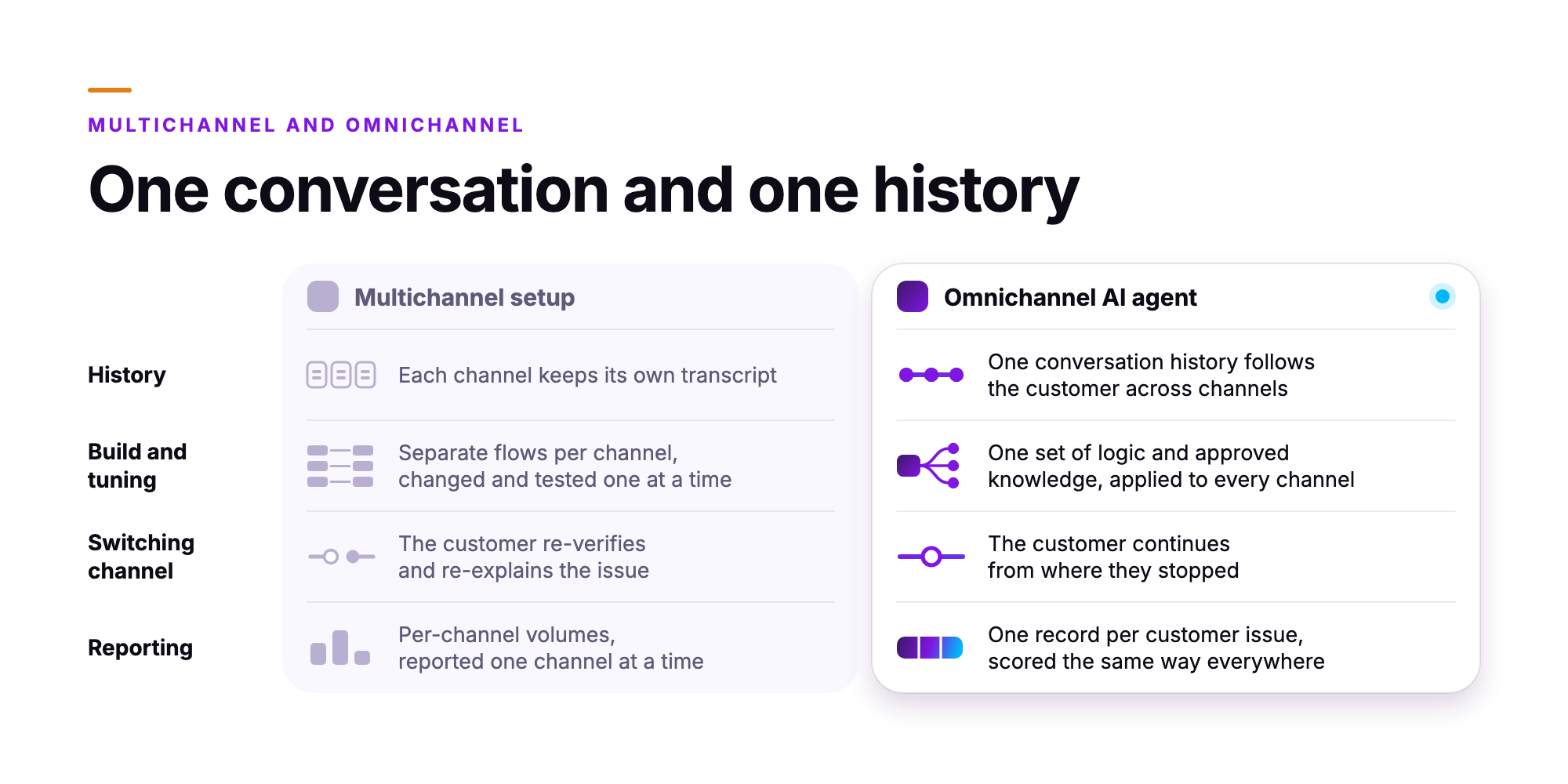
A multichannel setup puts separate automations on separate channels, each with its own build and its own history, while an omnichannel AI agent runs one conversation and one history across every channel the customer uses.
You feel the difference in maintenance, and the customer feels it too. In a multichannel setup, the phone flow and the chat flow are two separate artifacts. Every policy change gets made and tested once per flow. And when the customer moves from chat to a call, the call starts cold.
| Dimension | Multichannel setup | Omnichannel AI agent |
|---|---|---|
| History | Each channel keeps its own transcript | One conversation history follows the customer across channels |
| Build and tuning | Separate flows per channel, changed and tested one at a time | One set of logic and approved knowledge, applied to every channel |
| Switching channel | The customer re-verifies and re-explains the issue | The customer continues from where they stopped |
| Reporting | Per-channel volumes, reported one channel at a time | One record per customer issue, scored the same way everywhere |
The reporting row is the one operations leaders feel first. When each channel reports separately, a customer who tried chat, gave up, called and then emailed counts as three contacts. One shared history makes that a single issue with three touches, which is the number a team can manage against.
How does an omnichannel AI agent work across voice, chat, text and email?
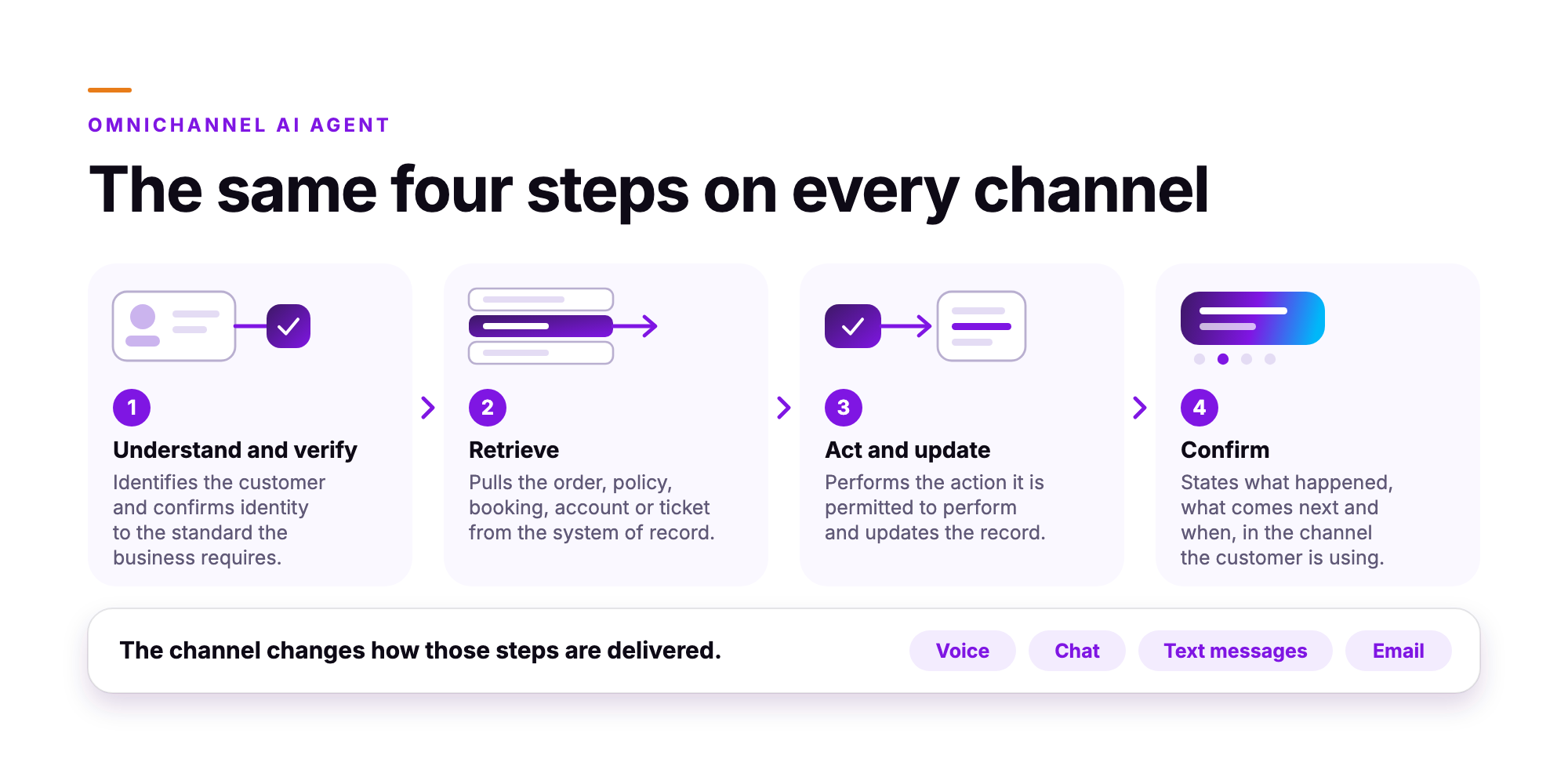
An omnichannel AI agent runs the same four steps on every channel: it understands and verifies the customer, retrieves their history and status from the business systems, takes the permitted action and writes it back, then confirms the next step. The channel changes how those steps are delivered.
- Understand and verify. The AI agent identifies the customer and confirms identity to the standard the business requires for the action being requested.
- Retrieve. It pulls the order, policy, booking, account or ticket from the system of record, along with the history of the current issue.
- Act and update. It performs the action it is permitted to perform, inside the rules set during deployment, and updates the record so the change is visible to everyone else.
- Confirm. It states what happened, what comes next and when, in the channel the customer is using.
Channels do differ, and the differences are mechanical. Voice needs natural speech, and it has to cope with interruptions, background noise and half-finished sentences. Text messages need short answers and a way to take a photo from the customer. Chat sits in between: it's written but conversational, and the customer is often doing something else. Email needs a complete reply that settles the question in one message, because the customer may be gone for hours.
If an AI agent for chat, email and phone draws on one set of approved knowledge, its answers come from the same approved source in every format.
What does one conversation look like when it moves across channels?
One conversation that moves across channels looks like a single issue the customer never has to restate, even as they shift from typing to texting to talking. The following is an illustration, written to show the mechanics, and it describes no specific customer.
A traveler opens web chat on a Thursday afternoon because her flight has been moved and her connection is gone. The AI agent verifies her, pulls the reservation and presents two rebooking options. She picks one and wants to check a document requirement before committing.
She then leaves for the airport and switches to text messages. She writes one line asking about the document, and the AI agent answers in the same thread, holding the rebooking option she selected. She photographs her document and sends it by text. The AI agent reads it and answers her document question in the same thread.
From the curb, she asks for a call. The AI agent calls her, reads the rebooking back for confirmation, completes the change in the reservation system and sends the new itinerary by email.
That is one issue across four channels, with one verification, one history and one record in the booking system.
Which customer experience jobs suit an omnichannel AI agent first?
The best first jobs are the ones that already move across channels and end in a concrete system action, because they have a clear definition of done and a record to write the outcome into.
- Order status and returns in e-commerce. The customer checks status by chat, gets the update and starts the return. The AI agent reads the order and creates the return.
- Reservation changes and refunds in travel and hospitality. Date changes, cancellations and refund eligibility resolve against the booking system, and customers often start in one channel and finish in another.
- First notice of loss in insurance. The customer reports the incident, sends photos by text, and the AI agent opens the claim with the images attached and the details recorded.
These jobs make good starting points for omnichannel customer support automation because you can measure success from day one. The return exists in the system, or it doesn't. Orvera has written up each job in detail, including order status and delivery exceptions in chat (opens in a new tab), flight disruption rebooking in self-service chat (opens in a new tab) and personal auto FNOL intake (opens in a new tab).
When should an omnichannel AI agent hand off to a person?
An omnichannel AI agent should hand off to a human agent whenever the conversation crosses a condition the team defined before go-live, and those conditions are set deliberately before the first live conversation.
Common handoff triggers include an injury reported on a claim, a billing or service dispute, a request that falls outside written policy, repeated failed verification and any customer who asks for a person. Each one is a rule the operations team writes, reviews and can change.
The quality of the handoff matters as much as the trigger. The human agent who picks up the conversation receives the history, the verification status, what the AI agent already attempted and a written summary of the issue. The customer carries on from where they stopped.
While the human agent works the conversation, assist software surfaces approved knowledge and the next action live. Our comparison of the best agent assist software (opens in a new tab) covers how to choose that layer.
How should a customer experience team evaluate an omnichannel AI agent?
A customer experience team should evaluate an omnichannel AI agent by running real contact reasons from its own queue through the system channel by channel, then checking what reached the systems of record afterward.
Run these tests before signing anything:
- Start on chat, finish on a call. Begin an issue in chat, then switch to voice mid-conversation. The AI agent should carry on from where the chat stopped.
- Count the repeats. Note every time the customer is asked to restate the account number, the order number or the problem. The target is zero.
- Check the system of record. After the test, open the CRM, order system or claims system. The outcome should be there, written correctly, with no manual cleanup.
- Read the handoff summary. Escalate deliberately and read what the human agent receives. It should be enough to continue without asking the customer anything.
- Inspect the knowledge source. Ask which approved articles and policies the AI agent may draw on, and what it does when the answer is missing.
- Review permissions per channel. Verification standards and permitted actions should be configurable by channel and by use case.
- Ask how conversations get scored. Find out whether every conversation is evaluated or only a sample, and against which scorecard.
How does Orvera AI run omnichannel AI agents?
At Orvera AI, we build omnichannel AI agents for customer experience teams, deploy them on the stack the team already has, and keep running them after go-live. Voice, chat, SMS, email, web and the team's other channels all share one memory.
The agents handle inbound and outbound conversations in more than 80 languages. Their answers come from knowledge your team has approved, and they write outcomes back to your CRM. Permissions, guardrails and policy get set per channel and per use case. If a person needs to step in, that human agent gets a full summary at handoff. Full deployment takes 3 to 6 weeks, depending on workflow complexity and your requirements. We're SOC 2 Type II certified, HIPAA compliant and GDPR compliant. See how it works on the Orvera Omnichannel AI Agents page (opens in a new tab).
Frequently asked questions
An omnichannel AI agent remembers a customer because every channel reads from and writes to one customer record and one conversation history. A customer who starts in text and then calls keeps the same order number on the call, because the voice conversation opens with the same record the text session updated. That shared record is what memory across channels means in operation.
A chatbot usually works within one text channel, using scripted flows to answer questions. An omnichannel AI agent carries one conversation across voice, chat, email and other digital channels, and it acts in the business systems: verifying the customer, looking up the record and completing the task. It then writes the outcome back to the record.
The handoff passes the live conversation, the history and a written summary to the human agent. A good handoff includes what the customer asked, what was verified, what actions were taken and why the conversation escalated. The customer carries on from where they were.
Yes, when the platform connects to the contact center platform, CRM and helpdesk a team already operates. Ask each vendor to demonstrate the live connection to your specific stack. Then ask for a demonstration of an outcome written back to the system of record: a case closed, a note added, a status updated.
Start with a contact reason that spans channels, then expand channels around that reason. Order status and reservation changes work well because the same question arrives by voice, chat and email, and the resolution path is the same in each.
The business owners who already own the process approve both the knowledge the AI agent can use and the actions it can take, set per channel and per use case. Answers stay based on approved knowledge, and action permissions keep refunds, cancellations and record changes within documented limits.
Score its conversations with the same scorecards applied to human agents, across all channels, with each score linked to the transcript. Orvera AI's AI Quality Management scores AI-handled and human-handled conversations this way, against the customer's own scorecards.

Written by
Anindita Majumder
Anindita Majumder is a communications professional with nearly four years of experience in public relations, corporate communications, and journalism. She creates content that helps brands communicate their vision, products, and expertise through press releases, thought leadership, and editorial pieces. Outside of work, she is a vocalist, which keeps her creativity flowing.