How Does Orvera’s AI Agent Assist Work During a Customer Support Call?
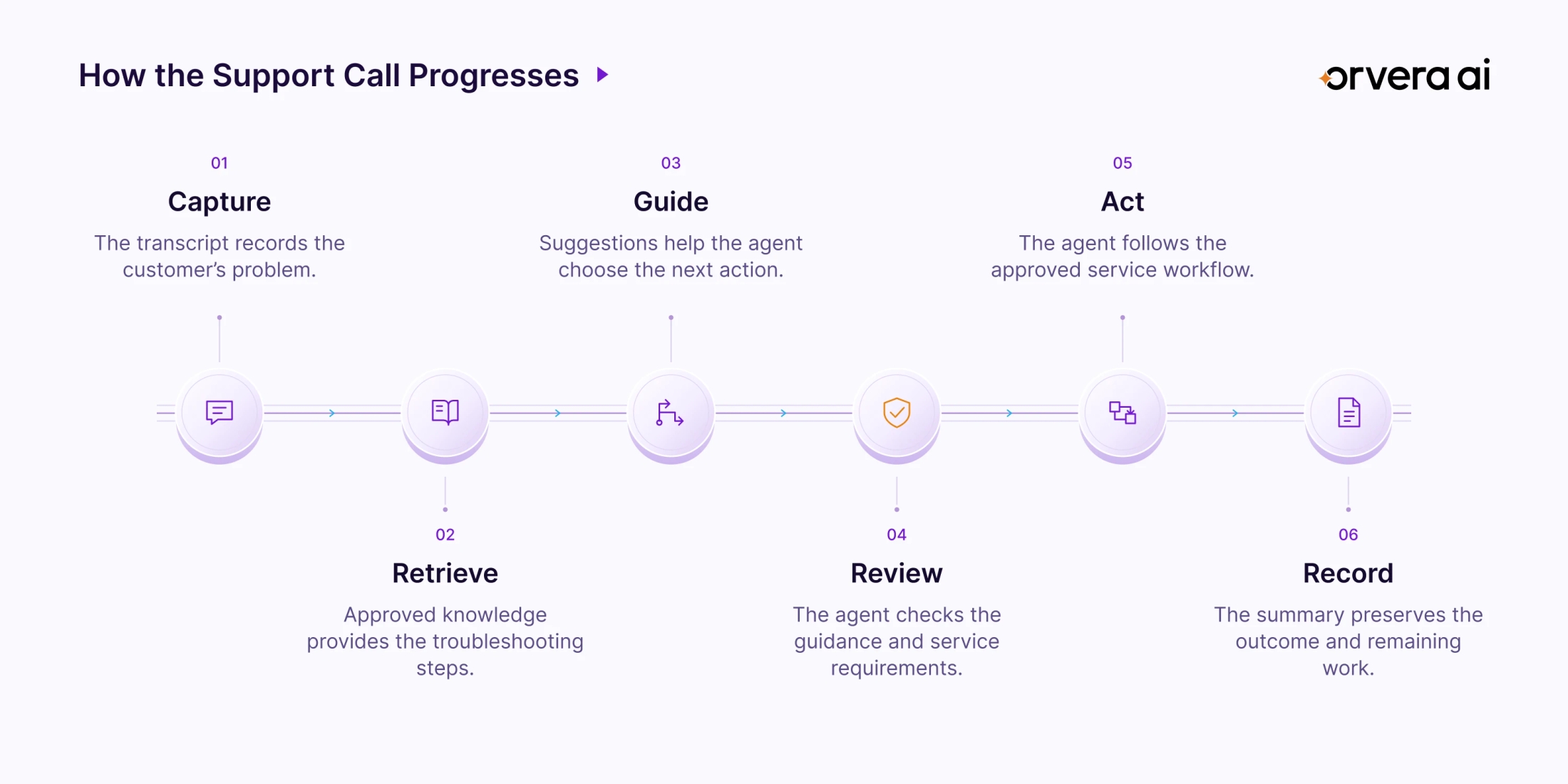
This blog follows an internet troubleshooting call to show how Orvera AI Agent Assist supports representatives with approved knowledge, coaching, and service guidance.


Key highlights
TL;DR
- Orvera AI Agent Assist brings cited knowledge, customer history, and suggested next steps into live conversations to help representatives handle customer requests.
- Representatives can accept, edit, copy, or dismiss suggestions, allowing them to adapt the guidance to the customer’s circumstances during the conversation.
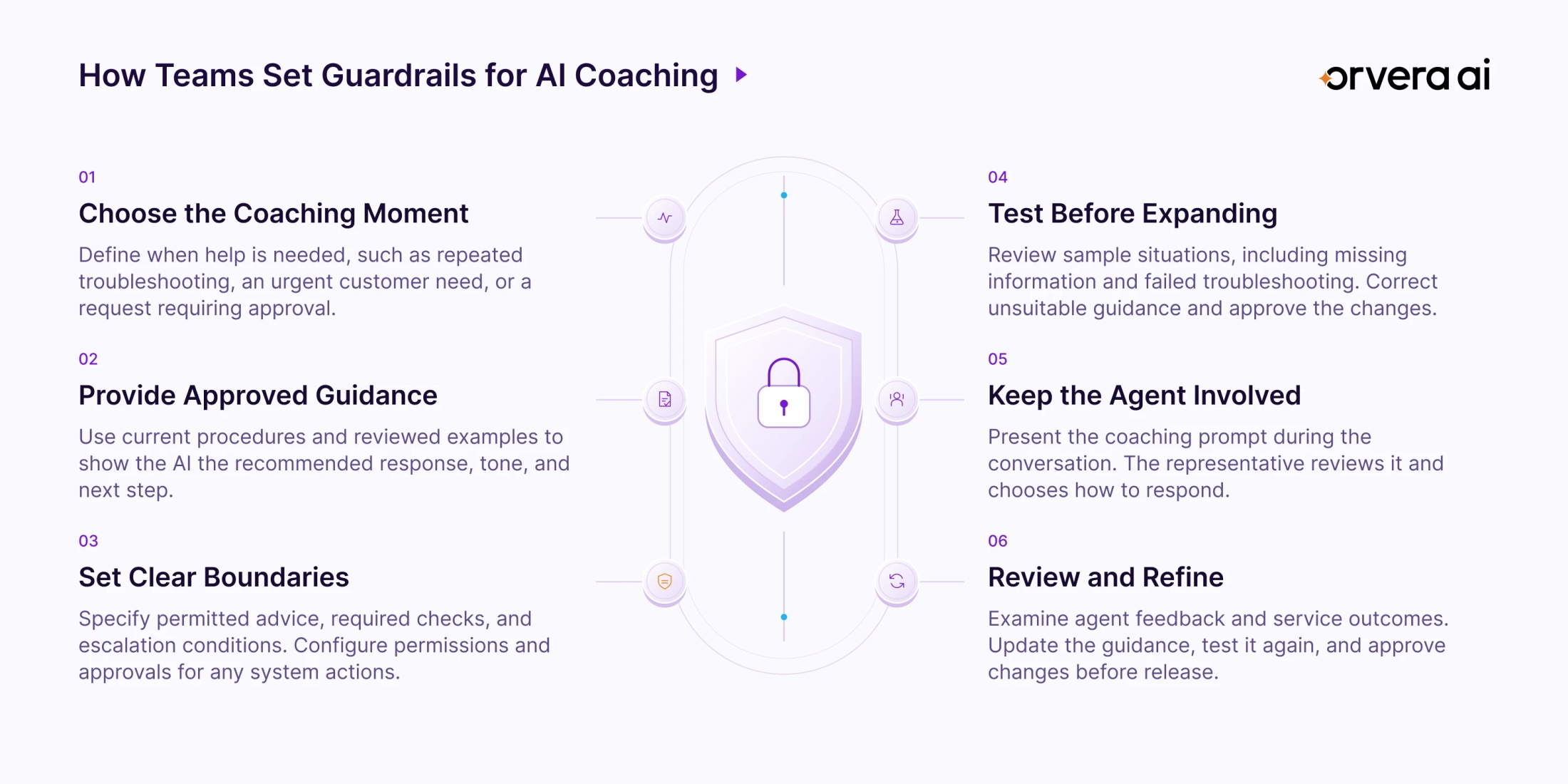
- Teams shape AI coaching through approved procedures, clear boundaries, and reviewed examples, then test changes before introducing them into live customer interactions.
- Compliance prompts highlight service requirements, while connected business records help reviewers verify whether the representative completed the actions promised to the customer. Knowledge
- Interaction summaries, system updates, and commitment tracking help preserve the customer’s request, document completed steps, and identify follow-up work that remains outstanding.
- Agent Assist connects through a browser extension or webhook, with deployment bringing approved knowledge and relevant business systems into the existing agent environment.
- Conversation timelines and analytics help supervisors examine guidance timing, suggestion feedback, and compliance alerts to identify where support processes need closer review. Event Timeline
- - CX leaders should evaluate handling time alongside summary accuracy, repeat contacts, service quality, and completed commitments to understand the operational impact of assistance.
How Does Orvera’s AI Agent Assist Work During a Customer Support Call?
A customer’s internet has been dropping every 30 minutes for two days. They work from home and have a video call coming up. James, the support agent, needs to understand the problem, review the account, follow the troubleshooting procedure, and arrange further help if the connection remains unreliable.
Several decisions sit inside that conversation. Should James check for an area outage first? Does the modem history suggest a line problem? What can help the customer before their meeting? What needs to be confirmed before the technician appointment is complete?
Orvera AI Agent Assist brings guidance into that working sequence. It presents relevant knowledge, suggested responses, coaching prompts, and service requirements alongside the conversation. The agent reviews the guidance and decides how to use it.
This walkthrough follows the internet troubleshooting demonstration from the opening exchange through the closing transcript, then examines the records and analytics available for review.
What Is AI Agent Assist?
AI agent assist (opens in a new tab) is software that supports human customer service representatives during customer interactions. It uses the conversation and relevant business information to present answers, suggest next steps, and help document the work.
Orvera AI Agent Assist is the human-agent assistance component of Orvera’s enterprise customer experience platform. Its capabilities cover three connected areas.
- During the conversation, it provides approved knowledge, next-action guidance, communication support, and coaching.
- As work progresses, it supports updates to connected business systems with approval options and audit trails.
- Around the close of the interaction, it prepares summaries and helps track commitments that require follow-up.
For a contact center leader, this creates a practical way to examine how guidance affects the handling of a service request. The review can follow what the customer needed, what the representative was shown, and what action followed.
How agent assist AI uses conversation context
The agent assist AI works with the developing conversation. A report of repeated disconnections, a history of modem errors, and an urgent meeting each contribute different information to the handling decision.
Orvera documents knowledge suggestions with citations, real-time summaries, and customer context drawn from CRM information and previous sessions. Together, these help the representative understand the current request and the relevant history.
In this demonstration, that context leads toward a troubleshooting sequence. James is prompted to check the network, inspect the modem diagnostics, and consider a temporary workaround while arranging further service.
Step 1: Capture the Customer’s Problem in the Live Transcript
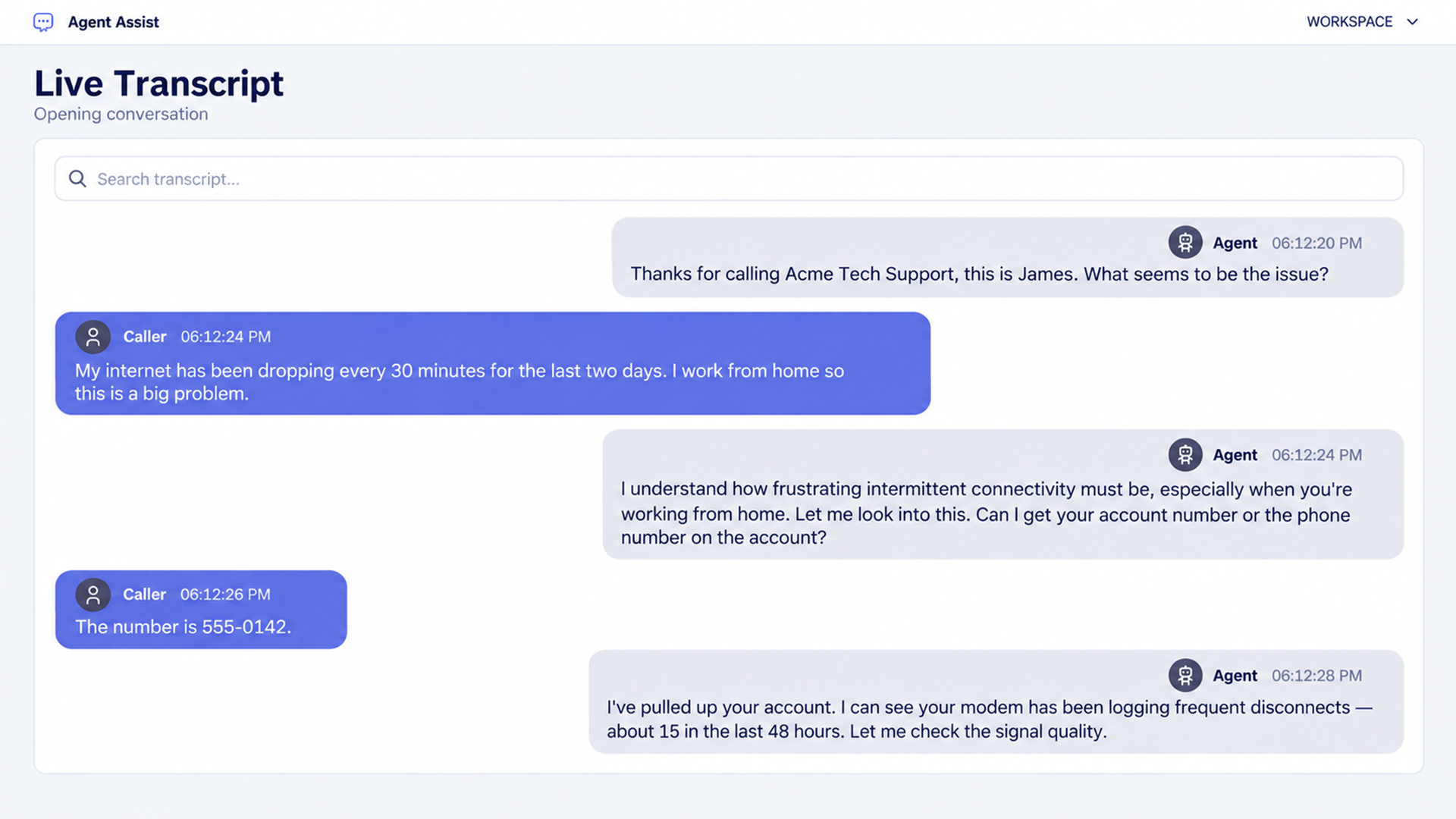
The demonstration opens with a searchable transcript. Caller and agent messages appear separately, with timestamps attached to each contribution.
The customer describes repeated internet drops. James acknowledges the disruption, asks for the account details, and then describes the modem’s recent disconnection history. The visible transcript gives a reviewer both the reported problem and the information James brings into the conversation.
What the transcript establishes
Three details shape the next stage of this call.
- The connection has been unreliable for two days.
- The customer depends on it while working from home.
- James reports repeated disconnections in the modem history.
Those details support further investigation into the connection. They also explain why a temporary restoration and a lasting repair need to be recorded separately.
The transcript search field gives the representative a way to locate an earlier statement. For example, James can revisit what the customer said about the duration of the problem while working through the troubleshooting steps.
How customer history contributes
Orvera’s Agent Assist can assemble CRM information and previous-session context into summary cards. An agent assistant can therefore bring earlier contacts and relevant customer information into the current interaction.
The implementation needs to establish which records are available. Account history, previous support contacts, and diagnostic information may come from different systems.
In this demo, James states that he has reviewed the account. The transcript records his statement. A production review would also use the connected account or diagnostic record when verifying what was checked.
Step 2: Recommend the Next Response and Troubleshooting Action
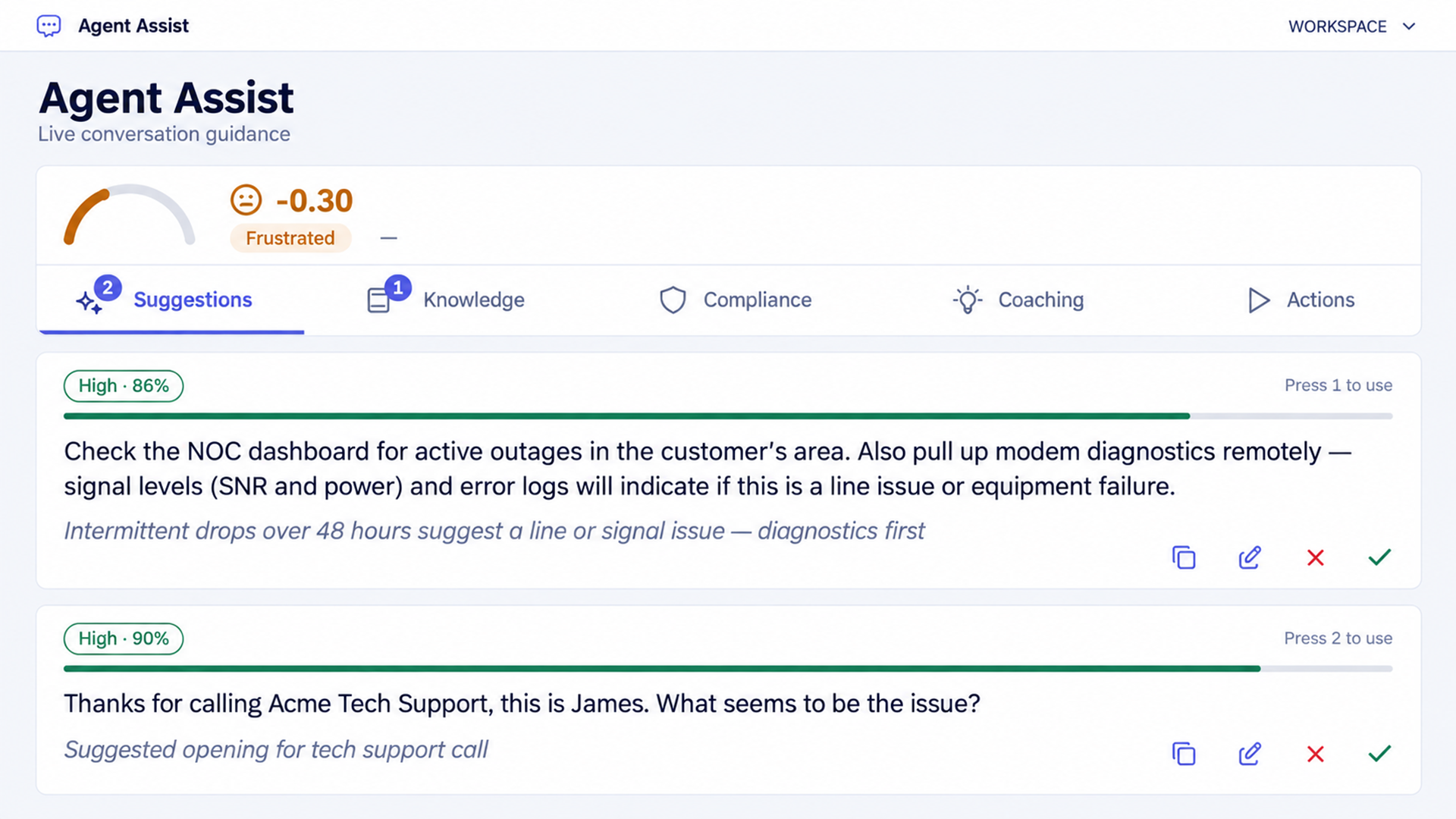
The Agent Assist sidebar groups guidance into Suggestions, Knowledge, Compliance, Coaching, and Actions.
Two suggestion cards are visible. One proposes the opening greeting. The other recommends checking for area outages and reviewing modem diagnostics to investigate a possible line or equipment problem. Each card also provides a short explanation of why the guidance is relevant.
Why the suggested action follows from the conversation
The customer describes a recurring fault. The troubleshooting suggestion therefore directs James toward the network operations dashboard and the modem’s signal and error information.
That sequence gives the representative a specific next step. It also gives a supervisor something concrete to evaluate later.
A useful review would ask whether the guidance matched the reported symptoms, whether it appeared at a useful point, and whether the agent followed the appropriate diagnostic path.
What the agent can do with a suggestion
The interface supports accepting, editing, copying, or dismissing a suggestion. The demo also displays numbered shortcuts for using the cards. Orvera’s published capability record describes logging how each suggestion was handled.
These choices serve different purposes. Editing lets James adapt wording to the customer. Dismissing a card can be appropriate when the suggested step has already been completed or does not fit the current circumstances.
The resulting feedback gives supervisors a starting point for examining the usefulness of the guidance.
How to read the confidence labels
The cards display a High label and a percentage. Those values belong to the demonstration interface.
For deployment decisions, establish how the score is defined and test recommendations against the approved workflow. Useful checks include whether the source is relevant, whether the facts are correct, and whether the proposed action fits the customer’s situation.
Step 3: Bring the Approved Troubleshooting Guide Into View
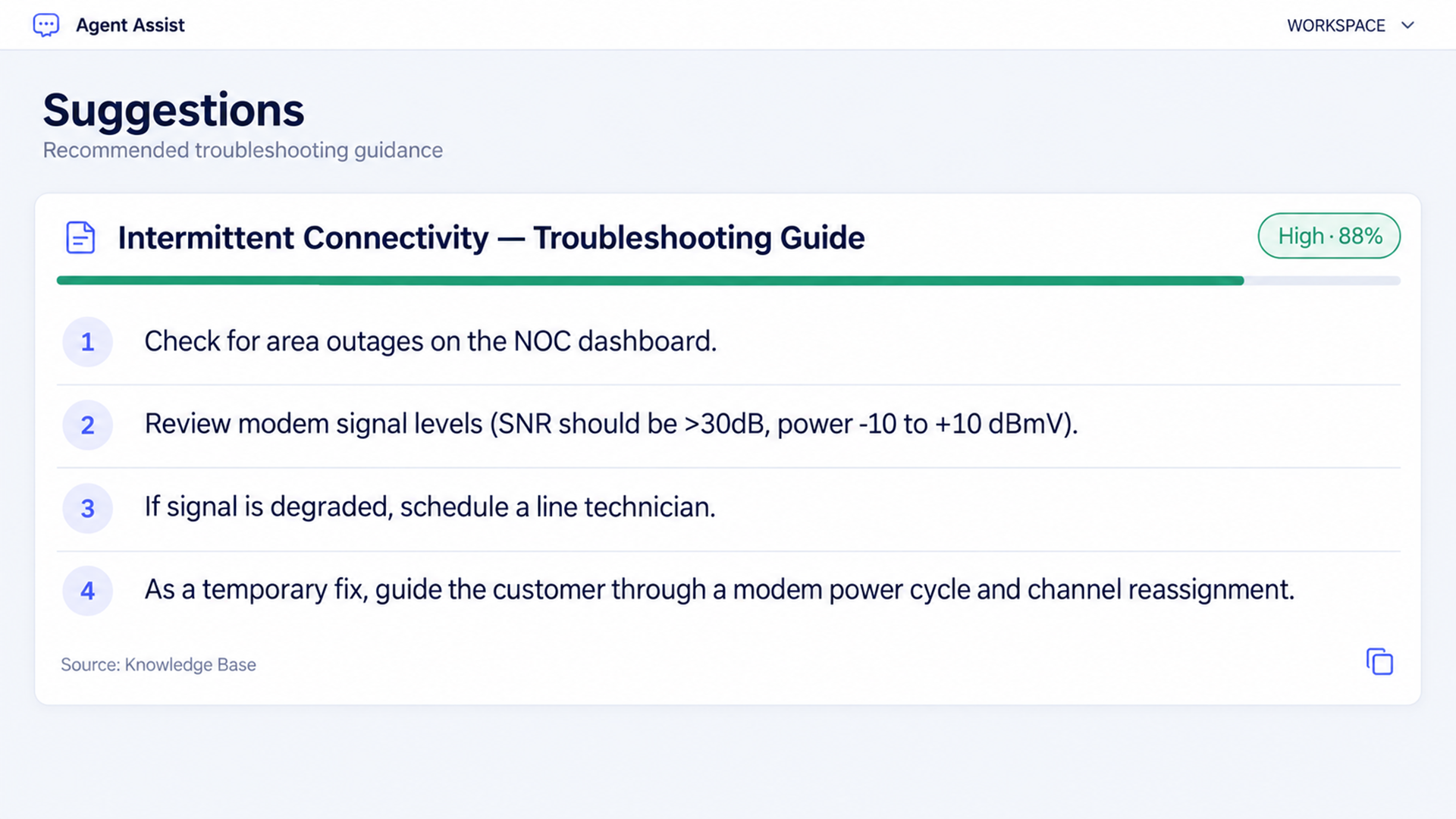
The knowledge card presents an intermittent connectivity troubleshooting guide. It covers checking for area outages, reviewing modem signal levels, arranging a line technician when indicated, and using a modem power cycle as a temporary measure. The card identifies the source as the knowledge base.
How knowledge supports the handling decision
The suggestion tells James what to examine next. The knowledge card supplies the procedure behind that recommendation.
Orvera documents knowledge suggestions with citations across voice and non-voice channels. This gives the representative a source to inspect when checking the answer or procedure.
For this example, the source contains technical thresholds and handling steps. A production knowledge base should carry the network provider’s validated procedures, including the conditions under which a technician visit is appropriate.
Why knowledge maintenance belongs in the operating plan
A useful implementation gives each source an owner and a review process. Product changes, revised policies, and new service procedures need to reach the guidance shown to representatives.
Orvera supports maintaining knowledge sources through ingestion, scheduled refresh, duplicate removal, and organization of content. It also supports identifying knowledge gaps and recommending updates.
For this call, that means the troubleshooting guide should remain consistent with the diagnostic tools, equipment, and service options the team actually uses.
Step 4: Coach the Agent Around the Customer’s Immediate Need
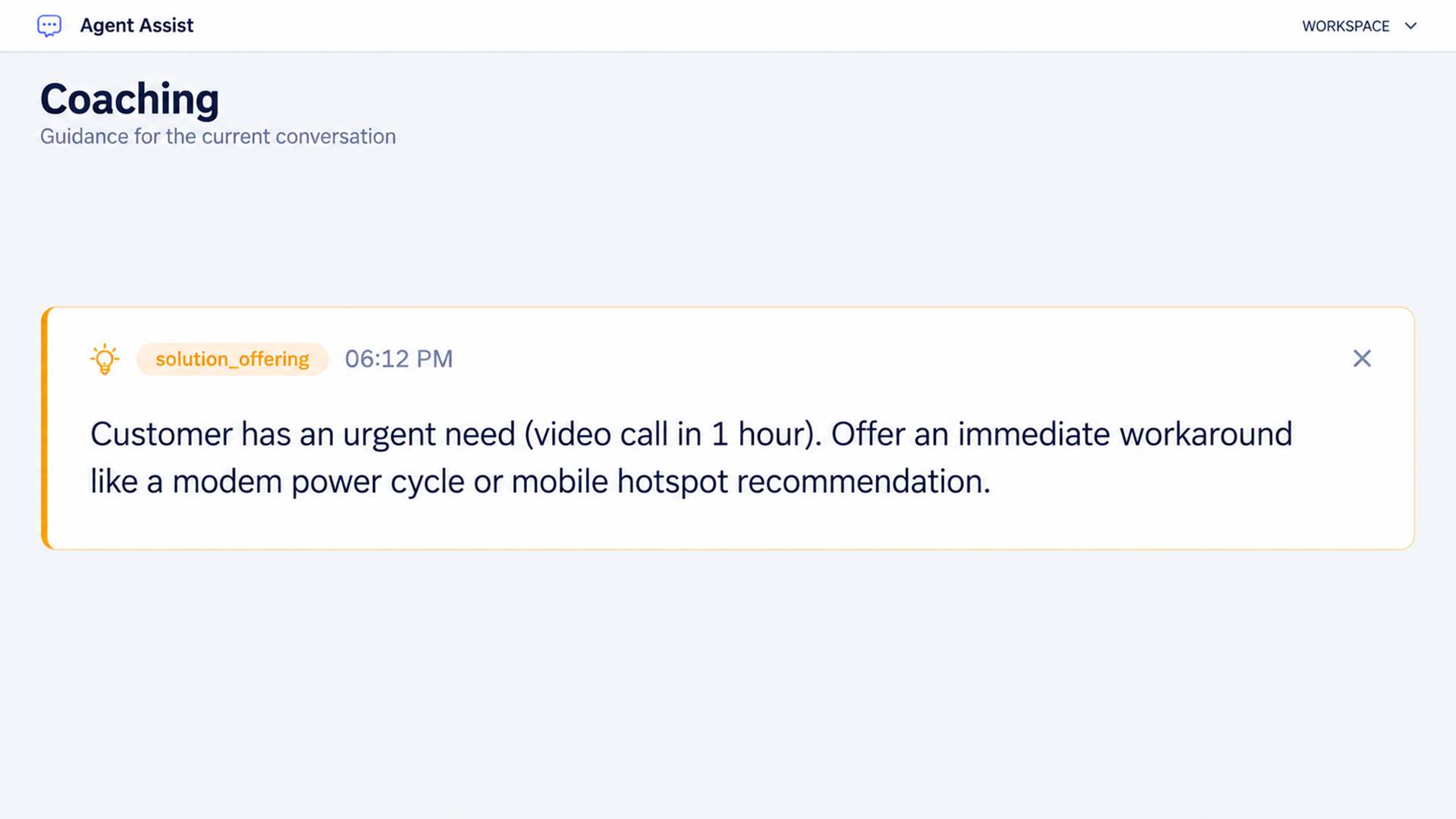
The coaching prompt identifies an urgent detail. The customer has a video call in one hour.
It recommends offering an immediate workaround, such as a modem power cycle or a suitable mobile hotspot option. This adds a practical response to the customer’s timing constraint while the technical investigation continues.
How coaching changes the conversation
The customer needs help with both the recurring fault and the next hour. James can explain the investigation, check whether a temporary option is suitable, and set expectations about further service.
In this example, real-time agent assistance helps connect the technical process to the customer’s circumstances. The proposed workaround still needs the representative’s judgment about suitability and the approved service procedure.
Step 5: Present the Service Requirement at the Relevant Moment
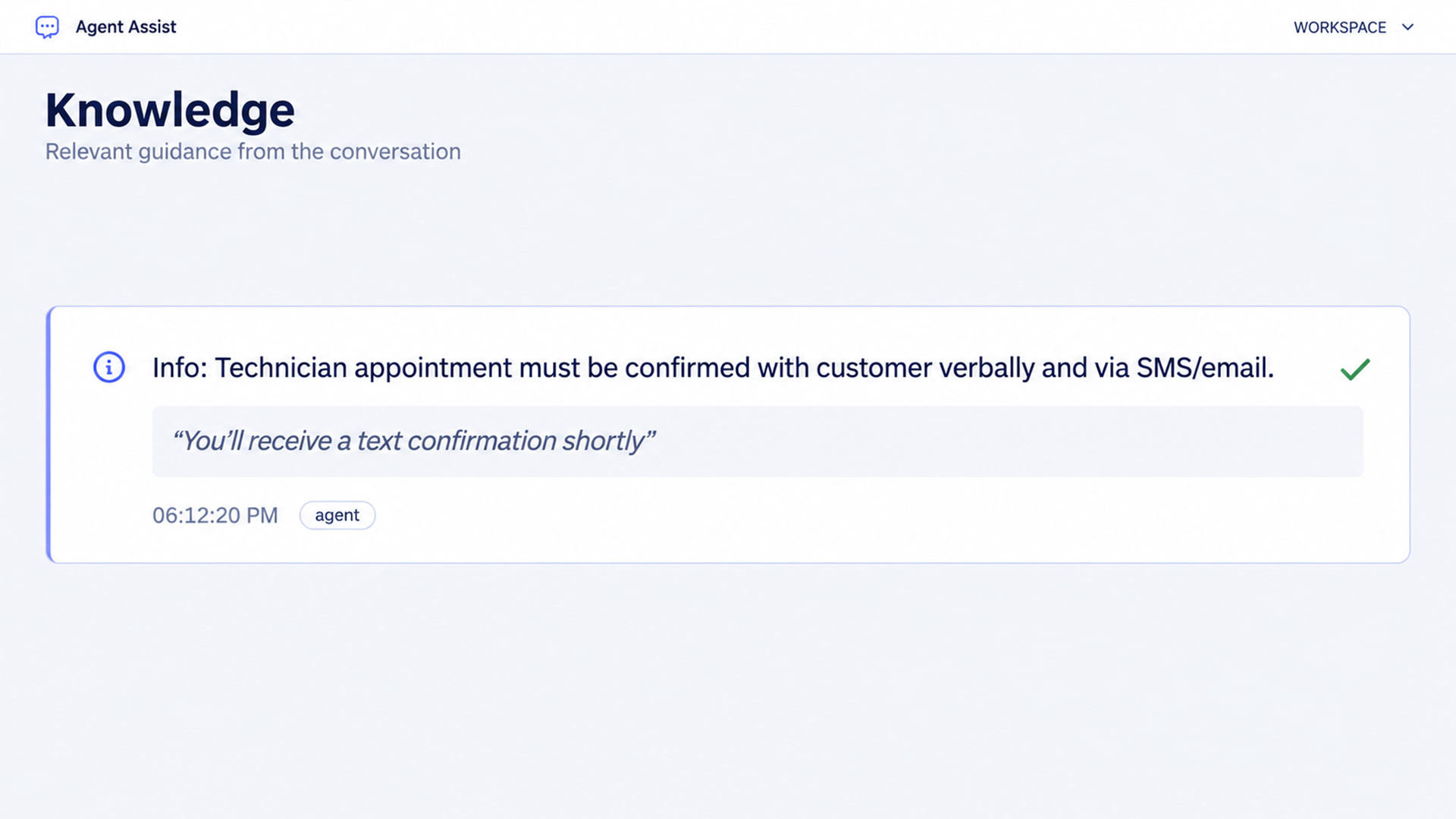
The compliance card states that a technician appointment must be confirmed verbally and through SMS or email. It also shows the agent’s statement that a text confirmation will follow.
How the reminder supports the workflow
This card makes a particular service requirement visible during the interaction. James can check that the customer understands the appointment window and that the required confirmation process is being followed.
The requirement shown belongs to the demonstration’s configured service process. Each enterprise should define its own applicable rules, wording, severity levels, and review responsibilities.
Orvera’s published Agent Assist description includes flagging compliance requirements during the conversation. Its system-update capabilities also support audit trails and approval options.
What confirms that the required action happened
The card displays a check mark beside the relevant statement. The transcript records what James told the customer.
Confirmation that the appointment exists comes from the scheduling record. Confirmation that a message was sent or delivered comes from the messaging system.
A well-defined review process identifies which evidence is needed for each step. This keeps the spoken commitment, the system action, and the completion status clear.
Step 6: Confirm the Workaround and Explain the Technician Visit
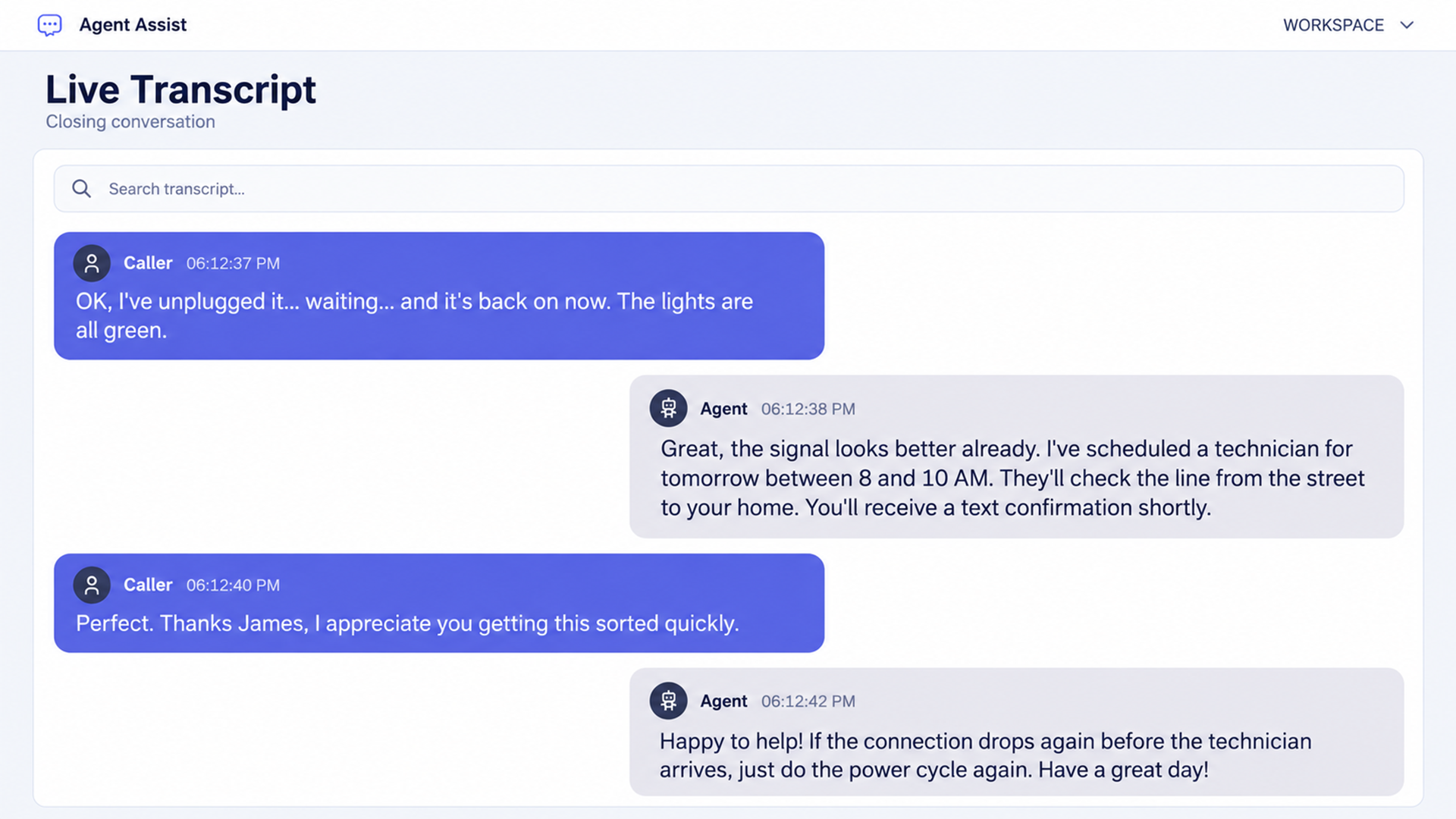
Near the end of the demo, the customer says the modem is back on and its lights are green. James says the signal looks better and states that a technician has been scheduled for the following morning between 8 and 10.
He explains that the technician will inspect the line to the home and that a text confirmation will follow. The customer thanks him, and James gives further guidance if the connection drops again before the visit.
Keep the service status precise
The visible outcome has two parts. Connectivity has returned during the call, and a technician visit remains part of the service plan.
For reporting, record the temporary restoration and the outstanding technician work separately. This preserves an accurate account of what the interaction accomplished.
The same principle applies to other workflows. A submitted refund, a confirmed appointment, and a completed repair each represent a different stage of service.
Connect commitments to the records that prove completion
Orvera documents updates to CRM, IT service management systems, and knowledge bases, with audit trails and agent approval options. It also tracks commitments made by human representatives and flags incomplete follow-ups.
For the troubleshooting scenario, implementation should establish how the appointment reference, confirmation status, and remaining service work are recorded.
The transcript provides the conversation evidence. The connected business systems provide the operational evidence.
Step 7: Review the Sentiment Display in Context
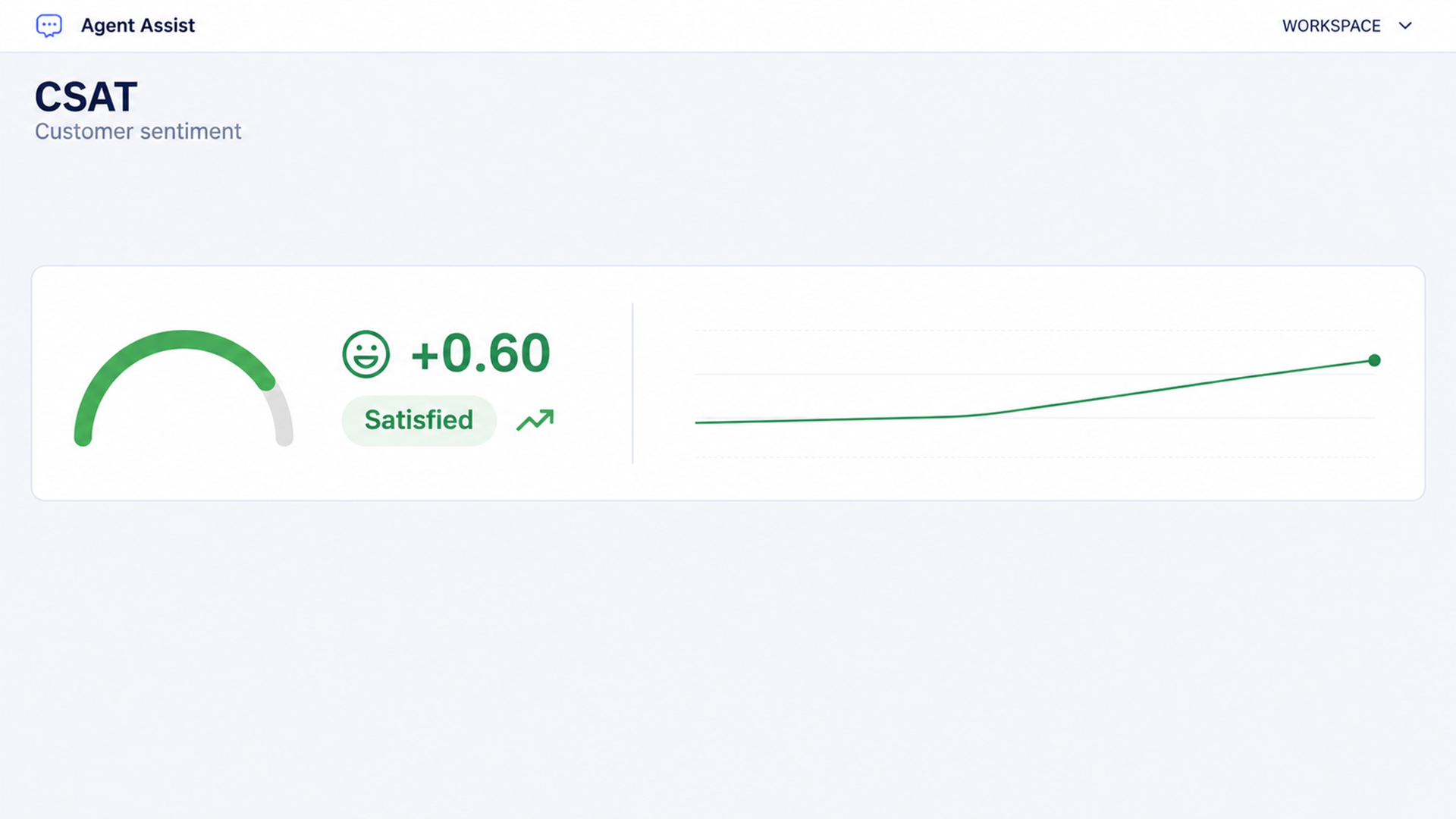
The demo begins with a frustrated sentiment display at negative 0.30. Later, the supplied gauge shows positive 0.60 and the label Satisfied. These values illustrate how the interface can present a change in the conversation.
How leaders should interpret this signal
Sentiment is an interpretation of the interaction. Customer satisfaction measurement uses feedback collected from the customer. Orvera’s Voice of Customer (opens in a new tab) offering brings survey responses and interaction information together for broader review.
In this demo, the customer’s closing response is positive. The technician visit remains outstanding. Both details belong in an accurate evaluation of the service outcome.
Live voice sentiment availability should be confirmed for the planned deployment. The reference documents live non-voice sentiment as available and places live voice sentiment on the roadmap.
Step 8: Preserve the Sequence in the Event Timeline
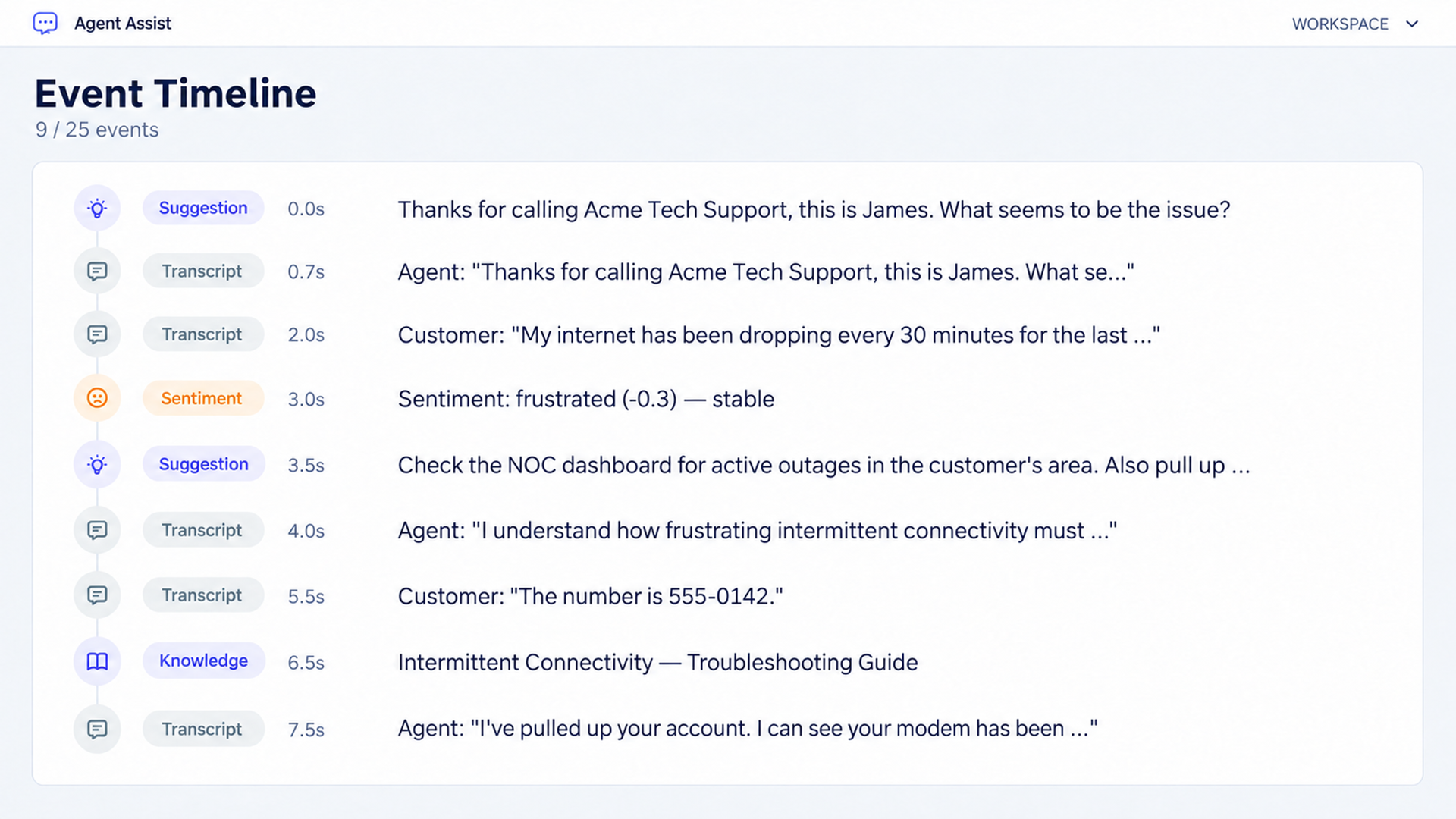
The event timeline brings several kinds of activity into one chronological view. The visible section contains transcript entries, suggestions, a sentiment event, and the retrieved troubleshooting guide.
Each entry has an elapsed-time marker. This lets a reviewer follow the order in which the conversation and assistance developed.
What a supervisor can investigate
The sequence helps answer practical questions.
- What had the customer said before the recommendation appeared?
- Which troubleshooting information was available to the agent?
- How did the agent respond after receiving the guidance?
Orvera’s published record describes a searchable timeline that captures suggestions and how they were handled, along with coaching and compliance events.
For supervisors, the value is the ability to examine the interaction in order. A recommendation can be appropriate in content and still arrive at an unhelpful point in the conversation.
The demo’s elapsed markers illustrate that sequence. Production performance testing should separately measure response times under the expected operating conditions.
How AI Summarization Supports After-Call Work
Orvera’s Agent Assist generates interaction summaries during the conversation and supports post-call processing of transcripts and summaries into connected records.
A useful summary preserves the original request, the checks performed, the customer’s response, and any work still required.
For this demonstration, an illustrative draft could be read as follows.
The customer reported recurring internet disconnections over two days while working from home. The agent reviewed the account and described repeated modem disconnections. The customer completed a modem power cycle and reported that connectivity had returned. The agent stated that a technician visit was scheduled for the following morning between 8 and 10 and that a text confirmation would follow. Technician assessment and confirmation delivery remain items to verify in the connected service records.
This is an example based on the visible conversation, rather than a screenshot of generated summary output.
Review the summary against the actual interaction
The review should preserve the difference between something reported, something promised, and something verified in a system.
For this call, the summary should accurately retain the temporary restoration and the planned technician visit. A production record should also use the actual appointment date and reference when available.
Before the summary becomes part of the case record, the review process should check important details such as account references, dates, customer commitments, and unresolved work.
Using AI Agent Assist Beyond Voice Support
The troubleshooting demo shows a voice support scenario.
Orvera also documents next-best-action guidance on synchronous non-voice channels and knowledge suggestions across voice and non-voice interactions.
The same service question can therefore be examined across different customer entry points, with the exact channel behavior established during implementation.
AI agent assist for in-app support escalations
Consider the same customer beginning in an app. They describe the connection problem, attempt a troubleshooting step, and then ask to speak with a representative.
AI agent assist for in-app support escalations should help the receiving representative understand what has already happened.
Orvera’s platform supports handoffs with retained context, a structured summary, and recommended next steps. The full transcript can be available on demand.
For the app workflow, the implementation should establish which information moves with the interaction. The useful record would identify the customer’s request, the steps already attempted, the reason for escalation, and any outstanding service action.
That gives the human representative a clear starting point for continuing the work.
Writing and multilingual assistance
Orvera documents writing assistance for tone, grammar, clarity, and verbosity. It also supports language detection, real-time translation, and language switching during an interaction.
The broader platform supports more than 80 languages. For human agents, the reference describes two-way translation on chat and voice, with context preserved during language changes.
A multilingual rollout should test the actual language pairs, terminology, and customer situations the team handles. Those checks are especially useful when service procedures contain specialist terms or exact statements that must retain their meaning.
Customer-specific information
Agent Assist can display customer profiles and relevant content to support personalization, cross-sell, and upsell.
For a service operation, this capability needs a defined purpose. The information shown should help the representative complete the current task or discuss a relevant option within the approved process.
How Supervisors Use the Agent Assist Analytics Dashboard
The supplied dashboard brings six views together. It shows session volume, suggestion feedback, compliance severity, sentiment trends, suggestions per day, and agent acceptance rates.
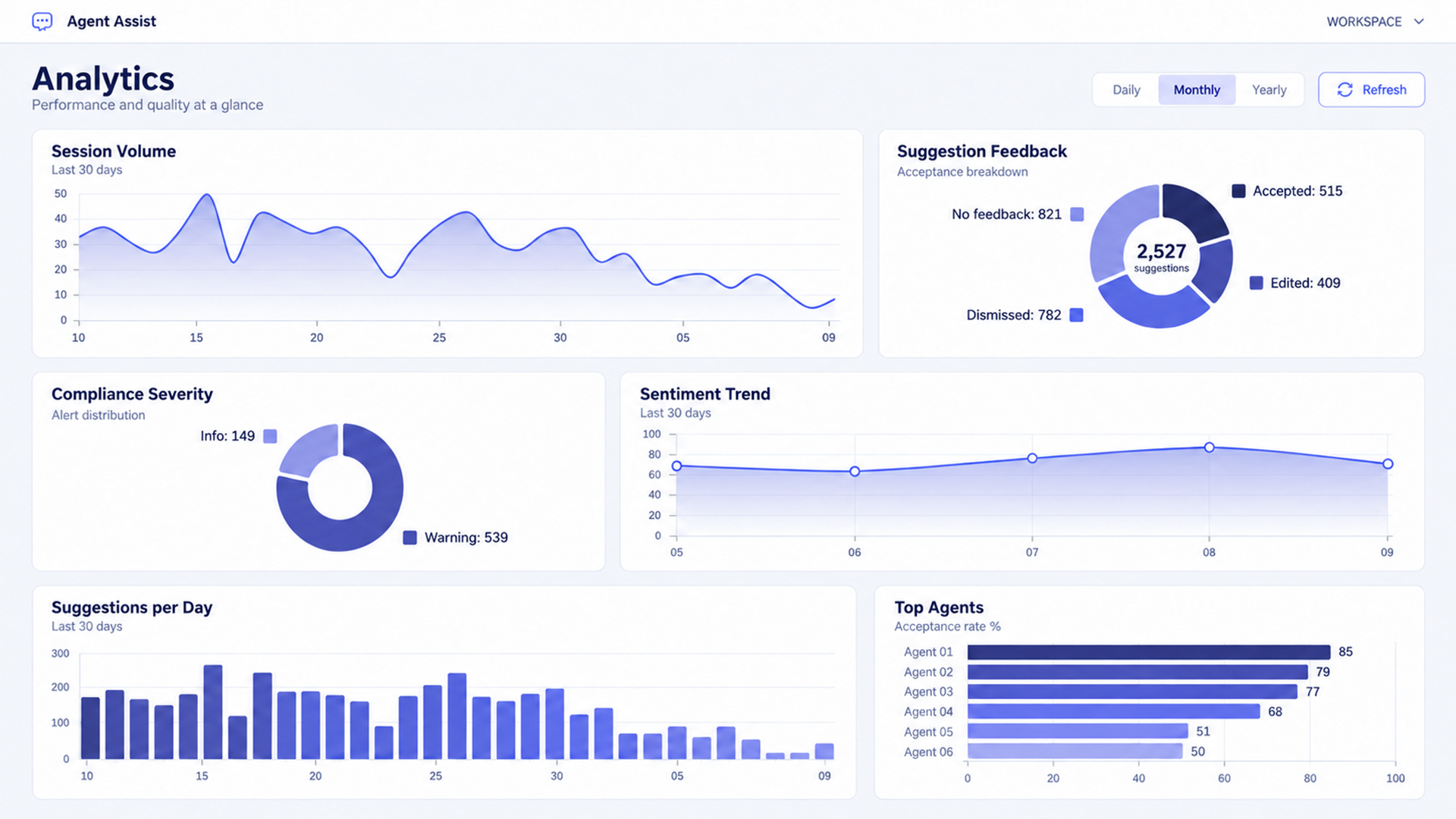
Each view supports a different management question.
| Dashboard View | What It Shows | Useful Review Question |
|---|---|---|
| Session Volume | Assisted sessions over the displayed period. | Is usage reaching the teams and workflows in scope? |
| Suggestion Feedback | Accepted, edited, dismissed, and unanswered suggestions. | Which guidance is useful, and which needs investigation? |
| Compliance Severity | The distribution of displayed alert levels. | Which alert types deserve closer review? |
| Sentiment Trend | The displayed sentiment pattern over time. | Which interactions should be examined alongside customer feedback? |
| Suggestions per Day | Daily suggestion activity. | Is the volume of guidance appropriate for the work being handled? |
| Top Agents | Agent rankings by the displayed acceptance measure. | How does adoption vary across representatives and their assigned work? |
Read suggestion feedback carefully
Acceptance is one piece of evidence about adoption. An edited suggestion may have been useful but needed clearer wording. A dismissed suggestion may have repeated a completed step. A suggestion with no feedback needs further context before a conclusion can be drawn.
During the pilot, agree how these categories are counted. Establish whether edited suggestions contribute to the adoption measure and how unanswered suggestions affect the denominator.
That definition helps leaders interpret changes consistently across teams and review periods.
Compare usage with service results
The dashboard’s activity measures can help identify what to investigate. The service evaluation should also examine handling quality, repeat contacts, summary accuracy, and completion of promised actions.
For the internet troubleshooting example, a useful review would examine whether the technician booking was recorded correctly, whether the confirmation process was completed, and whether the customer needed to contact support again.
The screenshot values are demonstration data. They provide an example of the reporting views.
How Compliance Rule Reporting Helps Set Priorities
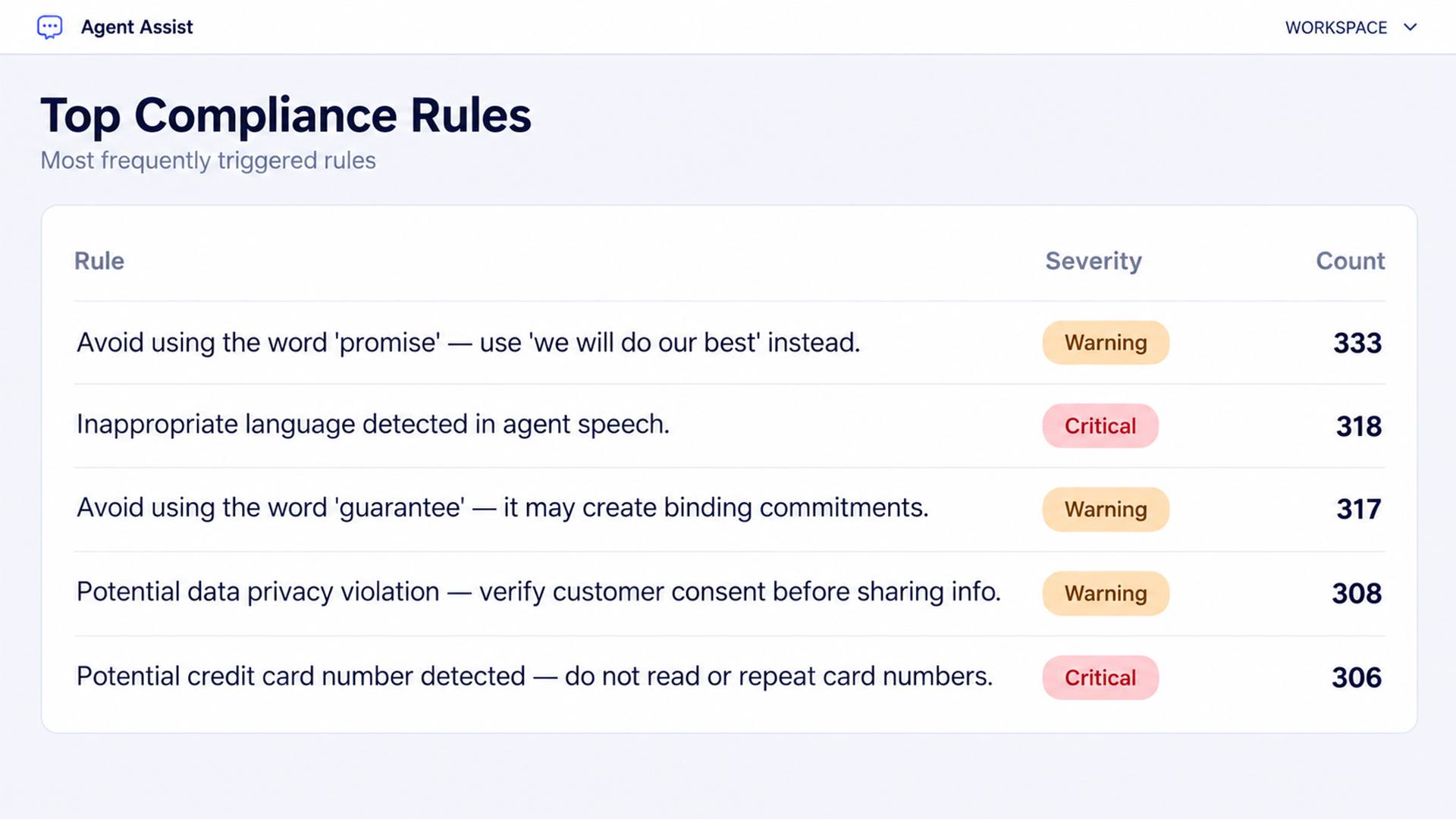
The Top Compliance Rules table groups configured rules by severity and count.
The visible examples concern commitment language, inappropriate agent speech, customer consent before sharing information, and potentially sensitive payment details. Warning and Critical labels distinguish the displayed severity levels.
Turn a recurring alert into a review decision
A quality leader can use this table to choose which conversations to inspect. Repeated alerts around a particular phrase may prompt a review of the script, the guidance, or the rule itself.
Confirmed findings require the conversation and the relevant policy. The rule count gives the team a place to begin that review.
Before comparing this table with another dashboard panel, establish the reporting period, population, and counting unit. A count may represent alerts, sessions, or reviewed findings, depending on the defined measure.
What Makes an AI-Generated Summary Useful for Audit Review?
Teams evaluating agent assist platforms with AI summarization that meets audit standards should begin with their own review requirements.
A useful evaluation asks whether the record can explain the customer’s request, the guidance available to the representative, the response given, and the action completed.
Orvera’s AI Quality Management (opens in a new tab) can apply the customer’s criteria to Agent Assist sessions. Its documented evaluation covers both conversation behavior and actions in connected systems. Criterion results can link to the relevant transcript moment and, where applicable, the CRM or case-system record.
Follow the evidence from the conversation to the action
For this troubleshooting call, the evidence review would follow a practical sequence.
The transcript establishes the connectivity problem. The knowledge source explains the recommended procedure. The agent’s response shows what was communicated. The summary records the interaction. The scheduling and messaging records establish the follow-up status.
Meeting a particular audit requirement depends on the configured process and the evidence that requirement calls for. The acceptance criteria should be agreed with the people responsible for reviewing the operation.
Define the evidence before rollout
For an appointment workflow, the review may need the booking reference, appointment window, customer confirmation, and message status.
For another workflow, the relevant evidence will differ. A refund review may require a transaction record. An account-change review may require the updated field and the approval behind it.
Orvera’s documented approach identifies the relevant system objects and fields with the customer during deployment.
Deploying Orvera AI Agent Assist on Existing Systems
Orvera’s Agent Assist rollout takes about 2 to 4 weeks, depending on knowledge-base size and integration scope. The process covers preparing knowledge, piloting with one team, expanding deployment, and reviewing performance after launch.
Connect the conversation, knowledge, and business records
The deployment should establish which information can be read, which updates are permitted, and where agent approval is required.
For this demo’s workflow, that means agreeing how conversation content, troubleshooting knowledge, account information, appointment records, and confirmation status are connected.
Pilot one service workflow with clear acceptance criteria
A focused pilot gives the team a manageable set of decisions to examine.
- Test guidance against real examples of the chosen service request.
- Review whether the knowledge and suggested actions match the approved procedure.
- Check whether the interaction record accurately preserves completed and outstanding work.
Orvera performs onboarding, knowledge-base setup, agent training, and change management.
Representatives should understand how to review suggestions and report problems. Supervisors should agree how those problems will be investigated and who owns changes to knowledge, prompts, or workflow rules.
Evaluate AI agent assist software through operational evidence
Before expanding deployment, compare assisted interactions with an appropriate baseline. Account for differences in case complexity, agent experience, and the work assigned to each team.
Useful measures include average handle time, after-call work, repeat contacts, summary corrections, and completion of follow-up actions. Review these alongside suggestion feedback and quality findings.
For this support scenario, a shorter call is one observation. A correct appointment, accurate documentation, and appropriate follow-up provide additional evidence about the service delivered.
Keep knowledge and guidance current
Orvera supports using interaction data, quality findings, and outcome signals to identify improvements. The reference describes reviewing proposed changes before promoting them into live operation.
A standing review can therefore connect recurring problems to specific changes. A frequently edited response may need clearer wording. Repeated knowledge gaps may require a new article. An incomplete service step may require a workflow adjustment.
Bring a representative support call and its approved procedure to an Orvera AI Agent Assist demo (opens in a new tab). Review how the guidance appears, how the agent responds, and how the resulting work can be checked.
Frequently asked questions
It helps the representative access relevant knowledge, choose the next action, and handle the conversation. Orvera also documents live summaries, communication support, coaching, system updates, and commitment tracking. The human representative reviews the guidance while serving the customer.
A team evaluating an agent assist chatbot should establish who receives its responses. In the Orvera demo, suggestions are presented to the human representative. Orvera’s customer-facing AI agents can separately conduct customer conversations and pass context to a person when the interaction requires a handoff.
Yes. The demonstrated controls support accepting, editing, copying, and dismissing suggestions. These choices let the representative adapt the guidance to the interaction and provide feedback that can be examined during review.
Orvera documents updates to CRM, IT service management systems, and knowledge bases, with audit trails and approval options. It also tracks commitments made by human representatives and flags incomplete follow-ups. The exact fields, actions, and approval rules are established for the deployment.
Check summary accuracy, access to the original conversation, the source of relevant guidance, and evidence of completed actions. Agree which approvals and records the review requires. Validate the configured process against those requirements before relying on the summaries for that purpose.
Orvera supports handoffs with retained context, a structured summary, and recommended next steps, with the transcript available on demand. For an in-app workflow, the implementation should define which customer information, attempted steps, and outstanding actions are carried into the handoff.
The reference documents two-way translation for human agents on chat and voice, including language switching with context retained. The wider platform supports more than 80 languages. Deployment testing should cover the language pairs and service terminology the operation uses.
It shows the demonstration’s interpretation of the conversation at that point. A supervisor should examine it alongside the transcript, customer feedback, and service status. In this example, the closing sentiment is positive while the technician assessment remains part of the follow-up plan.
The operating process should give the representative a clear route to clarification, supervisor review, or an approved escalation. Orvera supports identifying knowledge gaps and recommending content updates. Proposed improvements should pass review before they become live guidance.
Acceptance measures how guidance is used. Performance evaluation also needs the interaction’s complexity, response quality, and completed work. Review accepted, edited, dismissed, and unanswered suggestions in context, then compare that feedback with the service evidence.
Orvera does a 2 to 4 week window for Agent Assist rollout. Timing depends on knowledge-base size and integration scope. Scoping should establish the queues, sources, connected systems, and workflow being deployed.
Agree who can view transcripts and summaries, which systems can be accessed, which actions require approval, and how the required records will be handled. Security should confirm the deployment-specific data-handling requirements, while the operating team defines the service and review process.

Written by
Tania Chakraborty
Tania is a Senior Growth Marketing Specialist at Orvera, where she focuses on developing data-driven marketing strategies that drive brand visibility, audience engagement, and business growth. Her work spans growth marketing, content strategy, search engine optimization, demand generation, and digital campaigns for B2B technology audiences. She is particularly interested in the intersection of artificial intelligence, customer experience, and enterprise technology, translating complex ideas into clear, insightful content that connects business challenges with practical solutions. Through her work, she explores emerging industry trends, evolving customer expectations, and the role of AI in transforming how businesses engage with their customers.