Phone tree vs conversational AI: what contact centers should know
Phone trees route callers through fixed menus. Conversational AI understands intent, completes supported workflows and escalates with context. Here is what contact centers should weigh before switching.


Key highlights
Highlights
- Phone trees route callers through fixed menu options, while conversational AI understands natural language and responds based on intent.
- Phone trees are useful for basic routing, but they often create friction when customers have complex or urgent needs.
- Conversational AI can handle customer interactions more dynamically by identifying intent, retrieving data, completing workflows, and escalating when needed.
- Contact centers are moving toward conversational AI because it improves speed, personalization, scalability, and operational visibility.
- Conversational AI can reduce wait times, lower manual workload, improve containment, and support 24/7 service coverage.
- Phone trees can become difficult to maintain as call types, departments, products, and customer journeys expand.
- Orvera helps CX teams move beyond static routing through AI voice agents, workflow automation, summaries, QA, analytics, integrations, and governed escalation.
- The strongest contact center model is not just faster routing. It is a faster resolution with operational control.
What Is A Phone Tree, And How Does It Work?
A phone tree is a traditional call routing system (opens in a new tab) that directs callers through a series of pre-recorded menu options. The caller presses numbers or uses short voice commands to move through the menu until they reach a department, agent, voicemail box, or information line.
Phone trees are still common because they are familiar, relatively easy to understand, and useful for basic routing. Their limitations become clear when customers need faster answers, more flexible support, or help with issues that do not fit neatly into menu categories.
Overview of phone trees
A phone tree works by organizing call paths into branches. Each branch represents a predefined choice.
For example:
- Press 1 for sales
- Press 2 for billing
- Press 3 for technical support
- Press 4 for account information
- Press 5 to speak with an agent
The system follows a fixed structure. Every caller must choose from the available options, even if none fully match the reason for the call.
Phone trees can help businesses reduce basic routing work, but they do not understand customer intent beyond predefined selections.
Limitations of phone trees
Phone trees often become frustrating because they depend on the customer navigating the system correctly.
Common limitations include:
- Long menus
- Repeated transfers
- Limited personalization
- Poor handling of complex issues
- No real understanding of customer intent
- Difficult updates when business processes change
- Higher risk of callers choosing the wrong option
- Limited visibility into why customers are calling
For contact centers, the biggest issue is not only customer frustration. Phone trees can also create operational blind spots. Leaders may know where calls were routed, but they may not know whether the customer’s request was resolved, why the customer called, or where the journey broke down.
Want to move beyond static call routing? Orvera helps CX teams deploy AI voice agents that understand intent, complete supported workflows, and escalate with context. (opens in a new tab)What Is Conversational AI, And How Does It Work?
Conversational AI is technology that allows customers to interact with automated systems using natural language. Instead of pressing numbers through a fixed menu, customers can explain what they need in their own words.
Omnichannel conversational AI (opens in a new tab) can be used across voice, chat, messaging, and digital channels. For contact centers, AI voice agents are especially important because many high-value customer interactions still happen over the phone.
Defining conversational AI
Conversational AI uses technologies such as natural language understanding, speech recognition, large language models, text-to-speech, and workflow automation to understand and respond to customer requests.
A conversational AI system (opens in a new tab) can identify the customer's request, retrieve relevant information, follow business rules, trigger actions, and decide when to escalate.
Examples include:
- “I need to reschedule my appointment.”
- “Where is my order?”
- “I want to check my claim status.”
- “I need help with my bill.”
- “Can you update my address?”
- “I want to renew my policy.”
Rather than forcing the caller into a menu, conversational AI starts with the customer’s intent.
How conversational AI works
Conversational AI follows a more flexible process than a phone tree.
A typical AI voice workflow may include:
- The customer speaks naturally.
- The system transcribes the request.
- The AI identifies intent and context.
- The system retrieves information from connected tools.
- The AI follows approved workflow logic.
- The system completes the supported task or routes the interaction.
- A summary, outcome, and QA trail can be generated.
For contact centers, conversational AI quality depends on more than the model alone. Strong deployments need integrations, workflow design, compliance controls, analytics, and clear escalation paths.
Key Differences Between Phone Trees And Conversational AI
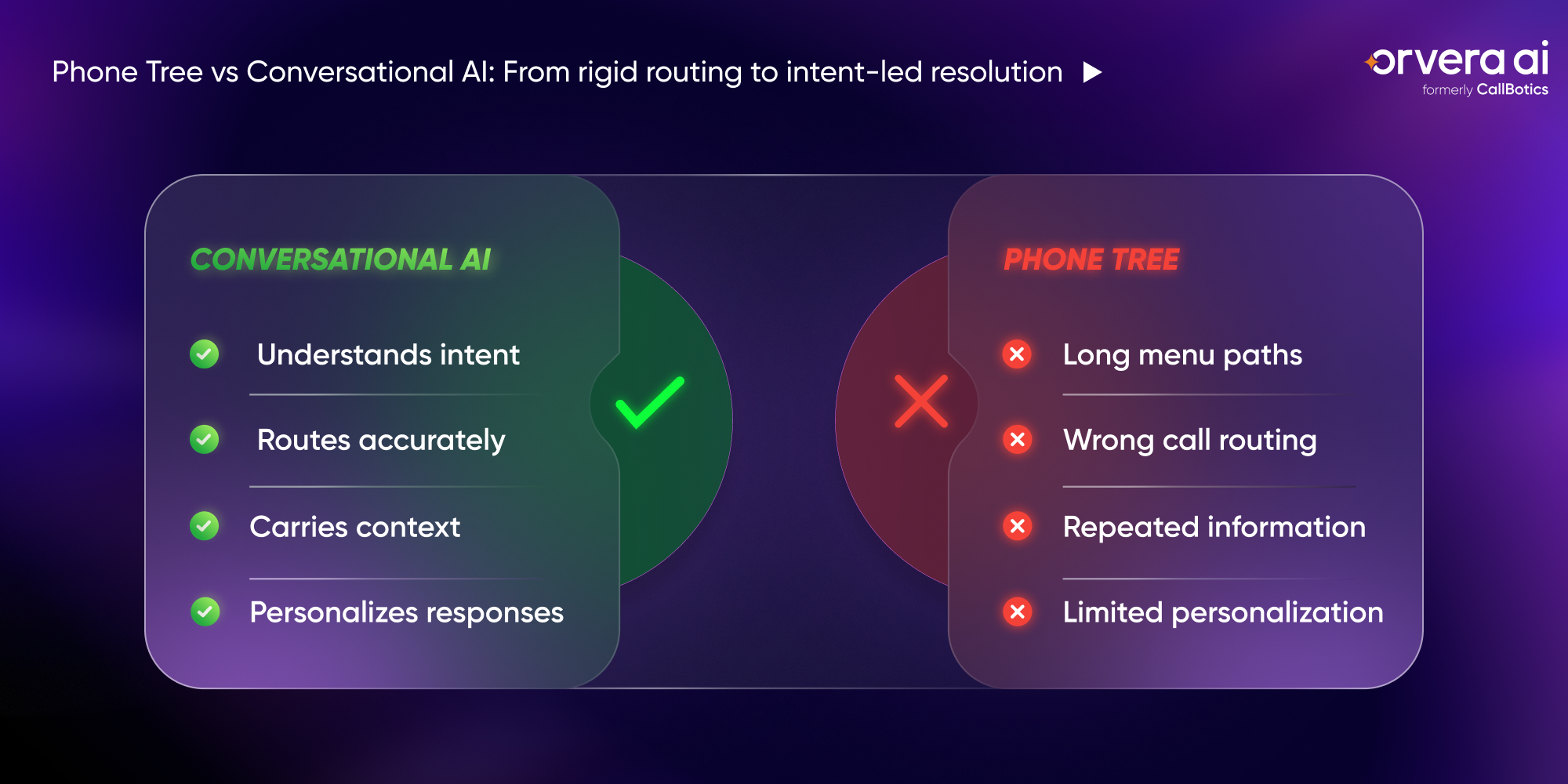
Phone trees and conversational AI both help contact centers manage calls, but they work in fundamentally different ways. Phone trees route customers through fixed paths. Conversational AI interprets customer intent and can support dynamic, workflow-based resolution.
The difference matters because modern customers do not want to spend time translating their problem into a menu option. They want the system to understand what they need and help them complete the task.
Functionality
Phone trees are routing systems. Their main purpose is to move calls from one place to another.
Conversational AI is an interaction technology. It can understand requests, ask follow-up questions, verify details, retrieve data, complete workflows, and escalate when needed.
| Area | Phone tree | Conversational AI |
|---|---|---|
| Input method | Keypad or fixed voice command | Natural language |
| Main function | Route calls | Understand and resolve requests |
| Customer path | Fixed menu | Dynamic conversation |
| Personalization | Limited | Based on customer data and context |
| Workflow execution | Minimal | Possible through integrations |
| Escalation | Usually blind transfer | Context-aware handoff |
Customer experience
Phone trees often increase customer effort because callers need to listen, choose, wait, and repeat information after transfer.
Conversational AI can improve customer experience (opens in a new tab) by reducing unnecessary steps. A customer can state the issue directly and receive a more relevant response.
For example, a phone tree may ask the customer to choose billing, account, or support. Conversational AI can understand: “I was charged twice for my last payment,” then move directly into the appropriate workflow.
Scalability
Phone trees can scale basic routing, but they become harder to manage as customer journeys expand. More departments, products, regions, languages, and issue types often lead to longer menus and more routing complexity.
Conversational AI scales differently. Once connected to workflows and systems, AI agents can handle more interaction types without forcing customers through longer menus.
Scalability becomes especially important during peak periods, such as open enrollment, claim surges, service outages, product launches, delivery spikes, or seasonal support windows.
Benefits Of Conversational AI For Contact Centers
Conversational AI gives contact centers a more flexible way to manage customer interactions. The goal is not only to reduce call volume for human agents. The goal is to resolve more customer needs faster, with better consistency and visibility.
For CX teams, the biggest benefits usually appear across efficiency, cost, customer experience, QA, and operational reporting.
Operational efficiency
Conversational AI takes common customer requests off the queue without manual intervention.
Common examples include:
- Status updates
- Appointment changes
- Payment reminders
- Account verification
- Order tracking
- Claim status checks
- Service request intake
- Follow-up calls
- Basic troubleshooting
- Escalation routing
AI systems can also reduce human error by following approved scripts, verifying required information, and logging outcomes consistently.
Cost savings
Conversational AI can reduce cost by lowering the number of interactions that require human handling. Savings usually come from fewer routine calls, shorter queues, lower after-call work, improved self-service completion, and better agent focus.
Cost reduction depends on workflow fit. A well-scoped AI voice workflow can reduce manual workload when the request is structured, common, and connected to the right systems.
For CX leaders, cost per resolved interaction is a stronger metric than cost per call. A cheaper call that does not resolve the customer’s request still creates repeat contacts and downstream effort.
Enhanced customer satisfaction
Customers usually want three things from a contact center:
- Faster help
- Clear answers
- Fewer transfers
Conversational AI can support all three when deployed well. It can respond instantly, understand the customer’s intent, complete supported workflows, and route complex issues with context.
Customer satisfaction improves when automation feels useful, not like a barrier between the customer and the business.
Challenges Of Using Phone Trees In Modern Contact Centers
Phone trees can still serve a role in simple environments, but they are increasingly misaligned with modern customer service expectations. Customers expect systems to understand context, remember information, and reduce effort.
As companies grow, phone trees often become more complex, less flexible, and harder to optimize.
Complexity of setup
Phone trees may appear simple at first, but they become difficult to manage as more teams, departments, and use cases are added.
Large phone trees often require:
- Multiple menu layers
- Department-specific routing rules
- Holiday and after-hours variations
- Language options
- Queue prioritization
- Regional routing
- Escalation paths
- Manual updates when processes change
Every new branch adds maintenance overhead. Poorly managed phone trees can quickly become confusing for both customers and internal teams.
Customer frustration
Customers often get frustrated when they cannot find the right option. Long menus, repeated prompts, wrong transfers, and forced restarts increase customer effort.
Common frustration points include:
- “None of these options fit.”
- “I already entered this information.”
- “Why am I being transferred again?”
- “I just want to speak to someone.”
- “The system does not understand my issue.”
Frustration rises when the phone tree delays support instead of helping the customer move toward resolution.
Lack of personalization
Phone trees treat most callers the same way. They usually do not adapt based on customer history, account status, previous interactions, or the reason for the call.
Conversational AI can use available context to create a more relevant interaction. For example, if a customer recently placed an order, the AI agent can prioritize order status intent. If a customer has an open claim, the system can guide the conversation toward claim updates.
Personalization does not mean overcomplication. It means using context to reduce effort.
If your contact center is still using phone trees for complex customer journeys, Orvera can help you design AI voice workflows that improve resolution, visibility, and customer experience. (opens in a new tab)How Conversational AI Enhances Customer Experience
Customer experience improves when the contact center reduces friction at the moment of need. Conversational AI helps by making support faster (opens in a new tab), more intuitive, and more available.
The strongest AI deployments do not try to make every interaction fully automated. They define which workflows AI should handle, where humans should step in, and how context should move between both.
Speed of response
Conversational AI can answer immediately (opens in a new tab), even during peak volume. Customers do not need to wait for an available agent to begin the interaction.
Faster response is especially valuable for:
- Appointment changes
- Delivery updates
- Billing questions
- Password resets
- Claim status checks
- Payment reminders
- Service outage updates
- Basic account requests
Speed matters most when the AI can also complete the next step. A fast answer without resolution may still create customer effort.
Personalization
Conversational AI can personalize interactions when connected to customer data, CRM records, ticketing systems, or operational platforms.
Personalized AI workflows can:
- Recognize returning customers
- Pull account context
- Confirm recent activity
- Adapt responses by issue type
- Route based on customer history
- Escalate with previous interaction context
- Avoid asking customers to repeat information
Better personalization creates a smoother customer journey and gives human agents more useful context when escalation is needed.
24/7 availability
Conversational AI enables contact centers to support customers outside standard business hours. That does not mean every issue must be resolved overnight. It means customers can still get help, complete common tasks, receive updates, or submit requests.
24/7 AI support is especially useful for industries with time-sensitive customer needs, such as healthcare, insurance, logistics, travel, retail, utilities, and financial services.
How Orvera Powers AI-Driven Contact Centers
Orvera helps CX teams (opens in a new tab) move from rigid phone trees to AI-driven customer interaction workflows built for real operational environments. Backed by 18+ years of contact center leadership experience, Orvera (opens in a new tab) connects AI voice agents with workflow execution, summaries, QA, analytics, dashboards, integrations, and governed escalation, helping teams resolve supported customer requests while maintaining visibility, control, and service consistency at scale.
Key Orvera (opens in a new tab) differentiators include:
- AI voice agents for inbound and outbound customer interactions
- Workflow execution for supported service requests
- Built-in QA and analytics across AI-handled and human-handled interactions
- Call summaries that reduce manual after-call work
- Executive dashboards for outcome and performance visibility
- CRM, ticketing, scheduling, billing, and contact center integrations (opens in a new tab)
- Governed escalation with context-rich human handoff
- Production-ready implementation for live operational environments
- Support for high-volume customer service workflows
- Operator-built design backed by contact center experience
Conclusion
Phone trees were useful when contact centers mainly needed structured routing. Modern contact centers need more than routing. They need systems that can understand intent, respond naturally, complete supported workflows, personalize interactions, and escalate with context.
Conversational AI gives contact centers a more flexible operating model. It helps reduce customer effort, improve service speed, lower manual workload, and provide better visibility into customer interactions.
The future of contact centers is not about replacing every human interaction. It is about using AI voice agents for the right workflows, giving human teams better context, and moving customers toward resolution faster.
Orvera (opens in a new tab) helps CX teams make that shift with AI voice agents, workflow automation, summaries, QA, analytics, dashboards, integrations, and governed escalation.
Frequently asked questions
Conversational AI improves customer support by understanding natural language, identifying customer intent, responding quickly, completing supported workflows, and escalating complex issues with context. It reduces the need for customers to navigate long menu paths or repeat information after transfer.
Phone trees route callers through fixed menu options. Conversational AI understands natural language and can respond based on customer intent, available data, workflow rules, and escalation needs. Phone trees focus on routing. Conversational AI focuses on interaction handling and resolution.
Conversational AI can handle structured, rule-based, and data-supported issues well. Complex or sensitive cases should be escalated to human agents with full context. The strongest deployments define which tasks AI should complete and which situations require human support.
Industries with high call volume and structured service workflows benefit most. Common examples include healthcare, insurance, retail, logistics, utilities, travel, financial services, telecom, contact centers, and BPO operations.
Start by identifying high-volume, repeatable workflows with clear rules and measurable outcomes. Then connect conversational AI to the systems required to complete those workflows, such as CRM, ticketing, scheduling, billing, knowledge base, or contact center platforms. A phased deployment helps teams test accuracy, escalation, QA, and reporting before expanding.

Written by
Anindita Majumder
Anindita Majumder is a communications professional with nearly four years of experience in public relations, corporate communications, and journalism. She creates content that helps brands communicate their vision, products, and expertise through press releases, thought leadership, and editorial pieces. Outside of work, she is a vocalist, which keeps her creativity flowing.