How an AI Agent Turns Utility Web-Form Service Requests into Typed Work Orders
A utility web-form service request stalls when it arrives missing one or two required fields for the work order type, and nothing progresses until these are completed.


Key highlights
- A utility web-form service request stalls when it arrives missing one or two required fields for the work order type, and nothing progresses until these are completed.
- Web-form service request completion is the work of validating a submitted request against the utility's records, closing its gaps with the customer, and creating the work order the request calls for.
- The agent processes the request by matching it to the utility's records, collecting any missing information from the customer, and creating the typed work order.
- A streetlight repair request becomes a typed work order when the pole in the customer's description is matched to a specific GIS asset record, and the agent does that match before anything reaches the field.
- A utility wants the platform built, deployed, and run for it because the work that makes energy contact center AI useful is integration work against the GIS and the work management system, and that work continues after go-live.
- Four measures tell a customer operations leader whether utility operations automation is working, and every one of them is read from data the utility already keeps.
- Take four points, each one written so a CFO, a CIO, and a field operations leader can each check it against something they already own.
- Once the agent is running, intake looks like a short conversation on the customer's side and a complete work order on the utility's side.
Why do utility web-form service requests stall before they become work orders?
A utility web-form service request stalls when it arrives missing one or two required fields for the work order type, and nothing progresses until these are completed.
Requests stall at predictable points:
- The customer types a service address that differs from the geographic information system (GIS) service point record, such as a unit number, a rural route, or a lot in a new subdivision.
- The asset field arrives blank, or the customer guesses at it.
- The customer describes the problem in their own words and leaves out detail the work order type requires, such as access instructions or the meter or pole number.
Coordinators are familiar with the manual path. Someone reads the form, looks up the address and the asset in the GIS, and re-keys the request into the work management system. Anything missing becomes a callback, and the request waits until that callback reaches the customer. Each missed attempt starts that wait over. Utility work order automation begins at this handoff, between the submitted form and the work management system.
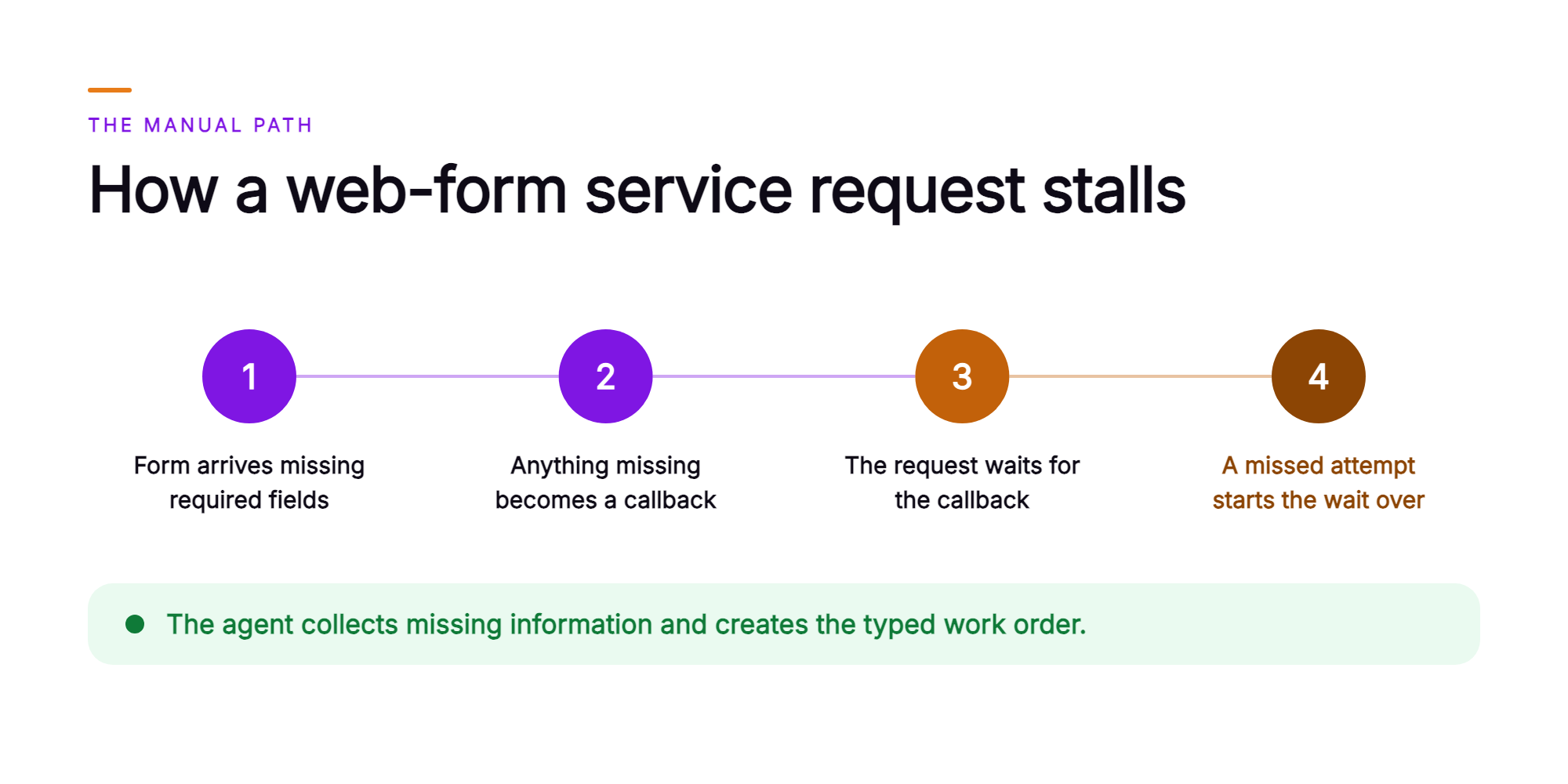
A work order with an unmatched address or asset returns to the coordinator for correction, causing the customer's request to wait again.
What is web-form service request completion at a utility?
Web-form service request completion is the work of validating a submitted request against the utility's records, closing its gaps with the customer, and creating the work order the request calls for.
An AI agent processes each routine service request the utility puts in scope on its web form by validating the service address and asset against the utility's GIS, requesting any required details from the customer via email or message, and creating the typed work order in the utility's work management system. That is the service request to work order path, with the agent keying the validated data into the fields each work order type requires.
A complete request carries:
- The service type from the utility's own catalog
- The service address matched to a GIS service point
- The asset ID from the GIS record, such as a meter, pole, streetlight, or valve
- The customer's contact details and access notes
- A summary of the request in the customer's own words
A typed work order is a work order created under one of the utility's defined work types, carrying every field that type requires, so it lands in the queue the utility's own rules assign.
What does the AI agent do with each web-form service request?
The agent processes the request by matching it to the utility's records, collecting any missing information from the customer, and creating the typed work order.
- Reads the submitted web form and identifies the service type.
- Matches the service address to a service point in the GIS, and the account to its record in the customer information system.
- Finds the asset the request concerns at that location, such as the meter, pole, streetlight, transformer, or valve.
- Checks the request against the utility's work-order rules for that service type and identifies which required fields are still empty.
- Asks the customer for each missing detail by email or message, in the customer's language. Orvera AI's agents work in more than 80 languages.
- Repeats the GIS match when the reply corrects the address or the asset.
- Creates the typed work order in the work management system with the validated address, the GIS asset ID, the service type, and a summary of the exchange.
- Confirms to the customer that the request is logged, with the reference number the system issues.
The agent turns routine web-form requests into typed work orders, with the address and the asset validated against the utility's GIS and the missing detail supplied by the customer, created in the utility's own work management system. That is typed work order automation on a live intake queue. When the GIS still shows several candidates after the customer replies, or the customer asks for a person, the agent routes the request to the utility's coordinators with the GIS candidates, the customer's replies, and a summary attached.
How does a streetlight repair request become a typed work order?
A streetlight repair request becomes a typed work order when the pole in the customer's description is matched to a specific GIS asset record, and the agent does that match before anything reaches the field.
Consider an illustrative request at an investor-owned electric utility. A customer submits the streetlight repair form. They give a street name, the nearest cross street, a pole number with two digits reversed, and a note that the light stays dark at night.
The GIS places the location on a block carrying several streetlight poles. One of them holds the entered number with those two digits reversed. The agent treats the near match as an open question. It emails the customer and asks them to confirm the number printed on the pole tag and the house number closest to the pole.
The customer replies with the corrected pole number. The agent matches it to the GIS streetlight record, creates a typed streetlight repair work order carrying the pole's GIS asset ID, the validated location, and the customer's note about the light staying dark, then confirms the request with its reference number.
The request enters the work management system complete. Every field came from the GIS record or from the customer, who also confirmed the pole the work order names. From that point, the utility's own rules and field teams set priority and scheduling, as they do today.
Which decisions stay with the utility, and which steps does the agent carry out?
The utility owns:
- The service types offered on its web form
- The work-order rules and required fields for each type
- The GIS records for every service point and asset
- The field priorities, scheduling, and crew assignments its own rules and field teams decide
The agent carries out:
- Reading each web-form request
- Validating the address and the asset against the GIS
- Asking the customer for the detail the utility's rules require
- Creating the typed work order in the utility's work management system
- Routing the requests that need a person to the utility's coordinators, with the GIS candidates and the customer's replies attached
This split keeps an AI agent platform for utilities governed: the utility sets the rules, and the agent applies them. Orvera configures the agent to the utility's own work types and required fields during deployment. Orvera runs the platform and updates that configuration as the utility's rules change, so the agent asks customers for the detail a new work type or a new required field needs.
Why would a utility want the platform built, deployed, and run for it?
A utility wants the platform built, deployed, and run for it because the work that makes energy contact center AI useful is integration work against the GIS and the work management system, and that work continues after go-live.
- Orvera AI builds, deploys, and runs the AI agent and the platform on the stack the utility already operates. Orvera does the integration with the GIS, the customer information system, and the work management system itself. A full deployment goes live in three to six weeks.
- Orvera is built on 18+ years of contact-center experience, so it configures the agent knowing what it means to staff, coach, and answer for a live contact-center floor.
- Orvera audits every conversation, human-handled and AI-handled, across every channel, with a transcript and a summary for each one.
- The platform is SOC 2 Type II certified, HIPAA compliant, and GDPR compliant, which matters when IT and security review the data path between the web form and the systems of record.
- Orvera supports 500+ integrations across CCaaS, CRM, and enterprise systems of record.
- The platform is multi-tenant and built for multiple organizations under a single parent, which fits a holding company running several operating utilities.
- It is one platform, adopted in stages. Start with web-form service requests and add other work later.
Which numbers tell a customer operations leader the agent is working?
Four measures tell a customer operations leader whether utility operations automation is working, and every one of them is read from data the utility already keeps.
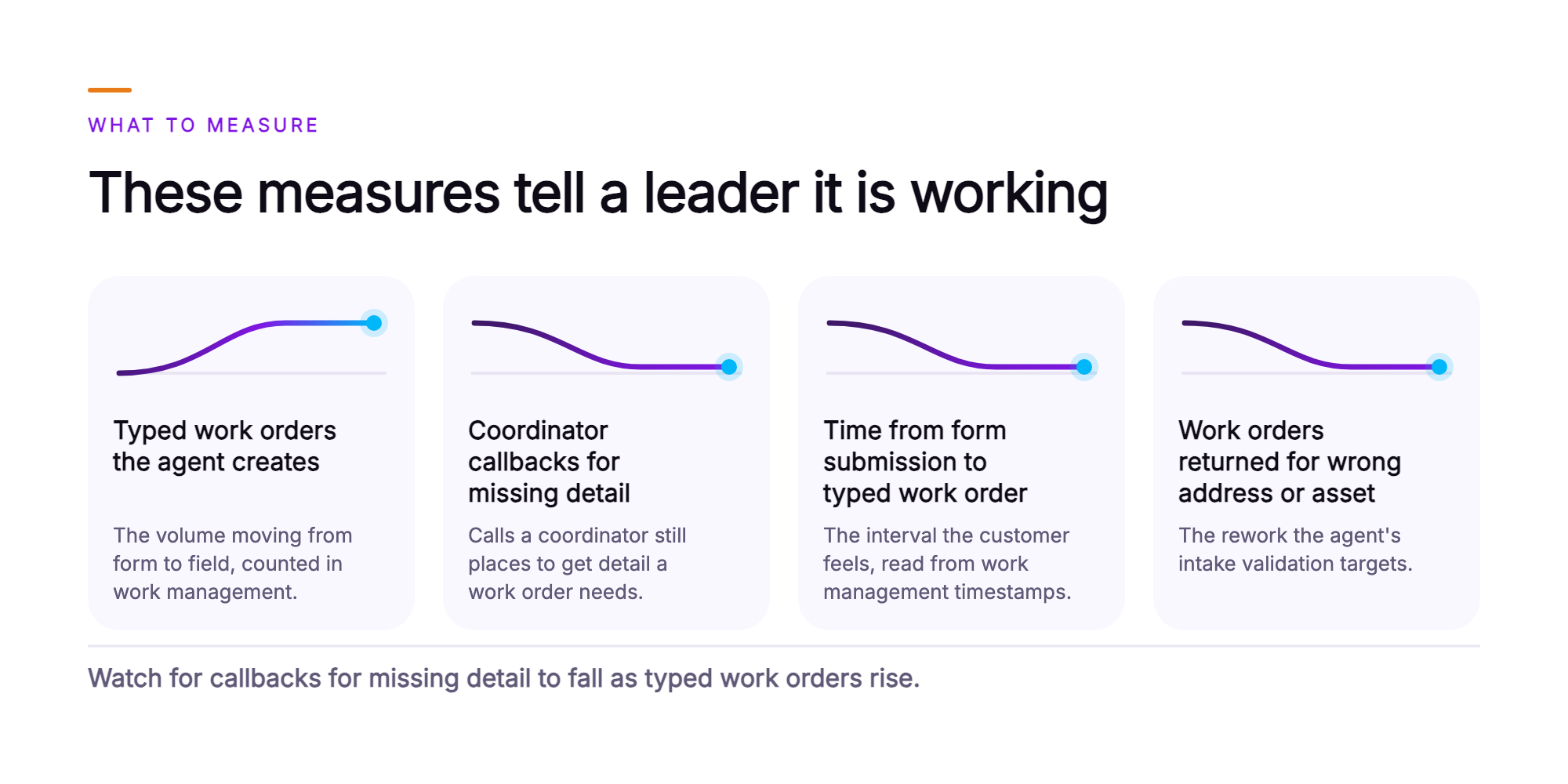
Typed work orders the agent creates from web-form requests. Counted in the utility's own work management system, this is the volume moving from form to field without a coordinator re-keying it.
Coordinator callbacks for missing detail. These are the calls a coordinator still places to a customer to get detail a work order needs, counted from the call records the utility already keeps.
Time from form submission to typed work order. Read from the timestamps in the utility's own work management system, this is the interval the customer feels.
Work orders returned for a wrong address, a wrong asset, or missing detail. Counted from the corrections the utility's field and coordinator teams already record, this is the rework the agent's intake validation targets.
Set the baseline from the utility's own data before the first request reaches the agent. Then read the trend for all four measures in the utility's own reports, alongside the transcript, summary, and quality audit Orvera keeps for every conversation.
What should a VP of Customer Operations take to the leadership team?
Take four points, each one written so a CFO, a CIO, and a field operations leader can each check it against something they already own.
- Web-form service requests become typed work orders in the utility's own work management system, with the address and the asset validated against its GIS and the missing detail requested from the customer by email or message.
- The service types, work-order rules, GIS records, and field priorities stay the utility's own. Its rules and field teams continue to decide scheduling and priority, and its systems of record remain in place as configured.
- The headline measures to report are the typed work orders the agent creates from web-form requests and the coordinator callbacks for missing detail, read side by side, month over month.
- Orvera builds, deploys, and runs the platform on the systems the utility already operates. A full deployment goes live in three to six weeks, and every conversation is audited, human-handled and AI-handled, across every channel, with a transcript and a summary for each one.
What does service request intake look like once the agent is running?
Once the agent is running, intake looks like a short conversation on the customer's side and a complete work order on the utility's side.
The customer submits the web form and receives a reply by email or message with any questions that need answering. They answer in the same thread, in their own language. The reference number for the logged request follows in that thread once the work order is created.
On the utility's side, typed work orders arrive in the work management system with a validated address and a GIS asset ID attached. Coordinators work the requests the agent routes to them, each one arriving with the GIS candidates and the customer's replies already assembled. The leader reads the typed work orders the agent creates beside the coordinator callbacks for missing detail, and watches for the second number to fall as the first rises.
That is what an energy customer experience platform is for: carrying the customer's intent straight into a validated work order for the utility's field teams.
To scope this against your own work types and GIS records, talk to the team (opens in a new tab).
Frequently asked questions
The AI agent completes the routine, non-emergency service requests a utility already accepts on its web form, and the utility decides which of its service types are in scope. Common examples across electric, gas, and water service include streetlight repair, meter test, re-read requests, high-bill investigations, and meter relocation for a home renovation. Each service type follows the utility's own work-order rules and required fields, so a streetlight repair collects what a streetlight repair needs and a meter relocation collects what a meter relocation needs. The agent fills those fields with data from the GIS and from the customer. Emergency reports, such as a gas odor, a downed wire, or a main break, follow the utility's own emergency process.
The agent matches the service address on the form to a service point in the utility's geographic information system, then finds the asset the request concerns at that location and reads its GIS asset ID. That asset may be the meter, pole, streetlight, transformer, or valve, depending on the service type. Partial matches are handled explicitly. Where the address matches but the asset does not, or the GIS returns more than one candidate, the agent asks the customer to confirm the details that settle the match, such as the number on the pole tag, the nearest house number, or the meter number. If the reply still leaves the match open, the agent routes the request to the utility's coordinators with the candidate assets attached.
The agent asks the customer for the missing detail before it creates anything. It checks each request against the required fields in the utility's work-order rules for that service type, then follows up by email or message for each missing item, such as gate or access instructions, the meter number, a callback number, or a corrected address. The reply is added to the request, and the typed work order is created once every required field is complete. Utility request intake automation hands off to people in two cases at this step: when the customer asks for a person, or the reply still leaves a required field open, the agent routes the request to the utility's coordinators with the full thread attached.
A completed request becomes a typed work order when the AI agent creates it directly in the utility's own work management system, under the work type that matches the service type, and carries the validated data into the correct fields: the service address, the GIS asset ID, the customer's contact details and access notes, and a summary of the exchange. The work order reaches the queue as a structured record, ready to act on. The agent then confirms to the customer that the request is logged, with the reference number the work management system issues. Priority, crew assignment, and scheduling stay with the utility's own rules and field teams.
Orvera AI does the build, the deployment, and the integration, connecting the AI agent to the systems the utility runs today. That means the geographic information system, the customer information system, and the work management system, each one kept in place as the utility has configured it. Orvera AI is an agentic AI platform for enterprise customer experience, offering 500+ integrations across CCaaS, CRM, and enterprise systems of record. For the utility's IT and security reviewers: the platform is SOC 2 Type II certified, HIPAA compliant, and GDPR compliant, and it keeps a transcript and a summary for every conversation. That record makes utility work order automation auditable, conversation by conversation.
Orvera AI builds, deploys, and runs the AI agent on the systems the utility already operates, and a full enterprise deployment goes live in three to six weeks. Enablement spans onboarding, knowledge-base setup, agent training, and change management, and Orvera carries it out with the utility's customer operations team. A utility can start with web-form service requests and add voice, chat, and other channels later. It is one platform, adopted in stages, so utility service request automation grows at the pace the utility sets. Orvera's AI Quality Management audits every conversation, human-handled and AI-handled, across every channel, so every intake conversation is scored and reviewable. When a coordinator picks up a routed request and speaks with the customer, AI Agent Assist surfaces the approved knowledge and the next action live. During deployment, Orvera AI configures the agent to the utility's own work types and required fields. To see how an AI agent platform for utilities handles web-form intake and GIS validation for a specific service type on your form, talk to the team.

Written by
Anindita Majumder
Anindita Majumder is a communications professional with nearly four years of experience in public relations, corporate communications, and journalism. She creates content that helps brands communicate their vision, products, and expertise through press releases, thought leadership, and editorial pieces. Outside of work, she is a vocalist, which keeps her creativity flowing.