Beyond the Notification: Why Patient Access Needs AI Voice Agents That Can Actually Reschedule
Why a reminder that only confirms leaves the no-show on the schedule, how an AI voice agent rebooks against live availability during the call, the six systems it has to reach, and the four metrics that move.

Key highlights
Key takeaways
- A one-way reminder tells the patient when to arrive but gives them no path to change the appointment, so the no-show stays on the schedule until the slot goes empty.
- A confirming reminder ends the interaction at yes or no. A rebooking reminder ends it with a new appointment written to the scheduling system.
- An AI voice agent moves an appointment during the reminder call by reading open slots directly from the scheduling system in real time, selecting a new time against the patient's stated constraints, writing the booking back to the source record, and releasing the original slot before the call ends.
- To move an appointment during an outbound reminder call, the AI agent has to read and write across six distinct system classes simultaneously.
- The AI agent completes a reminder interaction when the change is purely a scheduling change, and it transfers the call to a human the moment the change depends on a clinical or a coverage judgment.
- The agent checks consent state at the point of dialing on every single attempt, not once when the reminder campaign loads.
- Four metrics shift measurably when the reminder call can rebook: no-show rate on reminded appointments, inbound call volume, slot backfill lead time, and first-contact resolution.
- Putting a rescheduling AI agent live inside an existing access center is a configured deployment, not a development project, and full enterprise deployment lands in three to six weeks.
- Before you sign with any reminder vendor, four questions will tell you whether the system resolves the contact or simply notifies it.
Why does an automated appointment reminder still leave the no-show on the schedule?
A one-way reminder tells the patient when to arrive but gives them no path to change the appointment, so the no-show stays on the schedule until the slot goes empty.
Your access center sends the reminder. The patient hears a recorded message or receives a text and is asked to press 1 to confirm or reply Y to confirm. The interaction is built to capture a yes. It is not built to capture anything else.
The break happens the moment the patient wants a different day. There is no option for that inside the reminder. The call ends, or the text thread ends, and the patient is told to call the main line to reschedule. That instruction moves the interaction out of the outbound reminder and drops it into the inbound queue as a new contact. Your staff work the conversation twice: once when the reminder goes out, and again when the callback lands. Inbound volume climbs on every morning your reminders run.
The second-order effect is the one that fills your no-show report. Many patients do not make the callback. They intend to, they set it aside, and they never dial. The slot stays booked under their name, no replacement patient is scheduled, and the appointment becomes an empty room. An AI scheduler that stays active through the reply, reads live availability, and writes the new booking before the call ends is the mechanism that closes that gap. The next section draws the line between a reminder that confirms and one that can actually rebook.
What is the difference between a reminder that confirms and a reminder that can rebook?
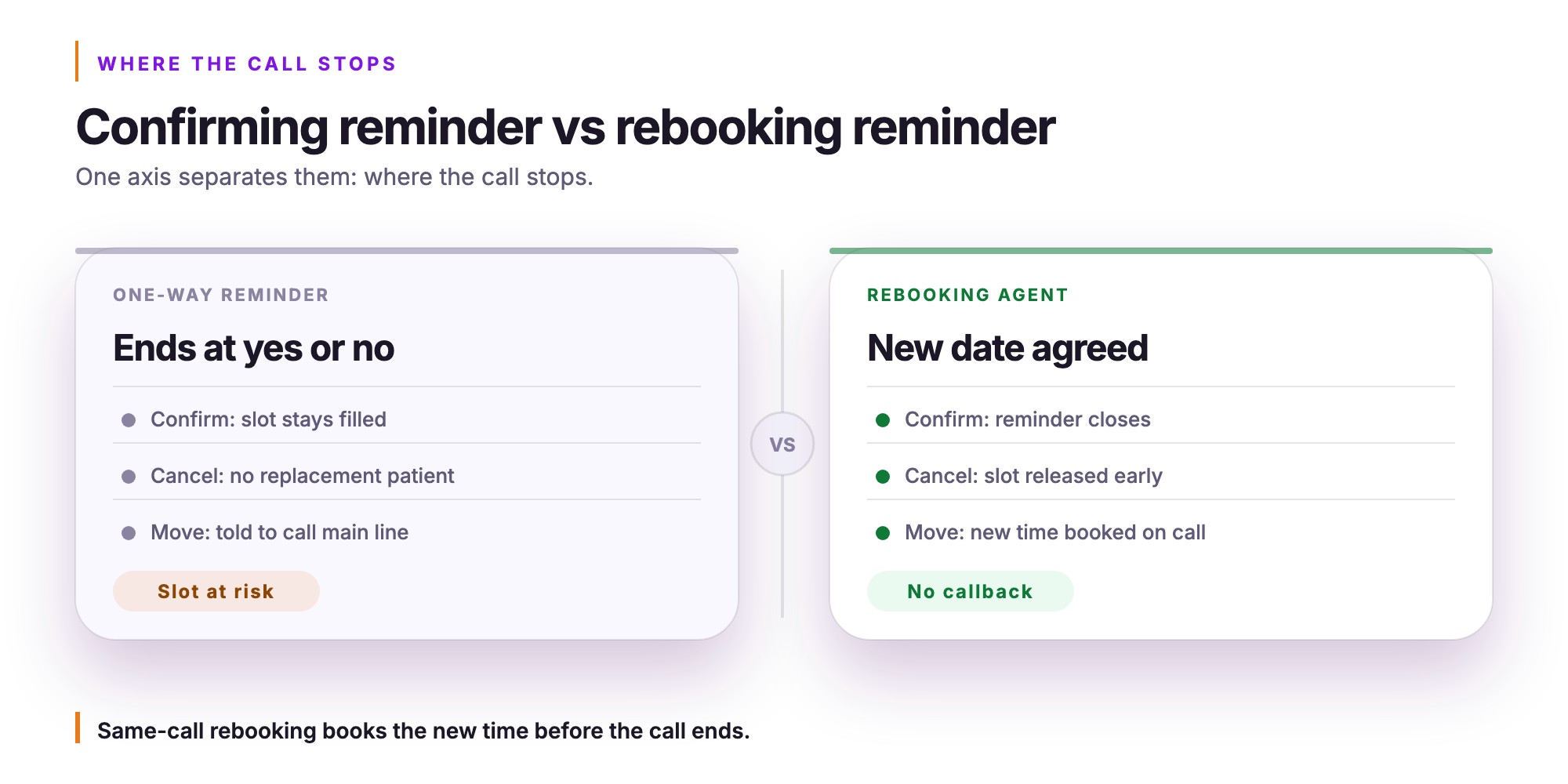
A confirming reminder ends the interaction at yes or no. A rebooking reminder ends it with a new appointment written to the scheduling system.
The distinction sits on one axis: where the call stops. Automated appointment reminders have long handled the first reply a patient gives, which is confirm. The patient says yes, the reminder closes, and the slot stays filled. That is the easy case, and most systems handle it well.
The second reply is cancel. A one-way reminder can log the cancellation, but it delivers that cancellation with no replacement patient attached. In practice, the notification often arrives mid-morning on the day of the appointment, which leaves staff too little time to fill the slot from a waitlist before it expires. The slot is lost. The revenue is lost. And the inbound queue absorbs a follow-up call from the patient who still needs care.
The third reply is move. A confirming reminder cannot handle it at all. The patient is told to call the main line, the interaction re-enters the inbound queue, and the original slot sits in an indeterminate state until staff resolve it manually.
Contrast the two paths for that same patient. In one, the call ends with an instruction to call back. In the other, the new date is agreed before the call ends.
The next step is understanding exactly how an AI voice agent executes that booking in real time against live availability.
How does an AI voice agent move an appointment against live availability during the reminder call?
An AI voice agent moves an appointment during the reminder call by reading open slots directly from the scheduling system in real time, selecting a new time against the patient's stated constraints, writing the booking back to the source record, and releasing the original slot before the call ends.
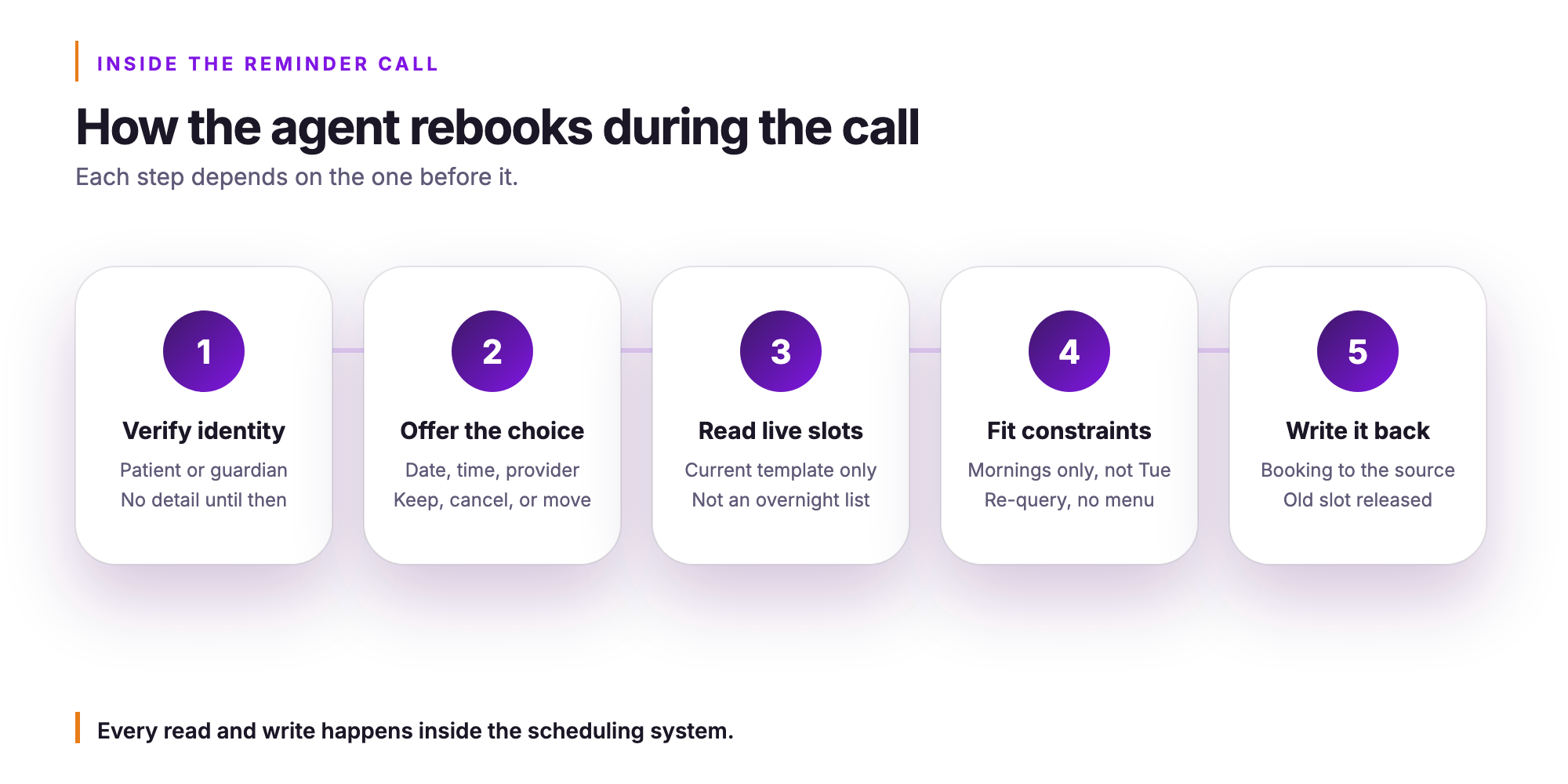
Voice appointment reminders that can reschedule follow a defined sequence. Each step depends on the one before it.
Step 1. The agent places the outbound call and verifies it is speaking to the patient or an authorized guardian before any appointment detail is spoken. This verification step is not optional. Protected health information does not travel until identity is confirmed.
Step 2. The agent states the date, time, provider, and location, then asks whether the patient wants to keep, cancel, or move the appointment. The patient hears a clear choice, not a passive notification.
Step 3. On a move request, the agent reads open slots from the scheduling system in real time for that visit type, provider, and location. Availability reflects the current template, not a list cached overnight.
Step 4. The agent handles the patient's stated constraints, such as not Tuesday, mornings only, or after the twentieth, and re-queries the scheduling system rather than reading from a fixed menu. Natural-sounding voice interaction allows the patient to speak conversationally, and the agent adjusts.
Step 5. The agent writes the confirmed booking back to the source system, releases the original slot so it becomes available to fill, and reads the new appointment details back to the patient before ending the call. The agent keeps no separate calendar of its own. Every read and every write happens inside the health system's existing scheduling system, so the record is authoritative the moment the call closes.
Which systems does the agent have to reach to move an appointment in real time?
To move an appointment during an outbound reminder call, the AI agent has to read and write across six distinct system classes simultaneously.
A one-way notification touches none of them. An agent that can actually reschedule must reach each class in sequence, and a failure in any one of them stops the transaction. The health system almost certainly runs all six already. Orvera AI connects to them without requiring a replacement scheduling system or a rip-and-replace of the contact center platform.
- EHR scheduling module (Epic, Oracle Health Cerner, MEDITECH, athenahealth, eClinicalWorks). The agent reads open slots against the provider template and writes the confirmed booking back into the schedule.
- Patient portal (MyChart and equivalent portal layers). The confirmed change has to appear in the patient's own view immediately, or the patient shows up at the old time.
- Referral and prior authorization work queues. The agent checks whether the visit can move at all before offering a new slot, because a referral tied to a date window may not cover the replacement date.
- Eligibility and benefits verification. A coverage change that affects the new date is flagged before the booking is written, not discovered at check-in.
- Contact center platform (Genesys Cloud, NICE CXone, Amazon Connect, Five9, Twilio Flex). This is where the outbound reminder call originates and where the conversation is recorded, transcribed, and audited.
- Consent and contact-preference record. The agent confirms the attempt is permissible for this patient before the call is placed.
Orvera AI offers 500+ integrations. A system absent from that directory is still integrable. The directory describes what has been connected, not what can be. Not every interaction stays within the automated layer, and the next section addresses how the agent decides when the call belongs with a human scheduler instead.
When should the AI hand a reminder call to a human scheduler or a clinical team member?
The AI agent completes a reminder interaction when the change is purely a scheduling change, and it transfers the call to a human the moment the change depends on a clinical or a coverage judgment.
That boundary is the governing rule. Patient appointment reminders are designed to resolve within the call. The cases that cross the line share a common trait: the right answer requires a judgment the agent is not authorized to make. A caller describing new symptoms before a procedure, asking whether their prep instructions still apply if they move to a later slot, or asking about a medication they were told to hold belongs with a clinical team member, not with the scheduling layer. A referral or prior authorization that is missing, expired, or tied to a date window the requested slot falls outside requires a human who can contact the ordering provider or payer. An eligibility or coverage change that affects whether the visit can proceed is a coverage judgment, not a scheduling one. A requested time the provider template does not permit for that visit type, a multi-resource booking that requires imaging with contrast, anesthesia, an interpreter, or transport coordination, a caller who is not the patient or the authorized guardian, a patient expressing distress or filing a complaint, and a request to stop being contacted all cross the same line.
The handoff itself carries context. A warm transfer moves the conversation summary and the stated reason for escalation to the human rep's screen before the patient speaks a second time. The patient does not re-explain the situation.
When no human is available, the agent does not end the call with nothing. It captures the request, tells the patient what happens next, and writes the task directly into the access center's work queue. And because Orvera audits 100% of conversations, human-handled and AI-handled alike, the escalated call is reviewed on exactly the same basis as one the agent resolved on its own. That consistency matters when the next section considers how consent and revocation state is managed across every attempt.
How does the agent honor consent and revocation on every reminder attempt?
The agent checks consent state at the point of dialing on every single attempt, not once when the reminder campaign loads.
Most appointment reminder software loads a contact list at campaign start and works through it. That design creates a gap. A patient who revoked consent yesterday afternoon may still receive a call this morning if the system never reconciled the change. Orvera AI closes that gap by querying the consent record immediately before each dial, so a revocation captured at any point, on any channel, suppresses the next attempt across all channels before it begins.
Revocation mid-call is handled the same way. When a patient says stop or requests no further contact during the call itself, the AI agent writes that state back to the record immediately. The following attempt is suppressed on voice, on SMS, and on any other channel tied to that record.
Identity verification precedes any disclosure of appointment detail. If the person who answers cannot be confirmed as the patient or an authorized contact, the agent discloses nothing and ends the call. On voicemail, the agent leaves only a callback number, not the appointment specifics.
Calling windows, attempt limits, and channel preference are enforced per the patient's stated preferences. The agent calls only during permitted hours, respects the attempt ceiling, and routes to the language the patient selected.
Orvera AI is SOC 2 Type II certified and HIPAA compliant. Every conversation is recorded, transcribed, and audited, so the consent state at the moment of each dial is preserved in the record.
Which metrics actually move when the reminder call can rebook?
Four metrics shift measurably when the reminder call can rebook: no-show rate on reminded appointments, inbound call volume, slot backfill lead time, and first-contact resolution.
The mechanism is direct. A patient who intended to skip now ends the call holding a date they selected themselves. Ownership of the new appointment sits with the patient, not with a confirmation text they ignored. That is a materially different psychological position, and it changes behavior.
Inbound call volume is the metric the access center feels first. When a patient cannot act during the reminder, the reschedule arrives as a separate inbound call the next morning, adding to the queue your team is already staffing. Remove that friction and the volume never enters the main line. The call to confirm appointment becomes the call that resolves the appointment.
Slot backfill lead time follows from timing. A slot released during the reminder window, days before the visit, can still be filled. A slot released the morning of the appointment cannot. Template utilization holds when the rebooking happens early enough for the scheduler to react.
First-contact resolution and average handle time are the two figures Orvera AI publishes as averages from its own customer engagements. First-contact resolution measures around 80%, and average handle time falls 8% to 15% in the first 90 days across AI-supported interactions.
No-show rate on reminded appointments: the before-and-after comparison is measured against the same appointment type run with one-way automated reminders, before two-way rescheduling was available inside the same call.
Quantifying these four metrics in your environment is the natural starting point before putting the capability live, which the next section addresses directly.
What does it take to put this live inside an existing access center?
Putting a rescheduling AI agent live inside an existing access center is a configured deployment that lands in three to six weeks, with Orvera doing the build, the deployment and the integration.
Orvera AI builds, deploys, and runs its AI agents on the health system's behalf, on the stack the health system already runs. Your scheduling system, your contact center platform, and your consent records stay in place. The work is configuration and connection.
Step 1. Scope the reminder population by service line and visit type. Agree, in writing with your access center leadership, which visit types the agent may move without a human in the loop. Imaging, routine follow-up, and preventive care appointments are common starting points. Surgical pre-op and behavioral health visits typically stay with a human rep from the first ring.
Step 2. Connect to the scheduling system, the consent and contact-preference record, and the contact center platform that places the outbound reminder call. Orvera AI supports 500+ integrations, so the connection work is mapping, not custom engineering.
Step 3. Encode the provider and template rules that govern what the agent may book. Visit length, provider preference, location, and same-day blackout windows all live in the template layer, not in the model.
Step 4. Set the escalation boundary described in the earlier sections of this article. Name the queue and the staff who receive the transfers. The agent needs a clear boundary, and your team needs to know exactly what arrives when a call crosses it.
Step 5. Run one high-volume service line with disciplined templates, such as imaging or a single specialty clinic, before widening to the enterprise. A contained first deployment gives your team real data on no-show rate, slot backfill, and inbound volume before you extend the reminder population.
What stays with the health system throughout: the scheduling rules, the clinical judgment about which visit types require a human, and the staff who take the escalations. The AI agent executes inside the boundaries your team defines. It does not set policy, and it does not operate outside the template your access center approves.
What should a Director of Patient Access ask a reminder vendor before signing?
Before you sign with any reminder vendor, four questions will tell you whether the system resolves the contact or simply notifies it.
- Can the reminder complete the new booking inside the same call against live availability? Ask the vendor to demonstrate a patient saying "I need to move this" and watch whether a confirmed appointment writes back in real time. A weak answer sounds like "we capture the preference and route it to your team."
- Does it write the new appointment to your scheduling system and release the original slot without staff intervention? If the answer involves a worklist, a reconciliation report, or a next-business-day sync, your coordinators are still doing the work the vendor implied was automated.
- Which exception types transfer to a human, what context travels with that transfer, and what happens when no human is available? A weak answer names a category without specifying the hand-off payload, or says "the call is queued" with no follow-up path defined.
- Is consent and revocation state re-checked at the point of dialing on every attempt, across every channel? A weak answer describes consent capture at enrollment only, with no mechanism for honoring a revocation that arrived after the outreach file was built.
Book a demo with Orvera AI to see how a rescheduling AI agent runs each of these paths live.
Frequently asked questions
Conversational AI for patient access resolves the appointment on the call itself, writing the confirmed, canceled or rescheduled disposition back to the scheduling system of record before the line closes.
Before identity is confirmed, an automated reminder call may identify the practice and ask to speak with the patient, and nothing more.
Automated patient outreach that reminds a patient of a scheduled appointment sits in a different regulatory category than a marketing call or a balance-collection call, and the system records consent and revocation accordingly.
The AI agent transfers to a human scheduler the moment a conversation moves outside appointment confirmation and into any territory a scheduler alone cannot resolve.
Automated reminder calls move the no-show rate on reminded appointments first, and every other metric in your reporting exists to explain why.
Confirm four items before a reminder pilot goes live: that the reminder can complete a new booking inside the same call against live availability, that it writes the new appointment to your scheduling system and releases the original slot without staff intervention, which exception types transfer to a human and what context travels with them, and that consent and revocation state is re-checked at the point of dialing on every attempt.

Written by
Anindita Majumder
Anindita Majumder is a communications professional with nearly four years of experience in public relations, corporate communications, and journalism. She creates content that helps brands communicate their vision, products, and expertise through press releases, thought leadership, and editorial pieces. Outside of work, she is a vocalist, which keeps her creativity flowing.